Search "linkedin automation tools" and you get a list of outreach bots, each promising it will not get your account restricted. That framing hides the thing that actually decides your risk: not which brand you pick, but which category the software belongs to, and whether it acts as you or acts with LinkedIn's permission. This guide sorts LinkedIn automation into six categories by that mechanism, quotes what LinkedIn's User Agreement actually says about each, and gives you a decision framework instead of another ranked list. It is written for founders, agency owners and solopreneurs whose LinkedIn account is a business asset they cannot afford to lose.
Key takeaways
- Risk comes from the access method, not the brand name. Two tools with identical features carry completely different risk if one drives your browser session and the other publishes through an app you authorized.
- LinkedIn's User Agreement prohibits scraping, and separately prohibits using bots or automated methods to access the service, add or download contacts, or send messages. That language is public and it is what enforcement is built on.
- LinkedIn does not publish detection thresholds. Any vendor quoting you a safe daily number is guessing, and so is anyone quoting a ban percentage.
- Publishing and engagement automation is a genuinely different risk class from outreach automation. Most "best LinkedIn automation tools" roundups conflate the two.
- The lower-risk design puts the machine before the action, not at the action. Research, drafting and scheduling are safe. Autonomous clicking and sending is where accounts get restricted.
- One rule if you remember nothing else: prefer tools that ask LinkedIn for permission over tools that borrow your session.
What "LinkedIn automation" actually covers
The phrase gets used as if it named one product category. It names at least three.
Outreach automation sends connection requests, messages and follow-up sequences on your behalf. This is what almost everything on page one of Google is selling.
Data automation extracts profile, company and contact data from LinkedIn pages or search results into a spreadsheet or CRM.
Content and engagement automation helps you produce, schedule and publish your own posts, and helps you write comments faster. This is the half of the category the tool roundups mostly skip, and it is the half with the lowest risk profile.
These three do not carry the same risk, because they do not touch LinkedIn the same way. Conflating them is why one person concludes automation is dangerous, another concludes it is fine, and both are half right.
The six categories of LinkedIn automation, ranked by risk
Read the third column, because it is what determines the fourth.
| Category | What it does | How LinkedIn's User Agreement treats it | Realistic consequence |
|---|---|---|---|
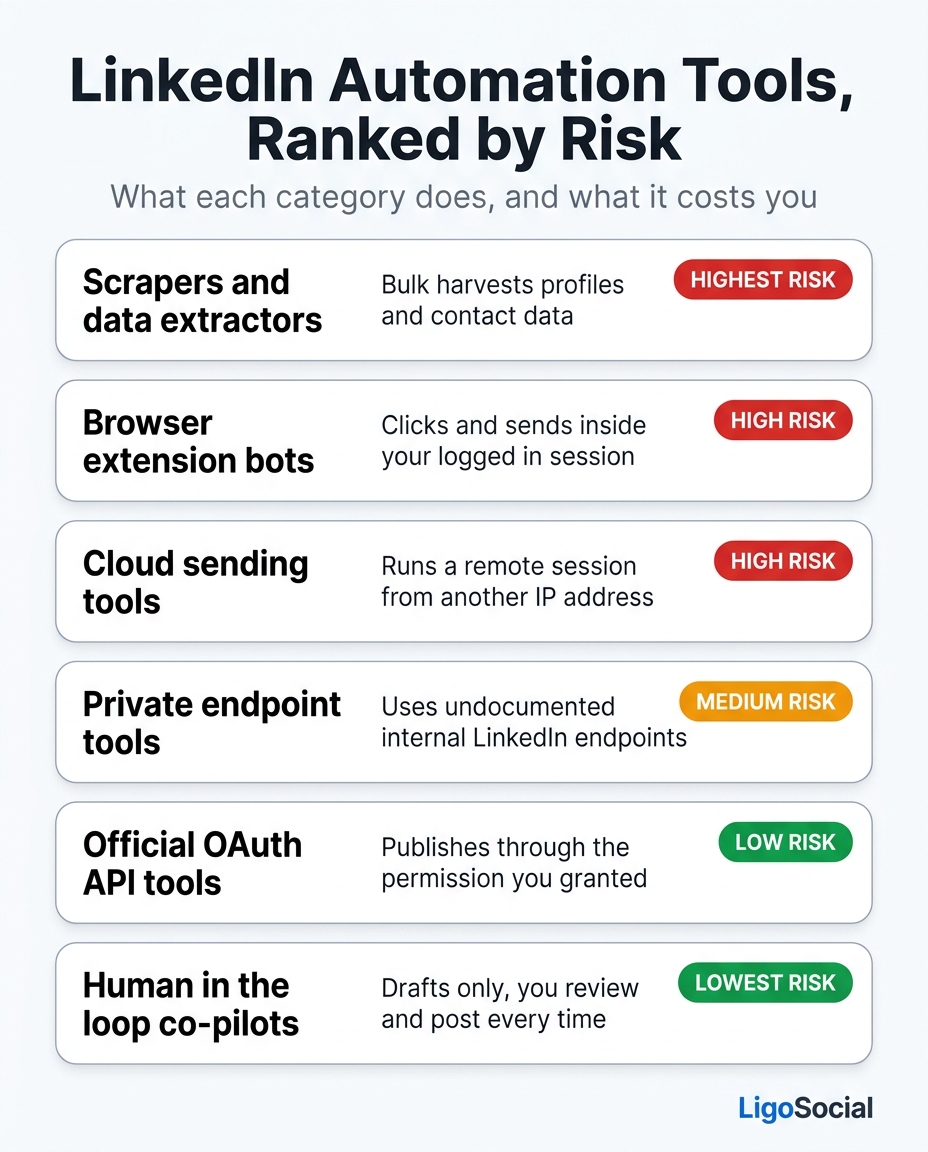
| Scrapers and data extractors | Bulk-harvests profiles, search results and contact data into a file or CRM | Named directly. You agree not to use crawlers, plugins or any other technology to scrape the service or copy profiles and other data | Highest exposure. LinkedIn has pursued scraping operations legally, and account enforcement here tends to skip the polite first rung |
| Browser extension bots | Injects into your logged-in LinkedIn tab and connects, messages, views or comments as you | Automated access to the service using your own session, which the "no bots" clause covers | Friction first (verification prompts, CAPTCHAs), then feature restriction, then permanent restriction if it continues |
| Cloud sending tools | Runs a LinkedIn session for you on a remote server so campaigns keep going while your laptop is shut | The same "no bots" clause, plus a sign-in from an IP and device that do not match your history | The same ladder, with an added account-security signal that can trigger identity verification on its own |
| Private endpoint tools | Calls undocumented internal LinkedIn endpoints that were never opened to developers | Unauthorized automated access. No permission was granted for those endpoints | Account risk plus product risk. The tool can stop working overnight when LinkedIn changes something internal |
| Official OAuth API tools | Publishes and reads through documented endpoints, after you approve the app on LinkedIn's own consent screen | Sanctioned. This is the channel LinkedIn built and asks developers to use | Your account is not the thing at risk. The worst realistic case is the app losing its API access |
| Human-in-the-loop co-pilots | Drafts posts and comments in a side panel or app. Nothing reaches LinkedIn until you press the button | No automated action is taken, so the bot clauses do not describe it | The action is yours, exactly as if you had typed it |
Two things are worth noticing.
First, the top four categories share one underlying problem: the software acts as you, using your credentials or your live session, without LinkedIn having authorized it. Whether it runs in your browser or on a server in another country changes the fingerprint, not the permission.
Second, the fifth category differs in kind rather than in degree. Connect an app through LinkedIn's own OAuth consent screen and LinkedIn shows you what that app is asking for, you approve it, and it then works through endpoints built for exactly that purpose. The action is authorized. That is the whole distinction, and almost no tool roundup makes it.
What LinkedIn's User Agreement actually says
Skip the vendor blog posts and read the source. The LinkedIn User Agreement contains a "Do Nots" section in which you agree not to:
Develop, support or use software, devices, scripts, robots or any other means or processes (including crawlers, browser plugins and add-ons or any other technology) to scrape the Services or otherwise copy profiles and other data from the Services.
And, separately, not to:
Use bots or other automated methods to access the Services, add or download contacts, send or redirect messages.
Read the second clause carefully, because it is broader than most people assume. It does not say "bots that spam". It says bots that access the service, add contacts, or send messages. An extension sending fifteen carefully personalized invitations while you drink your coffee sits inside that description as squarely as one firing off five hundred.
That does not mean every user of one gets restricted tomorrow. It means the vendor's safety promise is not a promise LinkedIn made. Enforcement is discretionary, and discretion can be revised.
Be equally sceptical of the opposite claim. Nobody outside LinkedIn knows the detection thresholds, so any specific figure, whether it is "fifty invitations a day is safe" or "X percent of automation users get banned", is invented. We are not going to hand you one.
What enforcement actually looks like
Restriction is not a single event. It is a ladder, and the useful thing is knowing which rung you are standing on.
The first rung is friction rather than punishment: verification prompts appearing more often, CAPTCHA challenges showing up where they never used to, or invitations quietly ceasing to be accepted at your normal rate. Treat these as a signal rather than a coincidence.
The next rung is a temporary restriction on a feature. You keep the account but lose the ability to send invitations or messages for a period. Above that sits a restriction on the account itself, where you have to verify your identity to LinkedIn before you get back in.
The top rung is permanent restriction. Your profile, connections, recommendations, post history and every inbound conversation they were producing stop existing for you. There is an appeal path. It is not a guarantee.
The asymmetry is what should drive the decision. The upside of aggressive automation is some hours saved and some extra volume this quarter. The downside is the total loss of an asset you spent years building.
Here is the same taxonomy in one image, if it is easier to keep on hand when you are comparing vendors.
A decision framework instead of a tool list
Google now hands you a list of brand names above the results, so another list is worth very little. What is worth something is knowing which category your job belongs in. Work down this in order and stop at the first yes.
- Does the job involve copying data off LinkedIn in bulk? Then it is scraping under the User Agreement, whatever the tool calls it. Decide honestly whether that data is worth the account.
- Does the job involve sending something to someone who did not ask for it? Then no architecture makes it safe, because the exposure is the behaviour rather than the software. Do it by hand and do less of it, or move that outreach to a channel built for outreach.
- Does the job involve publishing your own content? Then insist on OAuth. A sanctioned path exists for this, so there is no reason to accept an unsanctioned one.
- Does the job involve reading, research, drafting or prioritising? Then automate it freely. Nothing that happens in a drafting tool touches LinkedIn at all until you press post.
- Does the job involve engaging with other people's posts? Then automate the drafting and keep the click. A tool that writes six comment options and lets you choose is a different animal from one that comments while you sleep.
Most people who think they need a LinkedIn automation tool land on rows three, four and five. They want to be consistent, not to be everywhere.
Seven questions to ask a vendor before you pay
Copy these into an email to any tool you are considering. The answers, and how fast they arrive, tell you more than the pricing page does.
- How does your product access my LinkedIn account: OAuth, my browser session, or credentials I hand over?
- Do you ever ask for my LinkedIn password? (If yes, stop here.)
- Which actions does your product take without me clicking anything?
- If I switch every automated action off, what does the product still do for me?
- Are you a LinkedIn Marketing Developer Platform partner? If not, which endpoints do you use?
- What happens to my scheduled content if LinkedIn changes something next month?
- Has your product ever been named in a LinkedIn enforcement notice?
Question four is the one that separates a co-pilot from a bot. If the answer is "nothing", you are buying a bot.
The lower-risk path, in practice
A co-pilot approach is not the timid version of automation. It is a different design: put the machine before the action instead of at the action.
In a working week that looks like this. On Monday you spend twenty minutes turning a customer call, a support ticket and one strong opinion into drafts for the week, with software doing the first writing pass and you doing the editing pass. Then fifteen minutes a day on a curated feed of the twenty or thirty people whose audiences you want to reach, commenting in your own words, with software offering openings rather than publishing them. Nothing autonomous touches your account.
This is where LiGo sits, and the mechanism matters more than the label. LiGo uses LinkedIn's official OAuth API, so publishing happens through the permission you granted on LinkedIn's own consent screen rather than through a script driving your session, and the LiGo Chrome Extension only posts what you approve. On the production side, Post Lab runs 7 live agents today out of 15 planned, including the Viral Post Generator, Content Atomizer, Repurpose Radar and Opinion Miner. Every agent has three modes, Manual, Co-Pilot and Autopilot, and Autopilot defaults to producing drafts for your review, though you can enable direct scheduling if you want it. Review is the default by design.
For the architecture argument rather than the product, we have written up why MCP beats Chrome extensions for LinkedIn automation and a direct comparison of AI agents versus Chrome extension bots. For the commenting side, auto comment tools and safer alternatives works through the same tradeoff one comment at a time.
FAQ
What are LinkedIn automation tools?
LinkedIn automation tools are software that performs LinkedIn work for you: sending connection requests and messages, extracting profile and contact data, or drafting, scheduling and publishing posts. They fall into six categories depending on how they reach your account, and that access method, rather than the feature list, is what determines whether the tool puts your account at risk.
Is LinkedIn automation illegal?
For an ordinary user it is a contract question rather than a criminal one. The User Agreement you accepted at signup prohibits scraping the service, and prohibits using bots or automated methods to access it, add or download contacts, or send messages. Breaching those terms gives LinkedIn grounds to restrict or permanently close your account. Publishing through an app you explicitly authorized on LinkedIn's OAuth consent screen is a different situation, because you granted that permission through LinkedIn itself.
What are the best LinkedIn automation tools?
The honest answer is that "best" depends on which of the three jobs you are doing. For outreach, every option carries the same category risk regardless of brand, so the real decision is whether to automate outreach at all. For bulk data extraction, the User Agreement language is explicit and the safest tool is none. For content and engagement, look for OAuth publishing, a human approval step, and a product that still earns its keep when every automated action is switched off.
Are there free LinkedIn automation tools?
Free options exist in all six categories, and price tells you nothing about risk. A free browser extension that clicks inside your session carries exactly the same category risk as a paid one. If you want free with genuinely low exposure, use drafting tools that never touch your account and simply hand you text you paste in yourself.
Should I use a LinkedIn automation tool for connection requests?
Automated connection requests sit squarely inside the User Agreement clause about bots adding contacts, which makes this the highest-exposure common use case. If growing your network is the goal, a better-performing and lower-risk route is to publish consistently and comment where your audience already is, so that requests come to you. If you do send them, send them by hand and send fewer.
Automate the work, not the account
The question worth asking is not "which LinkedIn automation tool is safest" but "which parts of this job should a machine ever touch". Research, drafting, repurposing and scheduling can all be handed over with no exposure at all. The click that reaches another human is the part worth keeping.
If you want the automation without the borrowed session, LiGo connects through LinkedIn's official OAuth API and through ChatGPT, Claude, Zapier, Pabbly and Make, so your content pipeline can run wherever you already work while approval stays with you. The plans are listed on the pricing page. Try it at ligosocial.com.
LinkedIn is a registered trademark of LinkedIn Corporation. LigoSocial is a product of Ertiqah LLC and is not affiliated with, endorsed by, or sponsored by LinkedIn.