
LinkedIn Engagement Lists That Put You Where Engagement Happens
Stop scrolling a feed full of noise. Engagement Lists let you save any LinkedIn search as a one-click list, build curated feeds around the topics and people you actually care about, and engage where it matters. Available on every LigoSocial plan.
Engagement Lists in Action
Two Ways to Create a List
Every list in LigoSocial starts one of two ways. Paste an existing LinkedIn search URL, or build a new search inside the extension with the filter builder.
Paste URL
Run any search on LinkedIn with the filters you want, copy the URL from the address bar, paste it into LigoSocial, and give it a name. Works for people searches, company searches, job searches, and advanced filter combinations. The list opens in a new LinkedIn tab with every filter pre-applied.
Build URL
Skip LinkedIn's clunky filter UI. Build a content search directly inside the extension with dropdowns for Topics, Sort By, Date Posted, Content Type, Posted By, and Show Posts From. Hit Test URL to preview, then save it as a list when the results look right.
Everything You Can Do With Engagement Lists
Eight capabilities packed into the Lists panel inside the LigoSocial Chrome Extension. Every one of them is live today.
Save Any LinkedIn Search
Paste a search URL and turn it into a one-click list
Drop any LinkedIn search URL into LigoSocial with all your filters intact. The list saves to your account and opens in a new tab any time you click it, no filter rebuilding ever again.
- Works with people, company, job, and content searches
- All filters are preserved
- Lists open in a new LinkedIn tab
Build Search URLs with Filters
Skip LinkedIn's filter UI and build content searches inside the extension
Pick your Topic, Date Posted window, Content Type, sort order, and who posts it - all from clean dropdowns. Preview before you save with the Test URL button.
- 6 filter dropdowns: Topics, Sort By, Date Posted, Content Type, Posted By, Show Posts From
- Test URL preview before saving
- Great for trend monitoring and engagement workflows
Open Any List in One Click
Launch saved searches straight from the sidebar
Lists live in the LigoSocial extension sidebar. Click the list name and your LinkedIn search opens in a new tab with every filter already applied. No clicks wasted on setup.
- Accessible anywhere you browse LinkedIn
- Instant new-tab launch
- Zero loading lag
Copy URL to Share
Send a list to a teammate as a clean LinkedIn URL
Each list has a Copy URL button. Paste it into Slack, email, or your CRM. Whoever opens it sees the same filtered search you do, instantly.
- Share exact search setups
- Works for any user on your team
- No login required for list URL recipients
Cross-Device Sync
Your lists follow you to every device
Lists save to your LigoSocial account in the cloud. Log in on a different browser or laptop and every list is right there. Hit Refresh in the Lists header if a freshly added list hasn't appeared yet.
- Cloud synced and secured
- One account covers all your devices
- Manual sync button for instant refresh
Search and Filter Your Lists
Find any list by name or by URL keyword
Once you build 20 or more lists, search becomes essential. Type any part of a list name or URL and only matching lists stay visible. Helpful for teams running dozens of saved searches.
- Real-time instant filtering
- Search by name or URL keywords
- Keep lists clean and accessible
Edit and Rename
Update list names and URLs without rebuilding
Open the edit menu on any list to change the name, swap the URL, or both. Use it when LinkedIn updates a search URL pattern, or when you want a clearer naming convention.
- In-line editing directly in sidebar
- Update names in one click
- Zero disruption to existing workflows
Comment From Inside the List
Engage without leaving your curated feed
Pair Lists with the rest of the LigoSocial extension to comment on posts directly inside the list view. No bouncing to LinkedIn home, no losing your spot in the search.
- Direct action integration
- Maintain scroll position
- AI comment helper friendly
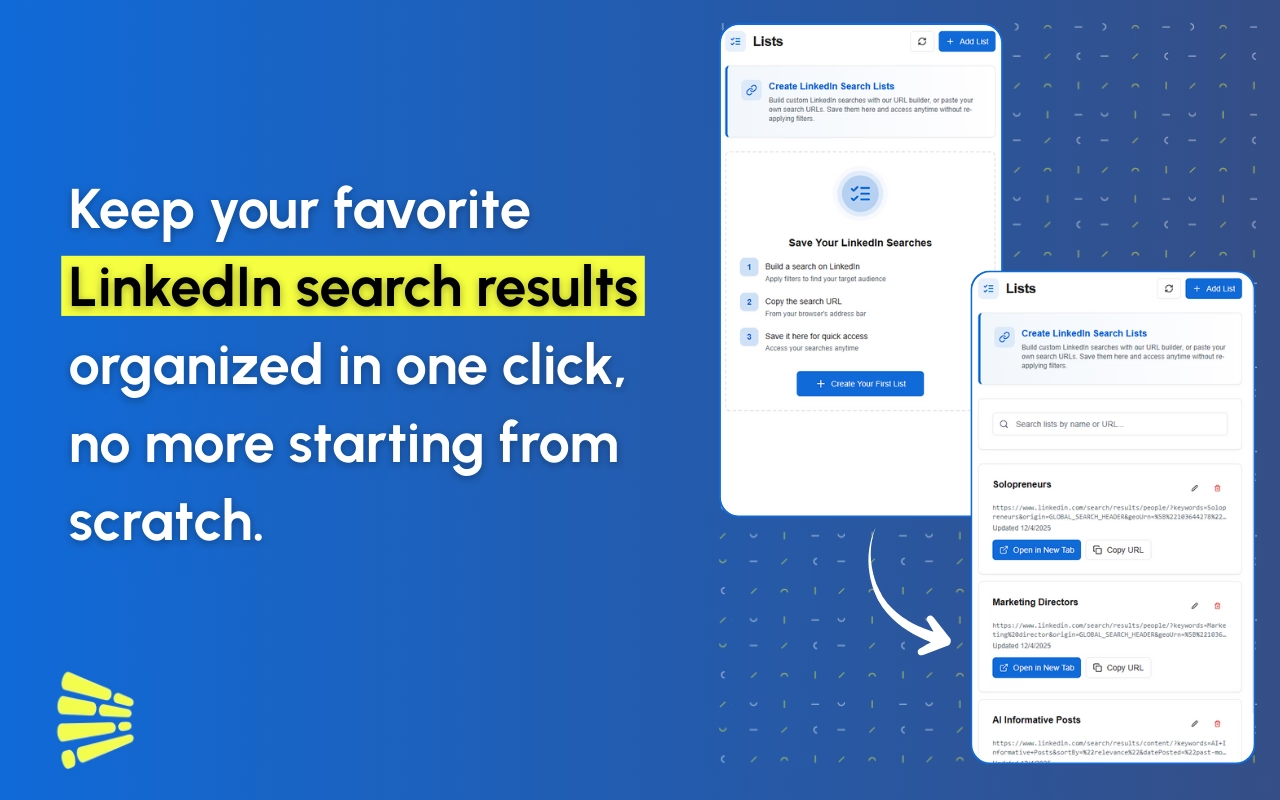
Keep Your Favorite LinkedIn Searches Organized in One Click
Save your searches directly inside the LigoSocial extension so you never have to start from scratch.
Who Uses LinkedIn Engagement Lists?
Lists work for anyone who keeps rebuilding the same LinkedIn searches every week. Here is how teams use them.
Sales Prospecting
Save searches like "CMO SaaS West Coast" or "VP Marketing FinTech NYC". Open the list every morning and engage with fresh prospects without rebuilding filters.
- Zero filter rebuilding
- Fresh daily prospects at top of list
- Direct engagement in one click
Recruitment Sourcing
Maintain a list per open role. "Senior Frontend Remote", "Product Manager FinTech London". Each list is a permanent sourcing pool you can revisit any time.
- Always-active talent pipelines
- Save searches per open position
- Quick touchpoints with candidates
Content Monitoring
Track industry topics with "AI Marketing Content Last 24h" or "SaaS Founders Posts This Week". Pair with LigoSocial's comment generator for fast engagement.
- Keep pulse on key industry tags
- Pair with AI comment generator
- Establish authority in trending topics
Networking
Track defined groups systematically. "YC W24 Founders", "Startup Founders Ecommerce", or "Conference Speakers". Show up consistently for the people who matter.
- Targeted networking groups
- Consistent presence for key accounts
- Organized connection pipelines
Market Research
Monitor competitor activity, industry trends, and thought leader content with dedicated saved searches. New posts surface every time you open the list.
- Track competitor updates
- Analyze market movement in real time
- Aggregate industry leaders' posts
Content Inspiration
Find trending content in your niche, then jump straight into LigoSocial's post lab to generate your own take while the topic is still hot.
- Never run out of post ideas
- Jump straight to Ligo Post Lab
- Fast adaptation of viral formats
How LinkedIn Engagement Lists Work
From setup to saved feeds, here is how Engagement Lists transform your daily LinkedIn routine.
Install the LigoSocial Chrome Extension
Free to install from the Chrome Web Store. Works on Chrome, Edge, and any Chromium-based browser. Log in once with your LigoSocial account and Lists appears in the extension sidebar.
Build or paste your first list
Click Add List, then choose Paste URL to drop in an existing LinkedIn search, or Build URL to construct a content search from filter dropdowns. Give it a clear name and save.
Open the list from the sidebar
Click any list name in the Lists panel. LinkedIn opens in a new tab with all your filters already applied. No rebuilding, no remembering which filters you used.
Engage without leaving the list
Comment, like, and react directly on the posts in your filtered feed. Pair Lists with the rest of the LigoSocial extension for AI comments, lead saving, and bulk reply.
What Are LinkedIn Engagement Lists?
LinkedIn Engagement Lists are saved searches with superpowers. Instead of rebuilding filters every time, you save the search once and open it in one click. The page below explains how Lists compare to the LinkedIn-native options.
LinkedIn Default Feed
Algorithm-driven. You see what LinkedIn decides is relevant. Most of it is not who you came to engage with. Good for passive scrolling, useless for focused outreach.
LinkedIn Saved Searches
LinkedIn does offer saved searches, but only for Recruiter and Sales Navigator subscribers, and they live deep in those products. No one-click sidebar access, no Build URL filter helper, no sync across devices.
LigoSocial Engagement Lists
Available on every plan. Lives in the extension sidebar. Save any search URL, build new searches with dropdowns, sync across devices, share by URL, and engage directly inside the list.
Frequently Asked Questions About LinkedIn Engagement Lists
Everything you need to know about using saved searches and filters on LinkedIn with LigoSocial.
Related LinkedIn Tools and Resources
LigoSocial Chrome Extension
The full extension feature list
LinkedIn AI Agents
13 AI agents that write posts in your voice
LinkedIn Comment Generator
Pair with Lists for fast engagement
LinkedIn Post Generator
Turn list inspiration into your own posts
LinkedIn Headline Generator
Craft headlines that get clicks
LinkedIn DM Generator
Reach the people you find in your lists
Post Lab
The full AI agent workspace
Pricing
Free, Pro, and Agency plans