


How I handed my X replies to a VA
Since 2024 I've wanted to grow on X. For a small account, being the reply guy is one of the best ways to do it, so I tried. Several times. Each time I took it seriously for a week or two, then founder life hit and I stopped.
In May 2025 I tried again, this time with the LiGo Chrome extension drafting the replies. For about a week I did 50+ replies a day in roughly 30 minutes a day and consistently got 8K+ impressions a day. That's when I noticed I was hardly editing the replies. The opinion in them was what I would have said anyway.
So in August I tested handing the whole thing to a VA.
What I gave him
About an hour of my time, most of it on one Loom video where I:
- walked through the kinds of tweets and authors I engage with
- generated replies for about 5 tweets, showing which tweets I pick and which reply option I usually choose
- showed the edits I make to certain types of tweets
How the training went
Round 1
25 practice replies, nothing posted
He put a screenshot of the reply he would have posted for each tweet into a Google Doc. 22 were good to go. 3 were completely off, and I wrote feedback on those.
Round 2
10 more
All 10 were good to go.
August 5, 2025
Live
He started replying from my account through X's Delegate feature, so he never needed my password.
What happened
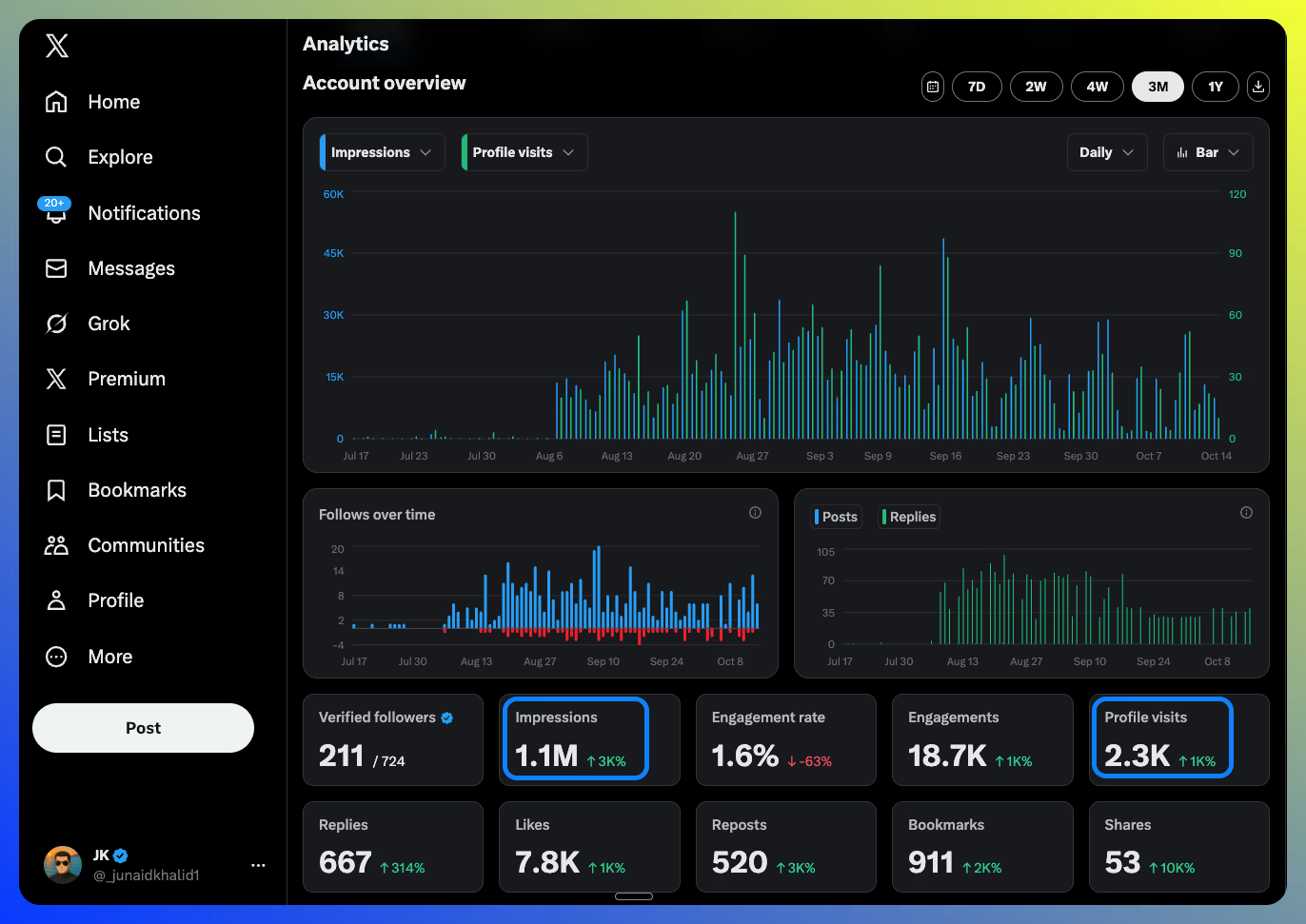
- impressions in the first 4 weeks
- 550K+
- impressions in the first 4 weeks
- profile views in the same 4 weeks
- 1,200
- profile views in the same 4 weeks
- impressions on X's 3-month view to Oct 14, 2025
- 1.1M
- impressions on X's 3-month view to Oct 14, 2025
- profile visits on that same view
- 2.3K
- profile visits on that same view
I started with about 300 followers and posted hardly 2 or 3 tweets or threads of my own in that time. The rest came from replies, at about an hour a day on weekdays.
When I wrote it up, about three weeks in, I traced where the attention went:
~600
profile views
223
clicked the link in my bio
140
installed LiGo
~20
became paid subscribers
That was from 1,000+ replies, or 15+ hours of work.
What I'd tell you before you start
- Expect a slow start. In our first few days, not one reply crossed 5 likes or 1,000 views.
- Don't wait for a perfect voice match. Out of every 100 replies, maybe 1 or 2 got called out as AI. That's okay.
- No VA yet? Start with 10 to 30 replies a day yourself. Once it becomes unbearable and you're seeing results, hire one from Fiverr, Upwork or wherever.
What to expect
A system you can hand to a VA that gets at least 100K+ impressions and thousands of profile views a month from LinkedIn and X (Twitter). The cost is 2 to 6 hours of your time up front to train them.
Week 1
Set up and train your VA on X. It's easier and faster than LinkedIn.
Weeks 1 to 4
Your VA goes live with 50 to 100 replies a day and sends a weekly report.
Week 5 onward
Review the numbers. Consider LinkedIn commenting if you're comfortable sharing access.
Why it works
- LigoSocial does 80 to 90% of the work
- It drafts comments in your voice, based on your experiences.
- Your VA handles the other 10 to 20%
- They are the human in the loop: picking posts and refining replies.
- The economics
- A VA costs $4 to $40 an hour. Your hour is worth $200 to $5,000.
- The scale
- A VA can do 50 to 200 replies a day, every day. You can't, or you wouldn't be here.
X vs LinkedIn: what you can delegate
How X (Twitter) and LinkedIn compare when you hand replies and comments to a VA.
| Feature | X (Twitter) | |
|---|---|---|
| Account delegation | Built-in Delegate feature | Posting via LigoSocial Delegate Access; commenting as you needs your login |
| Replies per day | 50 to 200 | 30 to 50 |
| Strategy | Focus on quantity | Focus on quality |
Part 1: your setup
YouSteps 1 to 3 are for you: founders, agency owners and account managers. Do them before you bring in your VA.
Step 1
Set up LigoSocial for your VA
Create your comment styles
Go to LigoSocial Style Preferences and create 2 or 3 different comment styles in one go. Give each one a clear name, like "Short replies", "Deeper opinionated replies" or "Agree and add value". You'll test them in a minute to find the one that sounds most like you, and you can fine-tune them later.
Install the LiGo Chrome extension
Install the Chrome Extension to use your custom styles directly while you scroll X (and LinkedIn).
Find your best style
This is the step that matters most. Go through your X feed and test your styles until one works consistently well:
- Open X and scroll through your feed.
- For each tweet you'd normally engage with, generate a comment with each of your styles.
- Do this for 10 to 15 tweets to find your best style.
- If you keep making the same edit, add it to the "Custom Instructions" section of the extension.
Record a Loom for your VA
Now record yourself using your best style on 10 to 15 replies. This video is your VA's training manual. Show three things, out loud:
- Which tweets you pick and which you skip. For example: "If a tweet is less than 5 words, I ignore. If it's about AI and sharing an opinion, I'm interested. If it's about marketing/AI/SaaS, I engage IF it has more than 2 sentences."
- Which generated comment you choose, and why.
- The edits you make, including phrases you always remove or change.
LigoSocial gets 75 to 95% of your style right. The Loom covers the remaining 5 to 25% that your VA has to learn.
Set up X (Twitter) delegation
Give your VA access to post on your X account with X's built-in Delegate feature. They never need your password.
- On X, open Settings and privacy and find Delegate (X's help page below has the current menu steps).
- Invite your VA's own X account as a contributor.
- Your VA accepts the invitation.
- They can now post and reply on your behalf.
Step 2
Plan your X (Twitter) replies
Build the target lists
Your VA builds 2 or 3 curated X lists of accounts to reply to. The mix:
- 70% established creators (10K+ followers, steady engagement)
- 30% peers about your size (up to 10K followers)
- All of them in your ICP, or attracting your ICP in their comments
Create a Twitter list called 'Primary Engagement Targets' with 50-100 accounts. Use these criteria:
- 70% should be accounts with 10,000+ followers who post about [YOUR NICHE]
- 30% should be accounts with 1,000-10,000 followers in [YOUR NICHE]
- All accounts should attract our ideal customer profile: [DESCRIBE YOUR ICP]
- Focus on accounts whose tweets consistently get 50+ replies
Time allocation: 2-5 hours one-time to build this list.
Review with me before proceeding to the next step.
What kind of replies work on X
One-line casual replies like "fr fr" or "this!" get lost in the noise. The replies that keep driving profile visits and engagement are substantive but conversational.
Aim for
- 3 to 6 sentences that add something: personal experience, data or a thoughtful question
- A reply that makes the original poster think "this person actually read my tweet and has something to add"
Avoid
- Generic one-liners that fit any tweet: "So true!", "Great insights", "This is the way"
- A row of emojis
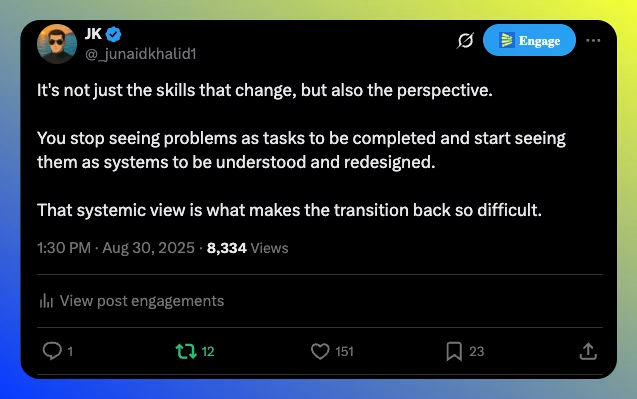
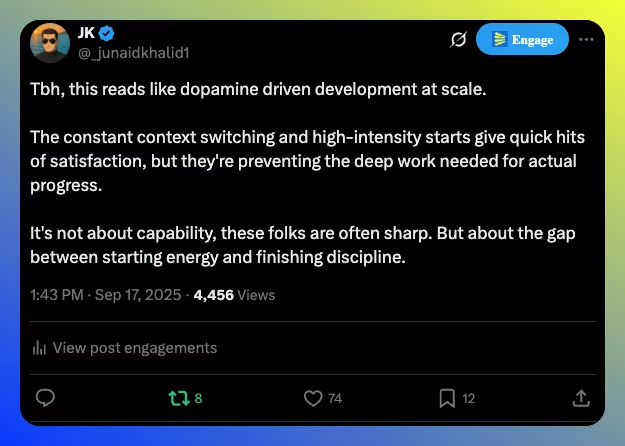
Real replies from my account
These drove real engagement and profile visits:
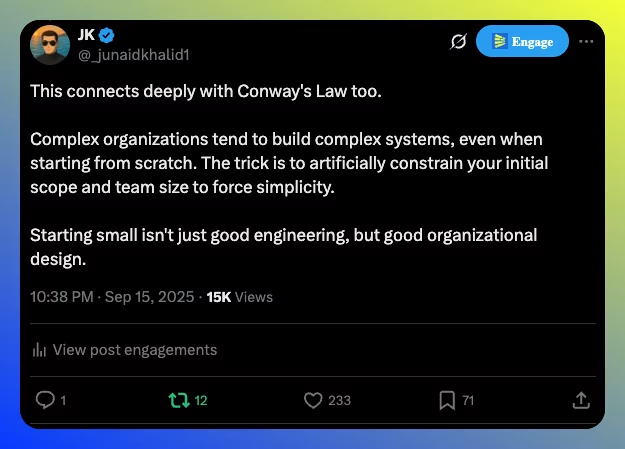

Show 3 more examples

Step 3
Decide what your VA does on LinkedIn
What your VA can do with no password
Posts for your profile
- You connect your LinkedIn profile to LigoSocial.
- You invite your VA as a delegate (Settings, Account Access, Invite Delegate; the Delegate Access guide explains the Admin, Editor and Viewer roles).
- Your VA generates and schedules posts for your profile.
- You keep full control. No credentials shared.
Company page
- You connect your company page to LigoSocial (paid plans).
- You give your VA access through LigoSocial.
- Your VA creates and schedules company page posts.
- Weekly target: 3 to 5 company page posts.
What needs your login (your decision)
Native commenting on LinkedIn has the most growth potential, but it needs access to your account. LinkedIn has no delegation feature for commenting as a personal profile (for company pages, see how to give someone access to LinkedIn without a password). Your options:
- Wait until you trust your VA (recommended).
- Share access through a password manager vault (1Password, LastPass).
- Write an SOP with fixed commenting hours.
- Start with X and add LinkedIn commenting later.
LinkedIn engagement limits
Unlike X, LinkedIn flags unusual activity. Keep your VA inside these limits:
Safe daily limits
- 30 to 50 comments a day (not 100 to 200 like X)
- Spread through the day, not all at once
- A mix of comment lengths
- 70%+ with 1st-degree connections at first
Red flags
- More than 50 comments in an hour
- Identical comment patterns
- Only engaging with strangers (no mutual connections)
- Commenting within seconds of a post going live
Before you bring in your VA
0 of 7 done
Part 2: hand it over
Your VASteps 4 to 6 are for your VA, with you reviewing. Share this part of the page with them.
Step 4
Train your VA in three rounds
This is a pilot run. Your VA drafts real replies, posts none of them, and you give feedback until their replies sound like you. Do it carefully: it decides the quality of everything after.
Round 1
50practice replies
~20 min review
15 to 20 needing feedback is normal
Round 2
25practice replies
~30 min review
Pass: 20+ of 25 right
Round 3
10practice replies
~15 min review
Pass: 9 or 10 of 10 right
Set up the training sheet
- Open the training spreadsheet template.
- Click File, Make a copy.
- Rename it, for example "VA Training - [Your Name]".
- Share it with your VA with Edit access.
The sheet has instructions in column F and an example in row 2. The four columns your VA fills in:
- ATweet or post URL
- Direct link to the tweet or post being replied to
- BOriginal content
- The text of the post, for context
- CSuggested reply
- The reply your VA picked in LigoSocial, with their edits
- DFeedback
- Your notes on that reply
Round 1: 50 practice replies
Complete this training exercise before going live:
- Open Twitter and filter the 'Primary Engagement Targets' list
- Find 50 tweets posted in the last 24 hours that have 10+ replies already
- For each tweet: use the LigoSocial Chrome extension to generate 3 reply options, pick the best one (or write your own if none fit), do not post it, and log it in the training spreadsheet
- Goal: complete 50 logged replies
- Send me the spreadsheet when done
Your review (about 20 minutes). Go through all 50. Mark any reply that doesn't sit well with you in red, and in column D note:
- words or phrases you'd never use
- tone issues (too formal, too casual, too salesy)
- structure (how you'd have started it)
- missing context or depth
15 to 20 replies needing feedback is normal. If more than 25 need it, refine your LigoSocial custom styles before round 2.
VA's reply
"This is a great point about email segmentation! We've seen similar results with our clients."
Your feedback
"I don't use exclamation marks much. Also, share a specific number instead of 'similar results'. Try: 'This tracks with what we've seen. Last quarter, 8 clients testing segmentation saw 34% higher open rates. The main reason, I think, was matching segment size to content specificity.'"
Round 2: 25 practice replies
Review the feedback from round 1. Pay special attention to:
- specific words and phrases I flagged
- tone adjustments
- how I structure my replies differently
In the same Google Sheet, create a new tab with the same columns and do 25 more: generate options in LigoSocial, apply the feedback before picking and editing, log them, don't post yet, and send me the sheet.
Your review (about 30 minutes). The goal is 20+ of 25 right. Got that? Move to round 3. Fewer? Give feedback and repeat with 25 more.
Round 3: 10 replies, go or no-go
This is the final calibration. Complete 10 more replies with all previous learnings applied. If these pass review, you'll be cleared to go live.
Your review (about 15 minutes). The goal is 9 or 10 of 10 right. If so, your VA is cleared for daily operations. If not, one more round of 10 with specific feedback.
Why this works
- Low risk: nothing is published during training.
- Fast feedback: your VA learns your voice in days.
- Written down: the sheet is a record your VA can go back to.
- Confidence: both of you know it works before it goes live.
- Payoff: 6 to 12 months of hands-off operation.
Before your VA goes live
0 of 5 done
Step 5
Go live: the daily routine
Once your VA passes training, this is the daily routine.
Weeks 1 and 2
50 replies a day
Then, gradually
Up to 100 a day
- Check the X lists for new posts from target accounts, and keep adding new people to the lists.
- Generate reply options with the LigoSocial Chrome extension.
- Pick the best option, with small edits if needed.
- Reply to anyone who responds, to keep the conversation going.
Step 6
The weekly report
Your VA emails you this report at the end of each week. It's the only regular check-in you need.
Getting the X metrics
Your VA opens X Analytics, selects 7D and takes a screenshot showing profile visits, impressions, new followers and the other key numbers for the week.
The report template
Weekly Report: [Date Range]

TWITTER METRICS:
[Attach screenshot from Twitter Analytics with 7D selected]

ACTIVITY THIS WEEK:
- Total replies posted: [NUMBER]
- Accounts engaged with: [NUMBER]

TOP PERFORMING REPLIES:
1. [Link to reply] - [Metrics: X likes, Y replies]
   Why it worked: [VA's brief analysis]

2. [Link to reply] - [Metrics: X likes, Y replies]
   Why it worked: [VA's brief analysis]

3. [Link to reply] - [Metrics: X likes, Y replies]
   Why it worked: [VA's brief analysis]

OBSERVATIONS & SUGGESTIONS:
[What the VA noticed this week: patterns in engagement, tweets that got more or less response, timing. Any change they want to try, for your approval.]

Example:
"I noticed replies to tweets posted in the afternoon (2-5 PM EST) got 2x more engagement than morning tweets. Should we focus more on afternoon posts next week? Also, deeper replies (4+ sentences) seem to perform better than shorter ones."
Templates
Make a copy of each and share it with your VA.
VA training spreadsheet
Track your VA through the three training rounds: post URLs, LigoSocial replies, their edits and your feedback.
Make a copy(opens Google Sheets in a new tab)Weekly report template
Metrics, top replies, learnings and next week's plan, ready for your VA to fill in.
Make a copy(opens Google Docs in a new tab)Stuck on any step? Email us at [email protected] and we'll help.
Ready to hand LinkedIn and X to your VA?
LigoSocial drafts the replies your VA picks from and lets them schedule your LinkedIn posts without your password. Set it up, record your Loom and start round 1 this week.
Card required. See pricing
Social media virtual assistant FAQ
What does a social media virtual assistant do on LinkedIn and X?
On X, they reply to posts from accounts on your target lists, starting at 50 replies a day and ramping to 100, posting through X's Delegate feature so they never need your password. On LinkedIn, they draft and schedule posts for your profile and company page through LigoSocial Delegate Access. Commenting on LinkedIn as you needs your login, so that part is your call. Every week they send you a report with metrics, their top replies and suggestions for you to approve.
Can a virtual assistant manage my LinkedIn without my password?
Partly. With LigoSocial Delegate Access your VA can create, schedule and publish posts for your profile without your login: you connect LinkedIn once, then invite them from Settings, Account Access. LinkedIn has no delegation feature for commenting as a personal profile, so native commenting means sharing access. If you do, use a password manager, turn on 2FA and set fixed commenting windows. More detail in how to give someone access to your LinkedIn without a password.
How do I give my VA access to my X (Twitter) account?
Use X's built-in Delegate feature. Invite your VA's own X account from your settings, they accept, and they can post and reply on your behalf without ever getting your password. Step 1 of the guide above links to X's official instructions.
What if my VA doesn't have experience with X or LinkedIn?
That's fine. The training process teaches them what they need to know. Look for strong writing skills and attention to detail more than platform experience.
How do I know if my VA is posting quality comments?
The 3-iteration training process ensures quality before they go live. After that, weekly reports show engagement (replies to your replies, profile visits). If engagement drops, review a sample of recent comments.
Can I use this for multiple accounts?
Yes. Once you have one VA trained, you can scale to multiple accounts (your personal account plus your clients if you're an agency). Each account needs its own LigoSocial custom styles and a 1-week calibration period.
Where can I hire a social media virtual assistant?
You can hire VAs from platforms like Upwork or Fiverr. Look for VAs with strong writing skills and attention to detail. Platform experience matters less than writing ability, since this guide teaches them the process.
How much does a social media virtual assistant cost?
VA rates typically range from $4 to $40 per hour depending on location, experience and where you hire from (check Upwork and Fiverr for current rates). Most people spend between $150 and $600 per month depending on the time commitment. For reference, a VA contracted for 10 hours a week can do 1,500 to 2,500 replies a month.
Can I use this for languages other than English?
Yes, LigoSocial supports 100+ languages. The training process works the same way. Make sure your VA is fluent in the target language.
Related resources
- LiGo Chrome ExtensionThe extension your VA uses every day
- Delegate Access GuideSetting up delegate access for your team or VA
- LiGo Pricing PlansFind the plan that fits your delegation needs
- LinkedIn Access Without a PasswordPage admin roles, OAuth tools and what LinkedIn allows when someone else runs your account
- LinkedIn Engagement ListsCurated lists of people to engage with, so replies go where your buyers are
- LigoSocial for AgenciesRun LinkedIn for several clients from one dashboard once your VA process works
Real results and case studies
The write-ups behind the numbers in this guide.
I got 500K+ impressions on Twitter/X in 4 weeks with this strategy
The full write-up of the VA run above: 550K+ impressions and 1,200 profile views in 4 weeks from a 300-follower account, with the sign-up numbers.
Read on Medium
Why LinkedIn comments matter more than posts (and how to leverage them in 2025)
The article that went viral with 14,000+ engagements: why commenting outperforms posting on LinkedIn and how to do it.
Read on Medium