
How to Fix Your LinkedIn Feed (The Saved People Search Strategy)
Your LinkedIn feed is lying to you.
Not maliciously. But it's showing you what the algorithm thinks you want - based on who you've engaged with in the past. And if you've been passively scrolling, liking random posts, and engaging with whoever shows up... your feed has become a mess of irrelevant content.
Here's the problem: the people you actually need to see - the creators in your niche, the prospects you want to connect with, the thought leaders whose content could help you grow - they're not showing up. Because you've never told the algorithm to show them to you.
Most people accept this. They scroll through whatever LinkedIn serves and hope something useful appears.
But there's another way.
You can reverse engineer the algorithm. Force it to show you exactly who you want to see. And in the process, get those people to notice you too.
It starts with one simple tool: a saved People Search.
Here's how the strategy works.
Why Your LinkedIn Feed Isn't Showing You the Right People
LinkedIn's algorithm has one job: keep you on the platform longer.
To do that, it shows you content it predicts you'll engage with. And it makes those predictions based on your past behavior - who you've liked, commented on, messaged, and viewed.
This creates a feedback loop.
If you've been engaging with random content (or worse, not engaging at all), your feed becomes generic. You see posts from people you barely know, about topics you don't care about, from industries you have no connection to.
Meanwhile, the creators and professionals you actually want to learn from? The ones in your target niche? They're posting every day - but you never see it.
The algorithm doesn't know you care about them. You've never told it.
And here's the real cost: if you want to grow on LinkedIn, you need to be visible in specific communities. You need the right people seeing your comments, recognizing your name, visiting your profile. But if your feed is full of noise, you're engaging with the wrong people entirely.
Your growth stalls. Your content reaches the wrong audience. Your time on LinkedIn feels wasted.
This is fixable. But not by scrolling harder.
The "Curated Audience" Strategy Explained
Here's the hack: you don't have to accept the feed LinkedIn gives you. You can build your own.
The strategy is simple:
- Identify the exact people you want to engage with (creators in your niche, prospects, thought leaders)
- Save a People Search that finds them
- Open that search every day and engage with their content
- Watch the algorithm adapt to show you more of them
You're manually curating your own "For You" page.
Instead of letting LinkedIn decide who you see, you're forcing yourself to see specific people every single day. And when you consistently engage with those people - commenting on their posts, reacting to their content, viewing their profiles - LinkedIn's algorithm takes notice.
It thinks:
"This user clearly cares about these people. Let me show more of their content in the main feed."
Over time, your feed transforms. The random noise disappears. The creators you actually want to see start showing up organically. And because you've been engaging with them consistently, they start recognizing your name too.
This is how you break into a niche on LinkedIn. Not by hoping the algorithm favors you, but by training it to.
The key tool that makes this possible? A saved People Search that you can access with one click, every single day.
How to Build Your Target Creator List
Let me walk you through exactly how to set this up.
Step 1: Define Who You Want to See
Before you search, get specific about who belongs on your list.
Ask yourself:
- What niche am I trying to grow in?
- Who are the active creators in that space?
- What job titles do they typically have?
- What industries are they in?
- Are they 1st connections, 2nd, or 3rd?
For example, if you're trying to break into the fintech space as a founder, your target might be:
- Founders and CEOs at fintech startups
- VCs who invest in fintech
- Content creators who write about fintech trends
- Journalists covering the fintech industry
You don't need hundreds of people. You need 20-50 of the right people.
Step 2: Build the Search on LinkedIn
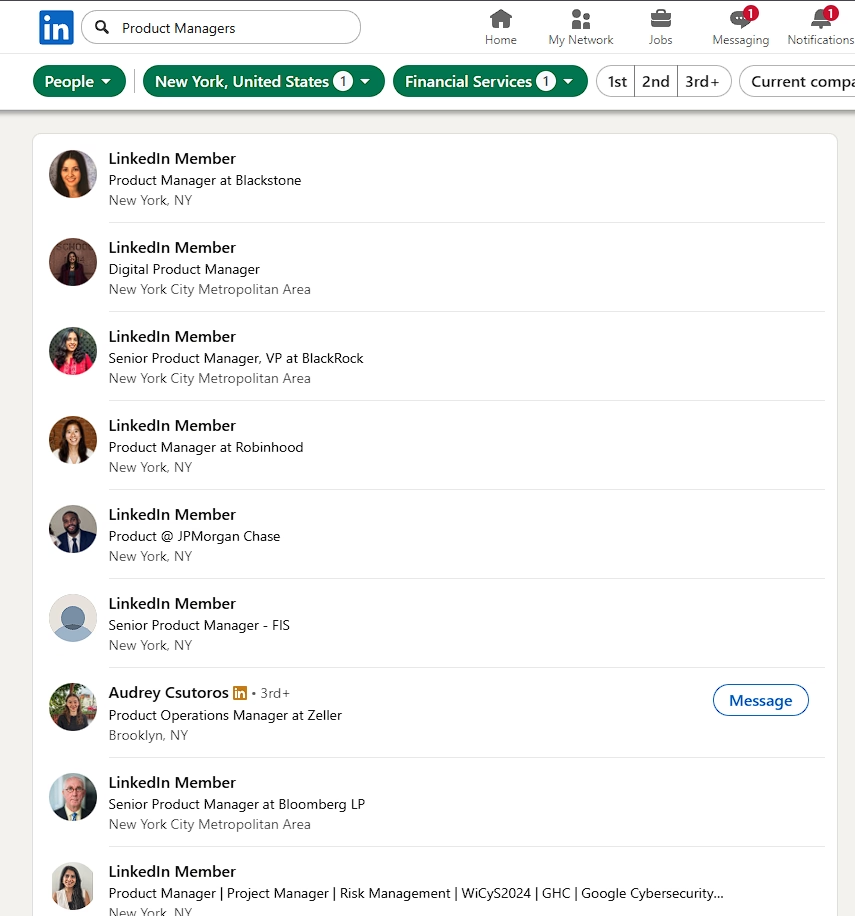
Go to LinkedIn and use the People Search with these filters:
Keywords: Terms that appear in their headlines or profiles ("fintech", "founder", "investor", etc.)
Industry: Filter to relevant industries
Connections: 2nd degree connections are ideal - close enough that engagement feels natural, but not people you already see constantly
Location: Optional, depending on your goals
Current Company: If you're targeting people at specific companies
Play with the filters until you see a results page full of exactly the type of people you want to engage with. Scroll through and make sure the results look right.
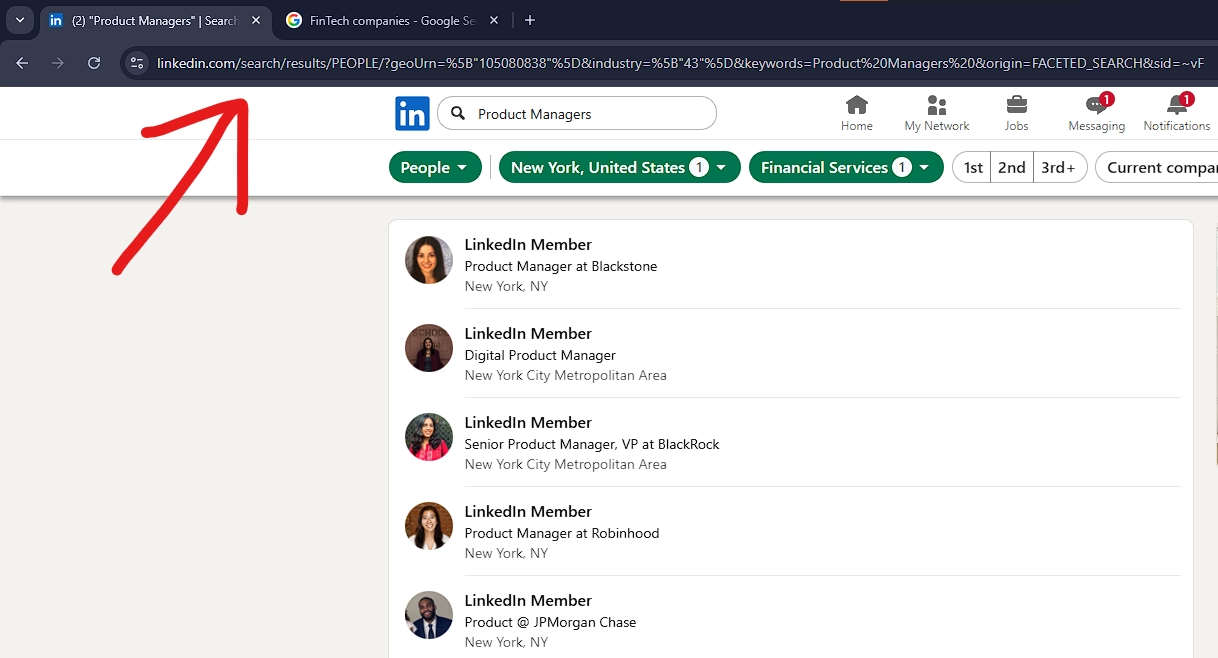
Step 3: Copy the URL
Once your search results look good, copy the entire URL from your browser's address bar.
It'll be long and ugly - something like: https://linkedin.com/search/results/people/?keywords=fintech founder&network=["S"]&origin=FACETED_SEARCH...
That URL contains all your filter settings. Don't try to clean it up. Just copy the whole thing.
Step 4: Save It in LinkedIn Lists
Open the LiGo Chrome Extension paid version and go to the Lists tab.
Click "Add List" and select the "Paste URL" tab.
Give it a clear name like "Fintech Creators to Engage" or "Target Niche - Daily".
Paste the URL and hit Save.
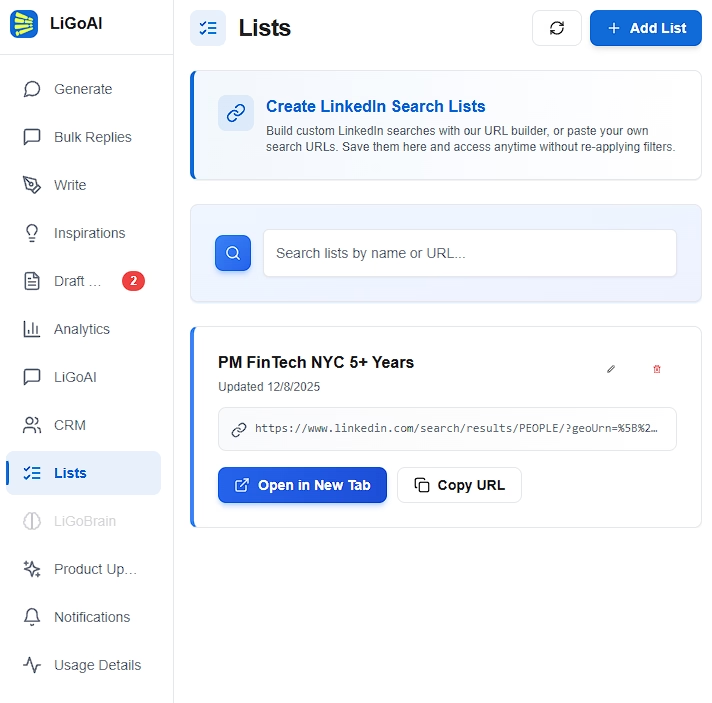
Done. You now have one-click access to your curated audience.
Step 5: Refine Over Time
Your first list won't be perfect. After a week of using it, you'll notice:
- Some people never post (remove them mentally or rebuild the search)
- Some people post but it's not relevant (adjust your filters)
- You've discovered new people to add (build a second list or expand keywords)
The list is a living tool. Update it as you learn.
The Daily Engagement Routine
Having the list is step one. Using it consistently is where the magic happens.
Here's the routine:
Every morning (15-20 minutes):
- Open the LiGo extension
- Go to Lists and click your saved People Search
- LinkedIn opens with your target creators
- Click through to 5-10 profiles
- Look for their recent posts (check their Activity section)
- Leave a thoughtful comment on 3-5 posts
That's it. Fifteen to twenty minutes, every single day.
The key word is consistent. Doing this once won't change anything. Doing it every day for 30 days will completely reshape your LinkedIn experience.
What "Thoughtful Comment" Means
Don't leave generic comments. "Great post!" or "Thanks for sharing!" does nothing.
A thoughtful comment:
- Adds to the conversation (share your own experience or perspective)
- Asks a genuine question
- Respectfully challenges or builds on their point
- References something specific from their post
You want the creator to read your comment and think "this person actually understood what I wrote."
This is where LiGo's comment generation feature helps. It generates comments that match your voice and actually engage with the content - not generic fluff.
Why Profiles Matter
Don't just comment. Click into their profiles first.
LinkedIn tracks profile views. When you view someone's profile, they get notified (unless you're in private mode, which you shouldn't be for this strategy). That notification puts your face and headline in front of them.
View the profile → find their recent post → leave a comment.
Now they've seen you twice. Do that for a week straight, and they'll start recognizing your name.
Why This Works (The Algorithm Psychology)
Let me explain what's happening behind the scenes.
Engagement Signals Have Weight
LinkedIn's algorithm ranks engagement signals by intensity:
- Comments - highest signal (you took time to write something)
- Shares - strong signal (you endorsed it to your network)
- Reactions - medium signal (easy action, low commitment)
- Profile views - light signal (shows interest)
- Dwell time - passive signal (you stopped scrolling)
When you comment on someone's posts consistently, you're sending the strongest possible signal that you care about their content.
The algorithm responds by showing you more of that person's content in your main feed. It also starts showing you similar content from similar people.
Your feed literally reshapes around your engagement patterns.
Reciprocity is Real
Here's the second effect: creators notice who engages with them.
If I post on LinkedIn and the same person leaves a thoughtful comment three times in two weeks, I notice them. I start recognizing their name. I'm more likely to check out their profile, maybe their content.
This is how relationships form on LinkedIn. Not through cold DMs, but through consistent, visible engagement.
Your saved People Search makes this systematic. Instead of randomly hoping to see their posts, you're guaranteeing you engage with them regularly.
The Compound Effect
This strategy compounds over time.
- Week 1-2: You're engaging, but nothing visible changes yet
- Week 3-4: Your feed starts showing more content from your target niche
- Week 5-8: Creators begin recognizing your name and engaging back
- Month 3+: You're a known presence in that niche; opportunities start appearing
Most people quit before week 3. They don't see instant results, so they assume it's not working.
It's working. The algorithm just needs time to learn your new patterns.
Example People Lists for Different Growth Goals
Different goals require different target audiences. Here are some examples:
Breaking Into a New Industry
You're pivoting careers or expanding into a new market. You need to become visible in that space.
List name: "Target Industry Thought Leaders"
Who to include:
- Top creators who post about that industry
- Founders of companies in the space
- Journalists and analysts covering the sector
- Community managers of industry groups
Engagement goal: Get recognized as someone who "gets" the industry before you even work in it.
Building Authority in Your Niche
You already work in a space but want to be seen as a thought leader.
List name: "Peer Creators in [Niche]"
Who to include:
- Other creators at your level (not just the mega-influencers)
- People who engage actively with their audience
- Rising voices who are growing quickly
- Complementary experts (adjacent topics)
Engagement goal: Build peer relationships that lead to collaborations, podcast invites, and cross-promotion.
Getting Noticed by Potential Clients
You're selling services and want prospects to see you as an expert.
List name: "Ideal Client Profiles"
Who to include:
- Decision-makers at target companies
- People with the job title of your typical buyer
- Prospects who are actively posting (they're engaged on the platform)
Engagement goal: Become a familiar face before you ever reach out. When you send a connection request or DM, they already know your name.
Connecting with Investors/VCs
You're fundraising or want to build relationships with the investment community.
List name: "Active VCs in [Sector]"
Who to include:
- Partners at funds that invest in your space
- VCs who post regularly about your industry
- Angel investors known for being founder-friendly
Engagement goal: Be on their radar. When you eventually pitch, you're not a cold email - you're "that person who always has smart comments on my posts."
Mistakes That Kill This Strategy
I've seen people try this and fail. Here's why:
Mistake 1: Generic Comments
If your comments are "Great post!" or "So true!" or "Love this!", you're wasting your time.
Generic comments don't register. The creator ignores them. The algorithm barely counts them. And anyone who sees your comment thinks you didn't actually read the post.
Take 60 seconds to write something real. It's worth it.
Mistake 2: Inconsistent Engagement
Engaging heavily for three days, then disappearing for two weeks, then trying again... doesn't work.
The algorithm needs consistent signals. Your target creators need to see you repeatedly. This is a daily habit, not a sporadic effort.
If you can't commit to daily, do it every other day. But stick to the schedule.
Mistake 3: Too Many People, Not Enough Depth
A list of 500 people is useless. You can't meaningfully engage with 500 people.
Start with 20-30. Go deep with them. Once those relationships are established, expand the list.
Depth beats breadth every time.
Mistake 4: Targeting the Wrong Creators
Follower count doesn't equal influence.
Someone with 500,000 followers might never see your comment (it gets buried in hundreds of others). Someone with 5,000 followers who's actively growing might notice you immediately.
Look for creators who:
- Actually respond to comments
- Post consistently
- Have engaged audiences (not just follower counts)
- Are in growth mode themselves
These people are more likely to notice you, engage back, and remember your name.
Final Takeaway
Your LinkedIn feed isn't fixed. You can reshape it.
By saving a People Search of exactly who you want to engage with, and opening that search every single day, you take control away from the algorithm. You decide who you see. You decide who sees you.
Over time, this simple habit:
- Transforms your feed into a curated stream of relevant content
- Gets you noticed by creators and prospects in your target niche
- Builds real relationships that turn into opportunities
The LinkedIn Lists feature in the LiGo Chrome Extension paid version makes this effortless. Save your People Search once, access it with one click forever.
Here's your action plan:
- Identify 20-30 people you want to engage with consistently
- Build a People Search on LinkedIn that finds them
- Save it in LinkedIn Lists
- Open it every morning and engage for 15-20 minutes
- Do this for 30 days and watch your feed (and your reach) transform
The algorithm isn't your enemy. It's a tool. Train it to work for you.
Next Resources
Want to go deeper on LinkedIn growth? Check these out:
- Fix Your LinkedIn Feed: A Saved Search Strategy That Works - Full documentation on saved searches and the Lists feature
- How to Write LinkedIn Comments That Actually Get Noticed - Make your engagement count
- LiGo Chrome Extension Features - Everything the extension can do
- LinkedIn Engagement: Building Real Connections - The bigger picture on engagement strategy
- Why LinkedIn Comments Matter More Than Posts - The case for comment-first growth
LinkedIn Lists is available now in the LiGo Chrome Extension. Start building your curated audience today.