
LinkedIn Job Search Hack: How to See Jobs Before Everyone Else
If you're job hunting on LinkedIn, you're probably making the same mistake everyone else makes.
You search for your job title. "Product Manager." "Software Engineer." "Marketing Director."
You scroll through results. You apply to a few. You come back tomorrow and do it again.
Here's the problem: you're only seeing a fraction of the jobs that actually match your skills.
The same role has five different names depending on the company. A "Frontend Developer" at one company is a "UI Engineer" at another, a "Web Developer" at a third, and a "JavaScript Specialist" at a fourth. They're all the same job. But if you only search "Frontend Developer," you miss the other 80%.
Meanwhile, everyone else is also searching "Frontend Developer." Those listings get hundreds of applications. The "UI Engineer" listing? Maybe a dozen.
You're competing in a crowded pool while ignoring the empty lanes.
I'm going to show you how to fix this with two strategies:
- The Portfolio Approach - Save multiple job search variations to cover the entire market
- The URL Hack - Modify LinkedIn's URL to see jobs posted in the last hour, not the last 24
Combined, these give you a systematic advantage over everyone else searching the obvious keywords and checking once a day.
Let's get into it.
Why Searching One Job Title Is Costing You Opportunities
Job titles are chaos.
There's no standardization. Every company invents their own naming conventions. HR teams use whatever sounds good. Founders title roles based on vibes.
The result: identical jobs get posted under completely different names.
A few examples:
The same engineering role might be called:
- Frontend Developer
- Frontend Engineer
- UI Developer
- UI Engineer
- Web Developer
- JavaScript Developer
- React Developer
- Client-Side Engineer
The same product role might be called:
- Product Manager
- Product Owner
- Program Manager
- Technical Product Manager
- Product Lead
- Product Analyst
The same marketing role might be called:
- Marketing Manager
- Growth Manager
- Demand Generation Manager
- Digital Marketing Manager
- Performance Marketing Manager
- Acquisition Manager
If you search one term, you miss the others. It's that simple.
And here's why this matters beyond just volume:
Less competition on non-obvious titles. Everyone searches the standard keyword. "Product Manager" gets flooded with applicants. "Program Manager" at the same company, doing the same work? Way fewer applications.
Smaller companies use weird titles. Startups especially. They might call the role "Head of Product Stuff" or "Growth Lead" or something completely made up. These jobs exist. You just have to search creatively to find them.
Recruiters don't always optimize for search. Not every recruiter knows SEO. They post jobs with the internal title, not the title candidates are searching. Their loss is your gain - if you know to look.
The fix isn't to search five different terms every morning. That's exhausting. The fix is to save all five searches once and check them with one click each.
The "Portfolio of Bets" Strategy
Think about this like an investor thinks about diversification.
If you put all your money in one stock, you're exposed to huge risk. If that stock tanks, you're done. Smart investors spread bets across multiple positions.
Job searching works the same way.
If you only search one job title, you're betting everything on that keyword. If the market is slow for "Product Manager" listings this week, you see nothing. Meanwhile, "Product Owner" listings are popping up and you have no idea.
The Portfolio Approach means:
- Identify all the title variations for your target role (aim for 4-6)
- Create a separate LinkedIn job search for each variation
- Save each search in LinkedIn Lists
- Check all of them systematically
You're not searching harder. You're searching smarter. Five saved lists, five clicks, complete market coverage.
No more typing the same searches every day. No more forgetting to check that alternate title you thought of last week. No more leaving jobs on the table because you didn't think to search "UI Engineer."
The searches are saved. The work is done once. Now you just execute.
How to Build Your Job Search Portfolio
Let me walk through exactly how to set this up.
Step 1: Brainstorm All Title Variations
Before you touch LinkedIn, make a list. Write down every possible title someone might use for the role you want.
How to brainstorm:
- Look at job boards and note different titles for similar roles
- Check LinkedIn profiles of people doing the job you want - what's their title?
- Ask ChatGPT: "What are all the different job titles for [your target role]?"
- Think about seniority variations (Manager vs. Senior Manager vs. Director)
- Think about industry-specific terms (some industries have their own vocabulary)
Aim for 4-6 solid variations. More than that becomes hard to manage. Fewer means you're probably missing something.
Step 2: Create Separate Job Searches on LinkedIn
Go to LinkedIn Jobs and create your first search.
Enter your first title variation in the keywords field. Then add your other filters:
- Location (or Remote)
- Experience level
- Date posted
- Company size
- Industry
Whatever matters to you.
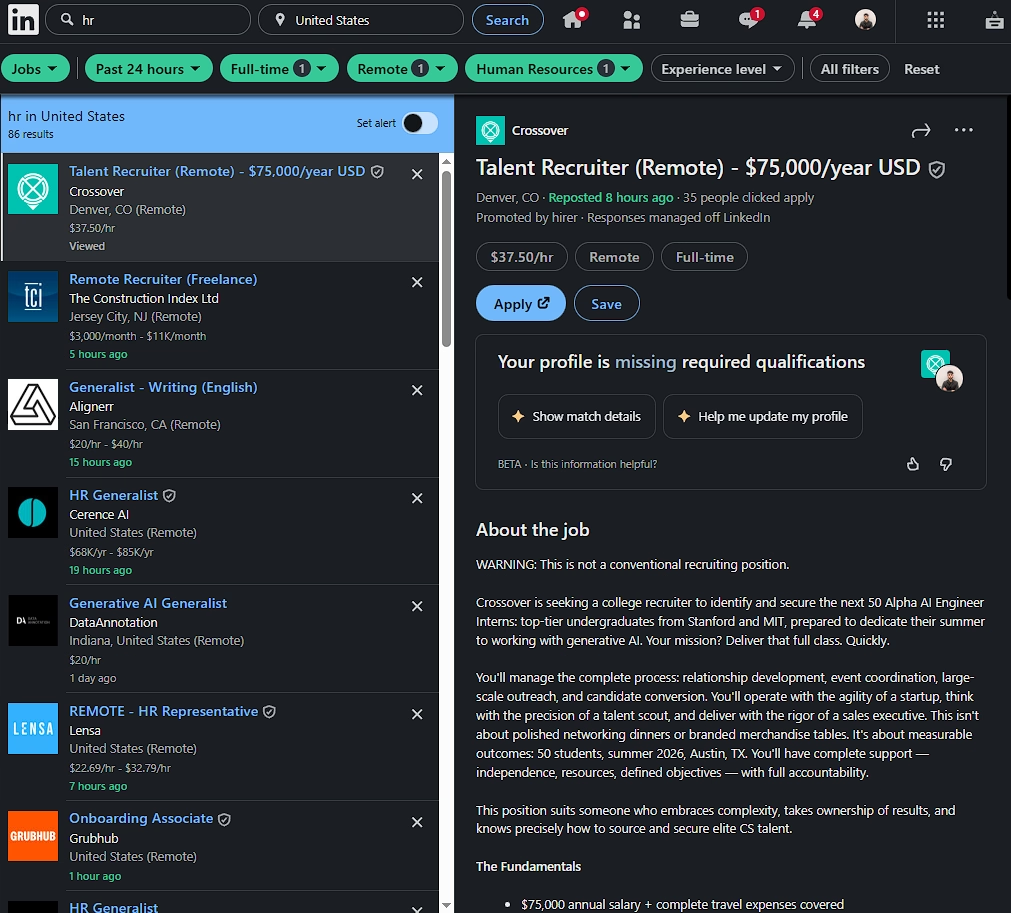
Once the results look right, copy the URL from your browser's address bar.
Now do the same thing for your second title variation. Same filters, different keyword. Copy that URL.
Repeat for all your variations.
Step 3: Save Each Search in LinkedIn Lists
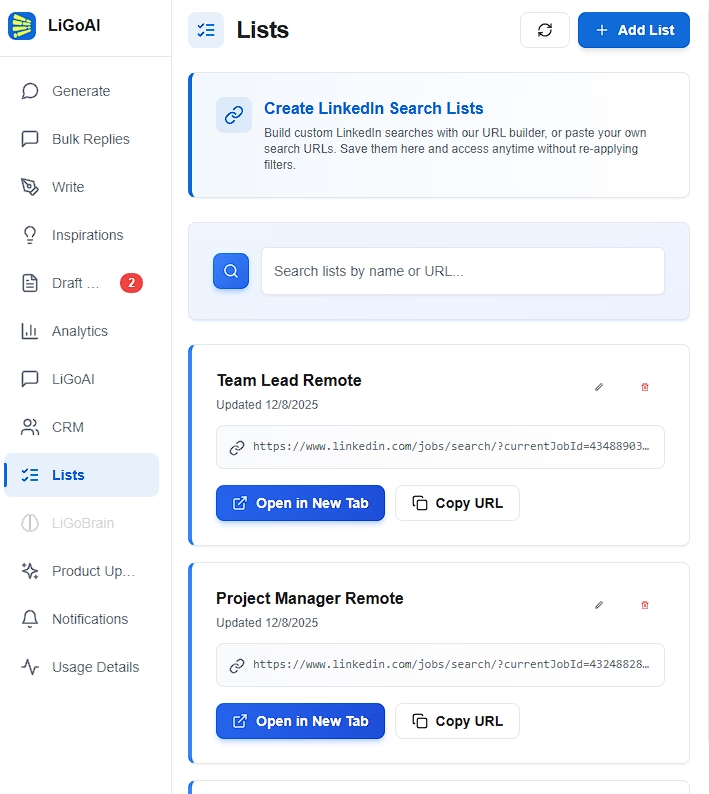
Open the LiGo Chrome Extension and go to the Lists tab.
For each URL you copied:
- Click "Add List"
- Select "Paste URL"
- Name it clearly (e.g., "Jobs - Frontend Developer" or "Jobs - UI Engineer")
- Paste the URL
- Save
Do this for all your variations. You should end up with 4-6 saved lists, one for each title variation.
Example: Frontend Developer Portfolio
Here's what a complete portfolio might look like for someone searching frontend roles:
| List Name | Keyword |
|---|---|
| Jobs - Frontend Developer | frontend developer |
| Jobs - Frontend Engineer | frontend engineer |
| Jobs - UI Developer | UI developer |
| Jobs - React Developer | react developer |
| Jobs - JavaScript Developer | javascript developer |
Same location. Same experience level. Same other filters. Different keywords.
Five lists. Five clicks every morning. Complete coverage of the frontend job market.
The URL Hack: See Jobs Before Everyone Else
Here's something most people don't know about LinkedIn job search.
When you filter by "Past 24 hours," LinkedIn adds a parameter to the URL that controls the time window. And that parameter is measured in seconds.
Which means you can modify it to see jobs posted in the last hour. Or the last 30 minutes. Or any custom timeframe you want.
Why this matters:
Job applications have a half-life. The first 24 hours are critical. After that, the listing has hundreds of applicants and your resume disappears into a pile.
But if you can see a job 2 hours after it's posted - before LinkedIn even shows it to most people in the "Past 24 hours" filter - you're one of the first applicants. Your resume gets seen. Your odds go up dramatically.
How the URL Parameter Works
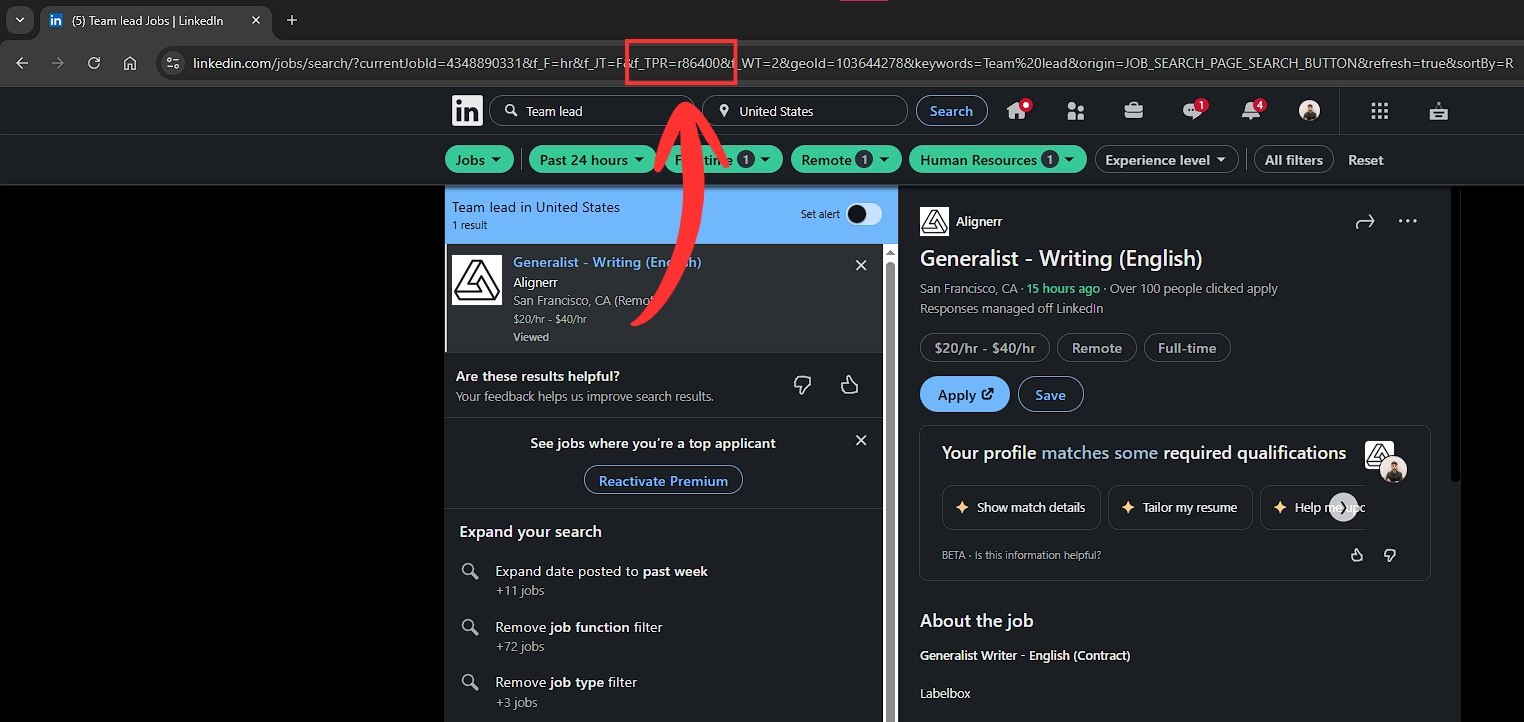
When you set LinkedIn's time filter to "Past 24 hours," your URL will contain something like this:
f_TPR=r86400
That 86400 is the number of seconds. 86,400 seconds = 24 hours.
The math:
- 1 hour = 3,600 seconds
- 2 hours = 7,200 seconds
- 6 hours = 21,600 seconds
- 12 hours = 43,200 seconds
- 24 hours = 86,400 seconds
To see jobs posted in the last hour, you change the URL from:
https://www.linkedin.com/jobs/search/?f_TPR=r86400&keywords=product%20manager...
To:
https://www.linkedin.com/jobs/search/?f_TPR=r3600&keywords=product%20manager...
That's it. Change r86400 to r3600. Now you're seeing jobs from the last 60 minutes only.
Step-by-Step: Creating a Custom Time Filter
- Do your normal job search on LinkedIn
- Set the time filter to "Past 24 hours" (this adds the time parameter to the URL)
- Copy the URL from your browser
- Find the f_TPR=r86400 part
- Change 86400 to your desired number of seconds
- Paste the modified URL back into your browser to test
- Save this custom URL in LinkedIn Lists
My Recommended Time Windows
For active job hunting, I suggest these:
"Last 2 hours" (r7200) - Sweet spot for catching fresh listings multiple times per day
"Last 6 hours" (r21600) - Good for checking twice a day (morning and evening)
"Last hour" (r3600) - Aggressive mode if you're checking constantly
The exact number depends on how often you're willing to check. But anything shorter than 24 hours puts you ahead of most applicants.
Combining the Portfolio + URL Hack
Now let's put both strategies together.
You have your portfolio of 5 title variations. Instead of saving them with the default 24-hour filter, you save them with a custom time parameter.
Here's what your final setup looks like:
| List Name | Keyword | Time Parameter |
|---|---|---|
| Jobs - Frontend Developer (2hr) | frontend developer | r7200 |
| Jobs - Frontend Engineer (2hr) | frontend engineer | r7200 |
| Jobs - UI Developer (2hr) | UI developer | r7200 |
| Jobs - React Developer (2hr) | react developer | r7200 |
| Jobs - JavaScript Developer (2hr) | javascript developer | r7200 |
Five lists. Each one showing jobs posted in the last 2 hours. Each one covering a different title variation.
The Morning Routine
Here's how you use this:
- Open the LiGo extension
- Go to Lists
- Click your first job search list - LinkedIn opens with fresh results
- Scan for interesting roles, open promising ones in new tabs
- Back to extension, click your second list
- Repeat for all 5 lists
Total time: 10-15 minutes.
What you've accomplished: swept the entire market for your target role, saw jobs that were posted in the last 2 hours, and you're among the first applicants.
Do this twice a day (morning and evening) and you're seeing jobs before they even show up in most people's "Past 24 hours" filter.
Why This Combination Is Powerful
Most job seekers:
- Search one title
- Use the default 24-hour filter
- Check once a day
- Compete with hundreds of applicants
You:
- Search five title variations
- See jobs within hours of posting
- Check multiple times a day with zero extra effort
- Compete with a handful of applicants
Same amount of work (thanks to saved lists). Completely different results.
Final Takeaway
Job hunting on LinkedIn doesn't have to be a daily grind of typing the same searches and scrolling through the same stale results.
The Portfolio Approach ensures you're seeing every version of your target role - not just the obvious keyword everyone else is searching.
The URL Hack ensures you're seeing jobs hours before most applicants even know they exist.
Combined with LinkedIn Lists in the LiGo Chrome Extension, you save all these searches once and access them with one click forever.
Here's your action plan:
- Brainstorm 4-6 title variations for your target role
- Create a LinkedIn job search for each variation
- Modify the URL to use a shorter time window (r7200 for 2 hours is a good start)
- Save each modified URL in LinkedIn Lists
- Check all your lists every morning (and evening if you're serious)
The job market is competitive. But most people are competing inefficiently - searching one keyword, checking once a day, applying to crowded listings.
You don't have to play that game.
Build your portfolio. Hack your time window. Be first.
Next Resources
More guides to level up your LinkedIn strategy:
- Fix Your LinkedIn Feed: A Saved Search Strategy That Works - Full documentation on saved searches and the Lists feature
- LiGo Chrome Extension Features - Everything the extension can do
- How to Optimize Your LinkedIn Profile for Job Hunting - Make sure your profile converts when recruiters click
- LinkedIn Profile Checklist 2025 - Complete optimization guide
- LinkedIn for Freelancers: Finding Clients and Building Authority - If you're searching for clients, not jobs
LinkedIn Lists is available now in the LiGo Chrome Extension. Start building your job search portfolio today.