Most advice on how to write a LinkedIn article stops at the mechanics: click Write article, add a cover image, hit publish. That is the easy 5%. The real question, the one that decides whether your article gets read or sits at 40 views forever, is whether you should have written an article at all instead of a post.
This guide answers both. First, the honest decision framework for article versus post, because picking wrong is why so many LinkedIn articles flop. Then the setup steps, a structure that actually holds a reader, and the fixes that get an article read and even cited. If you have ever poured two hours into a LinkedIn article and watched it die, the problem was probably format, not effort.
Key takeaways
- Articles and posts are different tools. A post is for fast feed reach that fades in a day. An article is a slow-burn, evergreen, search-indexed piece that lives on your profile.
- Use an article when the topic is genuinely deep, evergreen, and worth 800 to 2,000+ words. Use a post for everything else. Most content should be a post.
- Articles do not get the algorithmic push that posts do. They are not surfaced heavily in the feed, so you have to drive traffic to them yourself.
- The structure that works: a specific headline, a hook that earns the first scroll, scannable H2 sections, one clear idea, and a close that invites a comment.
- Articles are indexed by Google and increasingly cited by AI answers, which is their real long-term advantage over posts.
- Writing is desktop-only. You cannot create a LinkedIn article from the mobile app, though people can read it anywhere.
Article vs post: the decision that matters most
Before you write a word, decide whether this should be an article at all. Most of the time, the answer is no, and choosing a post instead will get you more reach for less work.
The distinction comes down to how each format behaves. The table below lays it out.
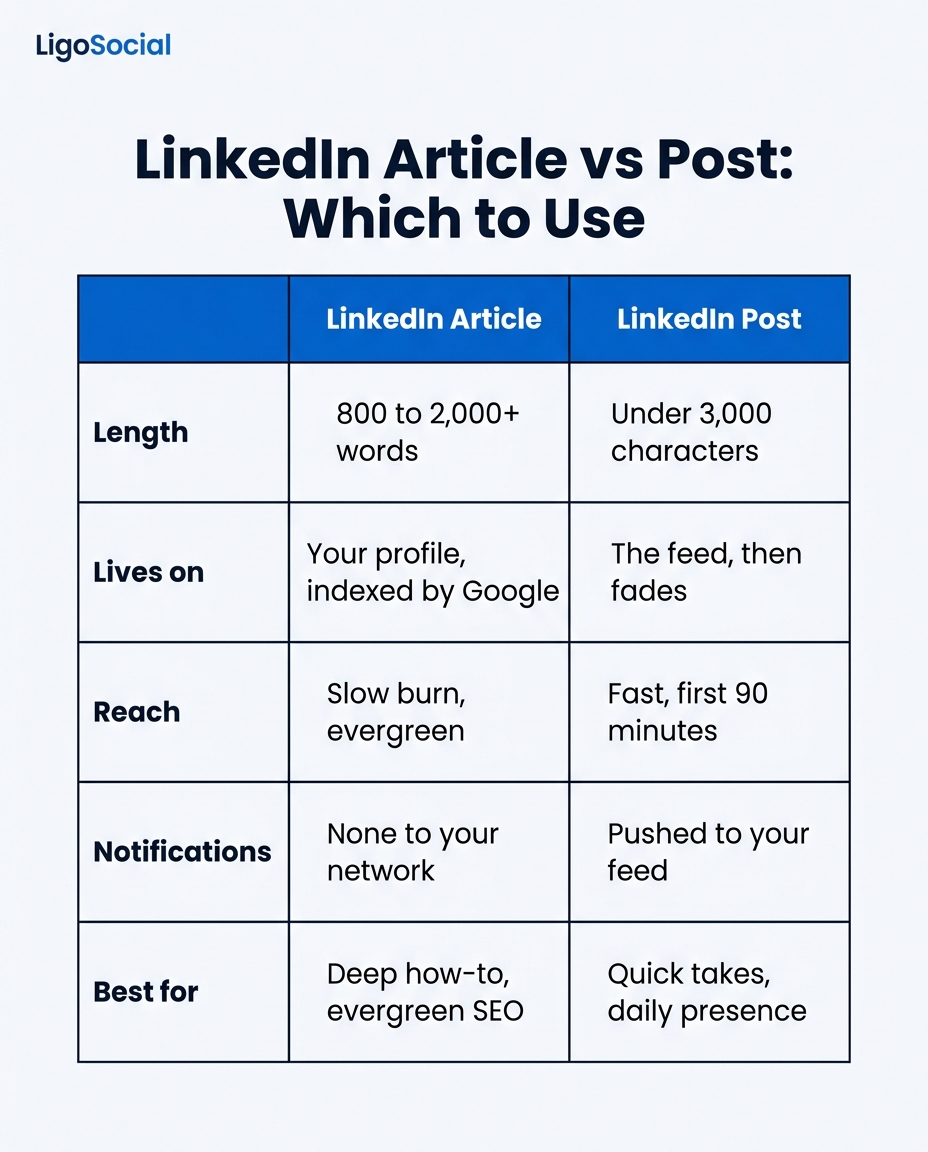
| Dimension | LinkedIn Article | LinkedIn Post |
|---|---|---|
| Length | 800 to 2,000+ words | Under 3,000 characters |
| Lives on | Your profile, indexed by Google | The feed, then fades |
| Reach | Slow burn, evergreen | Fast, first 90 minutes |
| Algorithmic push | Minimal | Strong |
| Best for | Deep how-to, evergreen SEO | Quick takes, daily presence |
Read that reach row carefully, because it is the trap. LinkedIn posts get a strong feed push; articles do not. An article will almost always get fewer immediate views than a post on the same topic. That is not a failure of your writing. It is how the platform treats the format.
So write an article only when the trade is worth it: when the topic is deep enough to need real length, evergreen enough to keep earning views for months, and valuable enough that people will seek it out or find it through search. A "5 lessons from my week" reflection is a post. A "complete guide to pricing your first SaaS product" is an article.
If a topic fits in a post, make it a post. Save the article format for the pieces that genuinely earn 1,000+ words and are meant to last.
When a LinkedIn article is the right call
To make the decision concrete, an article is the right format when at least a few of these are true:
- The topic is evergreen. It will be just as useful in a year. Guides, frameworks, and deep explainers qualify. Hot takes on this week's news do not.
- It needs real length. You genuinely cannot do the subject justice in a post. If you can, you should.
- You want search and AI traffic. Articles get indexed by Google, and they are increasingly pulled into AI-generated answers. That is a durable channel a feed post never gets.
- It is a cornerstone piece. Something you will link to repeatedly, pin to your Featured section, and point new connections toward.
- You will actively promote it. Because the feed will not push it for you, you need a plan to drive traffic (a companion post, your newsletter, DMs to the right people).
If most of those are false, write a post. You will reach more people and spend less time doing it.
How to write and publish a LinkedIn article, step by step
Once you have decided an article is right, the mechanics are quick. Note that writing an article is a desktop-only feature; it is not available in the mobile app.
- Go to your home feed and click Write article. It sits in the same box where you would start a post, at the top of your feed (not your profile). If you also admin a Company Page, LinkedIn asks whether to publish as yourself or the Page.
- Add a cover image. Upload a high-resolution image; LinkedIn recommends around 1920 x 1080 pixels. A clean, on-brand cover meaningfully lifts click-through, so do not skip it or use a random stock photo.
- Write a specific headline. This is the single most important element. Be concrete and promise a clear payoff. "What I Learned About Pricing" is weak; "The Pricing Mistake That Cost Us $40k (and How We Fixed It)" earns the click.
- Draft and format for scanning. Use the toolbar to add H2 and H3 subheadings, bold key lines, short paragraphs, and bullet or numbered lists. A wall of text loses readers no matter how good the ideas are.
- Add visuals and links inline. Break up long stretches with an image, an embedded video, or a link to a relevant resource. It holds attention and adds credibility.
- Publish and announce. Click Next, optionally add a custom meta title and description (useful for off-platform SEO), then publish. Immediately write a short, punchy feed post announcing the article so your network actually sees it exists.
That last step is the one everyone skips and everyone regrets. Publishing the article is not distribution. The announcement post is.
The structure that keeps a reader to the end
A LinkedIn article that gets read follows the same shape as any piece of writing that respects the reader's time.
- A hook, not a warm-up. Your first two lines have to earn the scroll. Open on the reader's problem or a sharp claim, never on "In today's fast-moving professional landscape." Our library of 30 LinkedIn hook formulas works for article openers too, not just posts.
- One idea, well. An article should make a single argument or teach a single thing thoroughly. Three half-covered ideas is worse than one covered completely.
- Descriptive subheads. A reader should get the gist from your H2s alone, then drop into the prose where they want depth. Write subheads that state a point, not vague labels.
- Specifics over adjectives. Real numbers, real examples, real steps. Specificity is what makes an article credible and what makes it worth citing.
- A close that invites a reply. End with a genuine question or a reframe that pulls comments. Engagement on an article still helps it, and it is the start of a conversation.
The formatting itself matters more than people think. If your paragraphs are dense and your subheads are missing, even great ideas read as a slog. Our guide on the LinkedIn text formatter covers why formatting decides whether your writing gets read, and the free text formatter tool handles the bold and italic formatting LinkedIn's editor makes fiddly.
The hard part is sounding like you, at length
Here is the honest problem with LinkedIn articles. A post is short enough that your natural voice carries it. An article is long, and somewhere around paragraph six most people slip into stiff, corporate, faintly-AI prose. The ideas are yours, but the writing stops sounding like a human and starts sounding like a press release. Readers feel it, and they bounce.
This is the exact problem LiGo is built for. Its voice layer, LiGo Brain, learns how you actually write from your own past posts and comments, so long-form drafts come out in your voice instead of a flattened AI baseline. LiGo's whole premise is authentic content produced faster, not generic AI content, which is precisely what a long article needs to survive.
There is also a smarter workflow than writing every article from scratch. Post Lab, LiGo's set of AI agents, includes a Content Atomizer that runs the loop in reverse: it takes one long piece and breaks it into a series of standalone feed posts, each with its own hook, in your voice. So your one article becomes the announcement post plus a week of feed content that all points back to it, solving the "articles get no push" problem by giving you the posts that drive the traffic. Because LiGo posts through LinkedIn's official OAuth API and you review everything before it goes out, you get the speed without handing your account to a scraper bot. If you want the full method, our guide on LinkedIn content repurposing walks through turning one idea into a month of content.
An article gets no feed push, so the post announcing it is not optional. It is the distribution.
Frequently asked questions
How do I write an article on LinkedIn?
On desktop, go to your home feed and click Write article in the box where you would normally start a post. Add a cover image (around 1920 x 1080 pixels), write a specific headline, then draft your content using the formatting toolbar for subheadings, bold text, and lists. Click Next, optionally set a custom meta title and description, and publish. Writing an article is not available in the mobile app.
What is the difference between a LinkedIn article and a post?
A post is short (under 3,000 characters), gets a strong feed push, and fades within a day or two. An article is long-form (typically 800 to 2,000+ words), lives permanently on your profile, and gets indexed by Google, but it receives little algorithmic feed push. Use a post for fast reach and daily presence, and an article for a deep, evergreen piece you will promote and link to over time.
What should a LinkedIn article look like?
A well-formatted LinkedIn article has a specific headline, a cover image, a hook that earns the first scroll, and a body broken into scannable H2 and H3 sections with short paragraphs, bold key lines, and lists. It makes one clear argument, uses real specifics rather than vague adjectives, and closes with a question that invites comments. Visually, it should be easy to skim from the subheads alone.
How long should a LinkedIn article be?
Most effective LinkedIn articles run between 800 and 2,000 words, sometimes longer for a definitive guide. The length should be driven by the topic, not padded to a target. If your subject genuinely fits in a few hundred words, it should be a post instead. Only commit to article length when the depth is warranted and the piece is meant to be evergreen.
Do LinkedIn articles help with SEO?
Yes. LinkedIn articles are indexed by Google, so a well-written one can earn search traffic long after it leaves the feed, and they are increasingly pulled into AI-generated answers. That durable, off-platform discoverability is the article format's biggest advantage over a feed post, which is only visible while it is being pushed in the feed.
Why does my LinkedIn article get so few views?
Because LinkedIn does not give articles the algorithmic feed push that posts get. Low initial views are normal and are not a sign your writing is bad. The fix is to drive traffic yourself: publish a short, punchy feed post announcing the article, share it in your newsletter, and link to it from your profile's Featured section. Over time, search traffic adds to the total.