LiGo Chrome Extension - Latest Updates (13/03/2025)

A newer version of the extension is now available - you can trigger a manual update (scroll down to see how), or wait for a few days for your browser to issue t...

Junaid Khalid
1 min read
(updated )
Summary for AI

This is a changelog for the LiGo Chrome extension update dated March 13, 2025, describing a new version available immediately by manual trigger or by browser auto-update within three to six days. The main new feature is the ability to create multiple comment and post style packs, called comment themes, replacing the previous limit of one set of five to seven comments, useful for separate styles across LinkedIn, Reddit, X, and Facebook. It also notes a speed setting: disabling the LiGo style tab for comments you rarely use doubles generation speed, plus a My Leads page and direct support access from the side panel. The update points to a new Resources section covering Theme Setup, called the most important factor in generated post quality, at ligosocial.com.

A newer version of the extension is now available - you can trigger a manual update (scroll down to see how), or wait for a few days for your browser to issue the auto-update (3 to 6 days).

Here's what's new:

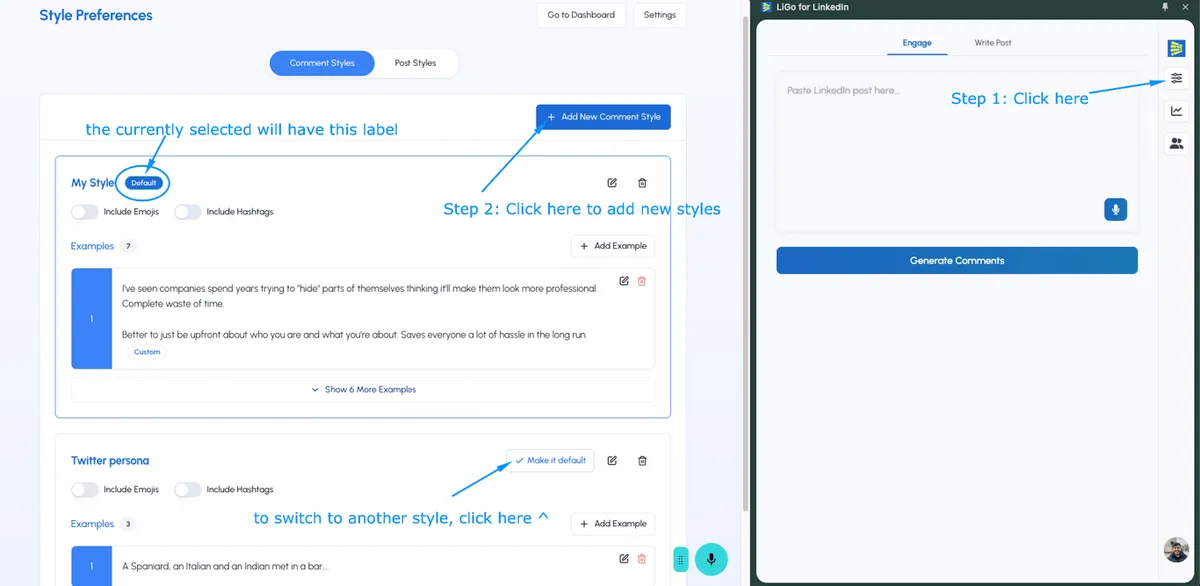
  1. Ability to add multiple styles (for comments & posts).

    • Previously: You could only add "one set of 5 to 7 comments" - now, you can create "comment packs" or "comment themes".

    • Use case: Create a separate comments theme for LinkedIn, Reddit, X & Facebook (that matches your style for each of these platforms).

    • Current Limitation: To switch between styles you need to open the web app:
      (in next week's release, you'll just get a toggle within the side panel).
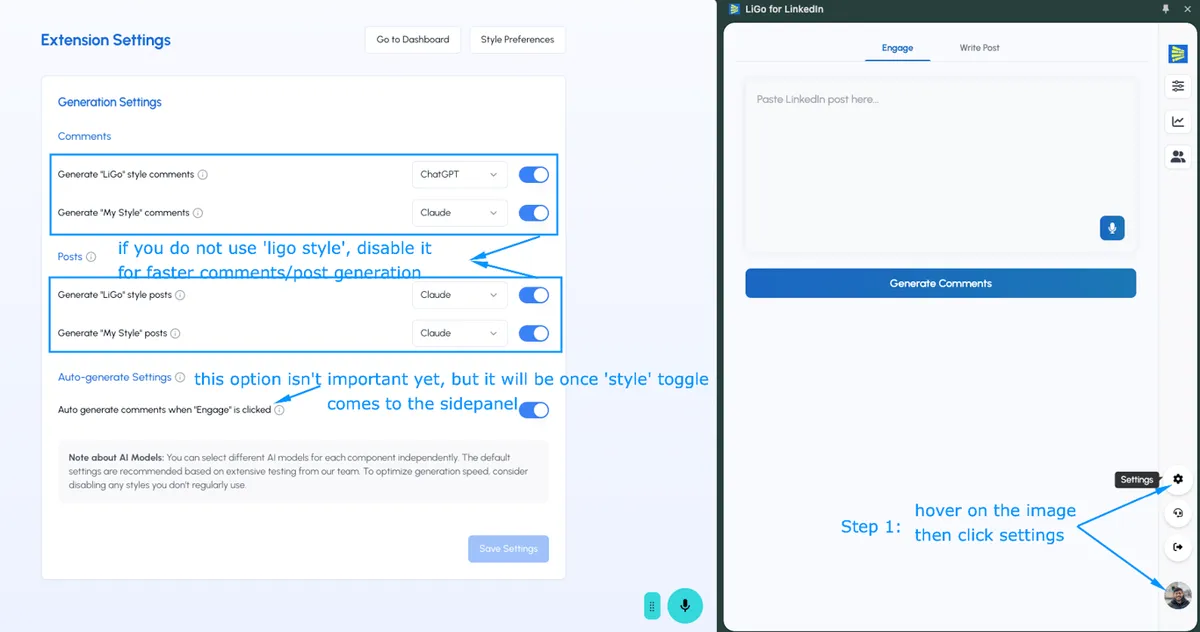
  2. You can speed up the comments and post generation by adjusting some settings.

    • For instance, if you notice that you hardly ever view the "LiGo style" tab for comments, just disable it (comment generation speed will 2x).
  3. You can also now navigate to the "My Leads" page, and contact support directly from the extension's side panel.

  4. New Resources section within the Web App targeting the most important item that dictates the quality of your generated posts: The Theme Setup!
    It has some really valuable tips, I'd highly recommend giving it a read and applying the recommendations to your themes.

How to manually update the extension

Option A: Uninstall, then Reinstall. Sign in with the same account.

Option B: Go to chrome://extensions (and do these 3 clicks).
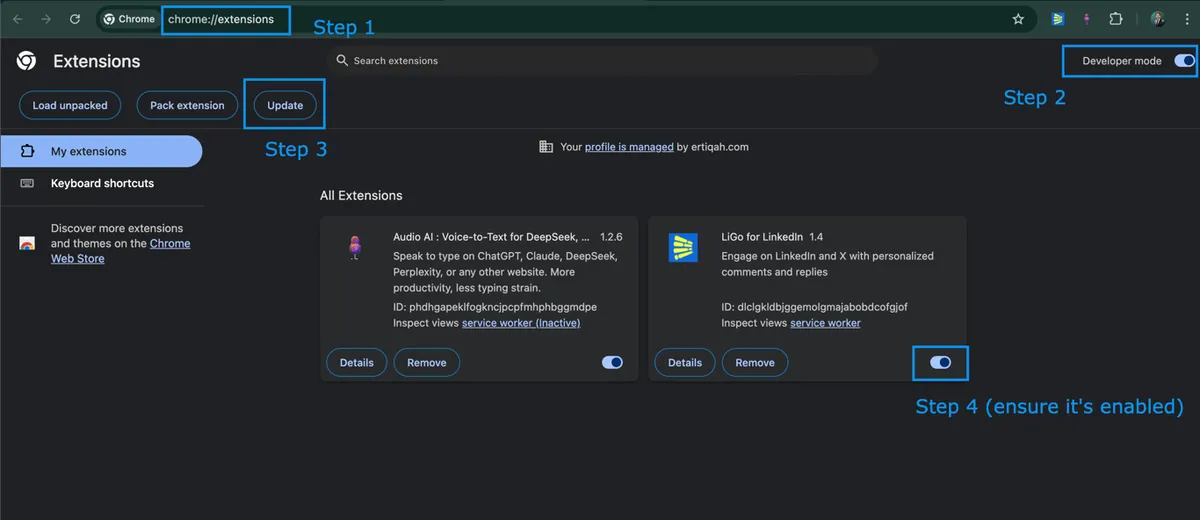
Hope these new additions help. If you run into any issues, please report it to support directly via the extension or web app.

Thank you!

Know someone who needs to read this? Share it with them:

Junaid Khalid

About the Author

LinkedIn Strategist, Ertiqah

I've written about LinkedIn strategy for over three years: 5M+ impressions and 10,000+ engagements on LinkedIn, dozens of viral and semi-viral posts, four viral Medium articles on the subject, and a newsletter, Hooked on LinkedIn, with thousands of subscribers. Along the way I've helped 50,000+ professionals build a personal brand on the platform. Everything in these articles comes from that work.

Free tool

Free LinkedIn Tools

Eleven free LinkedIn tools. No signup, no credit card.

Try it free