"I've been posting consistently for 3 months, but I'm not getting any clients."
I hear this all the time from consultants and agency owners. And I know exactly why.
You're focusing on the posts, but neglecting the foundation: your profile.
Why Your LinkedIn Profile Isn't Converting Viewers to Clients
Think about it: When someone sees your post and it resonates with them, what's the first thing they do?
They click your profile.
And in that moment, one of two things happens:
-
They see a clear path to working with you
-
They bounce, never to return
The #1 LinkedIn Profile Mistake Costing You Clients
Here's what most professionals get wrong: They treat their profile like a resume.
Your LinkedIn profile isn't a resume. It's a sales page. It's a lead magnet. It's your 24/7 business development team.
Quick Profile Audit: Are You Losing Potential Clients?
Before we dive into the optimization process, check if someone can understand these three things from your profile in 5 seconds:
-
Exactly who you help
-
Exactly how you help them
-
What they should do next
If not, you're losing potential clients every day.
How to Optimize Your LinkedIn Profile for Client Conversion
1. Profile Photo & Banner
-
Professional, approachable photo
-
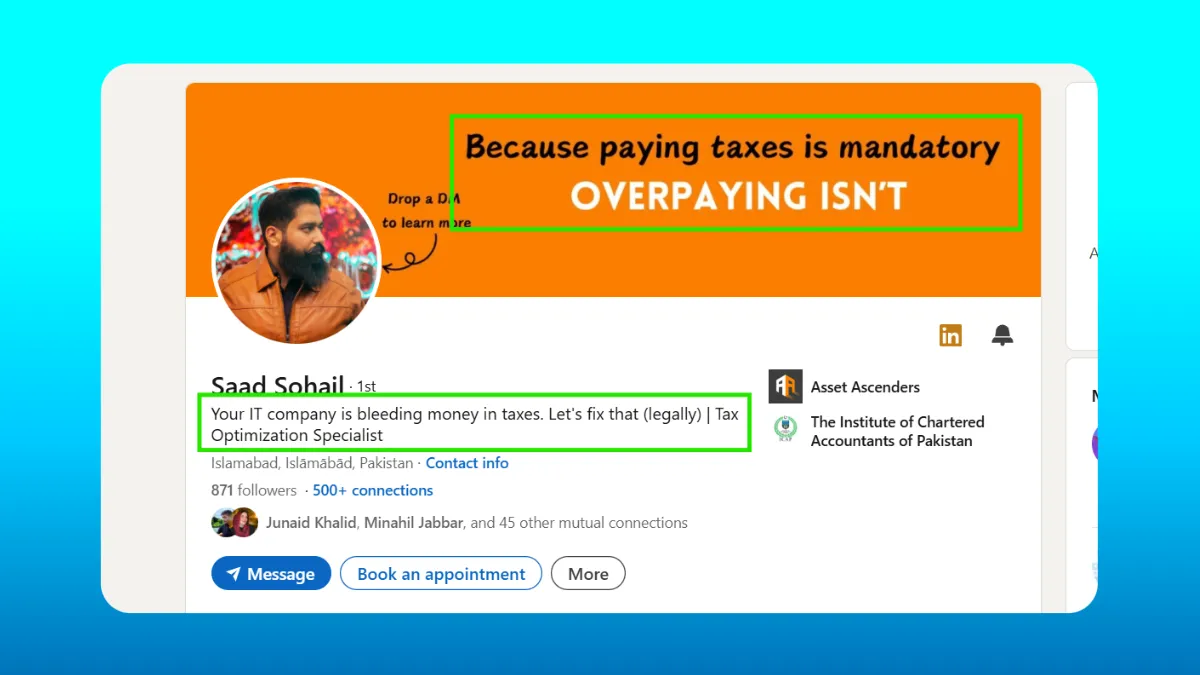
Banner that communicates your value proposition
-
Visual consistency with your brand
2. Headline Formula
Your headline needs these three elements:
-
Who you help
-
How you help them
-
Proof of expertise
Example: "I help SaaS companies increase trial conversions by 40% | Conversion Rate Optimization Expert | Featured in TechCrunch"
3. About Section Strategy
Structure your About section in this order:
-
Hook (client pain point)
-
Solution (your unique approach)
-
Proof (results and credentials)
-
Call to action
4. Experience Section That Sells
Transform your experience section from a job history into client success stories:
-
Lead with results
-
Focus on client outcomes
-
Include specific metrics
-
Link to case studies
5. Featured Section Blueprint
Use your Featured section to:
-
Showcase client testimonials (and if you run your own site, collect them into a wall of love you can link to). For the kinds of quotes worth featuring, see these customer testimonial examples for products and services
-
Display case studies
-
Share valuable content
-
Offer lead magnets
The Client Journey Through Your Profile
Optimize your profile with this visitor journey in mind:
-
First Impression (3 seconds)
-
Photo & banner communicate professionalism
-
Headline shows clear value proposition
-
-
Quick Scan (10 seconds)
-
About section hook grabs attention
-
Featured content demonstrates expertise
-
-
Deep Dive (30 seconds)
-
Experience section builds credibility
-
Case studies provide proof
-
-
Action (45 seconds)
-
Clear call-to-action
-
Easy way to start conversation
-
Compelling lead magnet
-
Profile Optimization Checklist
✓ Professional photo that builds trust
✓ Banner that communicates value
✓ Client-focused headline
✓ About section with clear CTA
✓ Experience section showcasing results
✓ Featured section with proof elements
✓ Activity section showing consistency
✓ Clear path to contact you
Tools to Maintain Your Optimized Profile
Once your profile is optimized, you need to maintain consistent visibility with quality content. This is where tools like LiGo come in:
-
Generate content ideas that align with your expertise
-
Create posts that drive profile visits
-
Maintain posting consistency
-
Track profile view metrics
-
Convert viewers to connections
Next Steps to Start Getting Clients
-
Implement these profile changes today
-
Set up your content system
-
Start posting consistently
Keep the momentum going after optimizing your profile. [Try it at ligosocial.com]. Our Premium users are seeing:
-
2x more profile visits
-
3x higher engagement
-
5x more direct messages
Your LinkedIn profile isn't just a digital resume - it's your most powerful lead generation tool. Optimize it like one.