
If you want to automate LinkedIn with Pabbly Connect, here is the fork in the road most guides skip. You can wire up a workflow that scrapes leads and blasts generic posts on a schedule, which is fast and risky and sounds like a robot. Or you can wire up one that drafts each post in your actual voice, routes it through your own review, and publishes through LinkedIn's official API so your account is never in the crosshairs.
This guide is the second path. You will connect Pabbly Connect to LigoSocial, set up a no-code workflow that turns a trigger (a new blog, a spreadsheet row, a form submission) into a LinkedIn post written the way you would write it, and keep a human check before anything goes live. No code, and no scraping.
Key takeaways
- Pabbly Connect links 1000+ apps with a one-time pricing model and unlimited workflows, which makes it a cheap home for high-volume automations.
- The LigoSocial integration is the piece that writes the post in your voice, so automation does not mean generic output.
- The workflow is trigger, then route through Pabbly, then LigoSocial drafts, then you review, then it schedules or publishes.
- LigoSocial posts through LinkedIn's official OAuth API, and you approve posts before they go out, so this is a co-pilot, not a scraping bot.
- The Pabbly integration is available to paid LigoSocial users; you connect it with the API key from your LigoSocial settings.
- Best first use case: auto-draft a LinkedIn post every time you publish a blog, newsletter, or YouTube video.
Why Pabbly Connect for LinkedIn automation
Pabbly Connect is an automation platform in the same family as Zapier and Make. It connects apps with triggers and actions so a change in one tool kicks off an action in another, no code required. Two things make it a favorite for people running a lot of automation.
- One-time pricing. Unlike the monthly-task pricing of most competitors, Pabbly is known for lifetime-deal and one-time plans, which is appealing if you plan to run many workflows for years.
- Unlimited workflows and 1000+ app connections. You are not rationing "zaps." You can build as many LinkedIn automations as your content operation needs.
The catch with any automation platform is that the platform only moves data. It does not write anything good. A raw automation that dumps a blog title and link onto LinkedIn every day is exactly the kind of low-effort feed nobody engages with. The value is in what fills the post, and that is where LigoSocial comes in.
What LigoSocial adds: the post is written in your voice
Here is the difference between a spammy automation and one that actually builds your brand. LigoSocial is a LinkedIn content and engagement platform whose core is LigoSocial Brain, a voice model you train on your own writing. Connect your LinkedIn account or paste in past posts, and it learns your tone, your topics, and the way you actually phrase things.
So when Pabbly hands LigoSocial a trigger (a new article, a product update, a raw idea), LigoSocial does not spit out a generic template. It drafts a post that sounds like you wrote it. That is the whole point: automation that produces authentic content faster, not more AI sludge.
If you want to go further than a single post per trigger, LigoSocial's Post Lab AI agents are purpose-built for specific jobs and also write through your trained voice. The Content Atomizer, for example, turns one long piece (a blog, a newsletter, a podcast, a set of meeting notes) into several standalone LinkedIn posts, each with its own hook and angle. Pair that with a Pabbly trigger and one published article can quietly become a week of on-voice posts. For the bigger picture on what these agents are and how they work, see our guide to LinkedIn AI agents.
Before you start: what you need
Three things, and then you are ready to build.
- A paid LigoSocial account. The Pabbly integration, like the other automation integrations, is for paid users. Want to see the voice quality before you wire anything up? Try it at ligosocial.com.
- Your LigoSocial API key. Find it in your LigoSocial settings under the integrations section. Treat it like a password.
- A Pabbly Connect account with a workflow (Pabbly calls them workflows) ready to build.
That is the whole setup. No developer, no server, no LinkedIn scraping tool.
The workflow, step by step
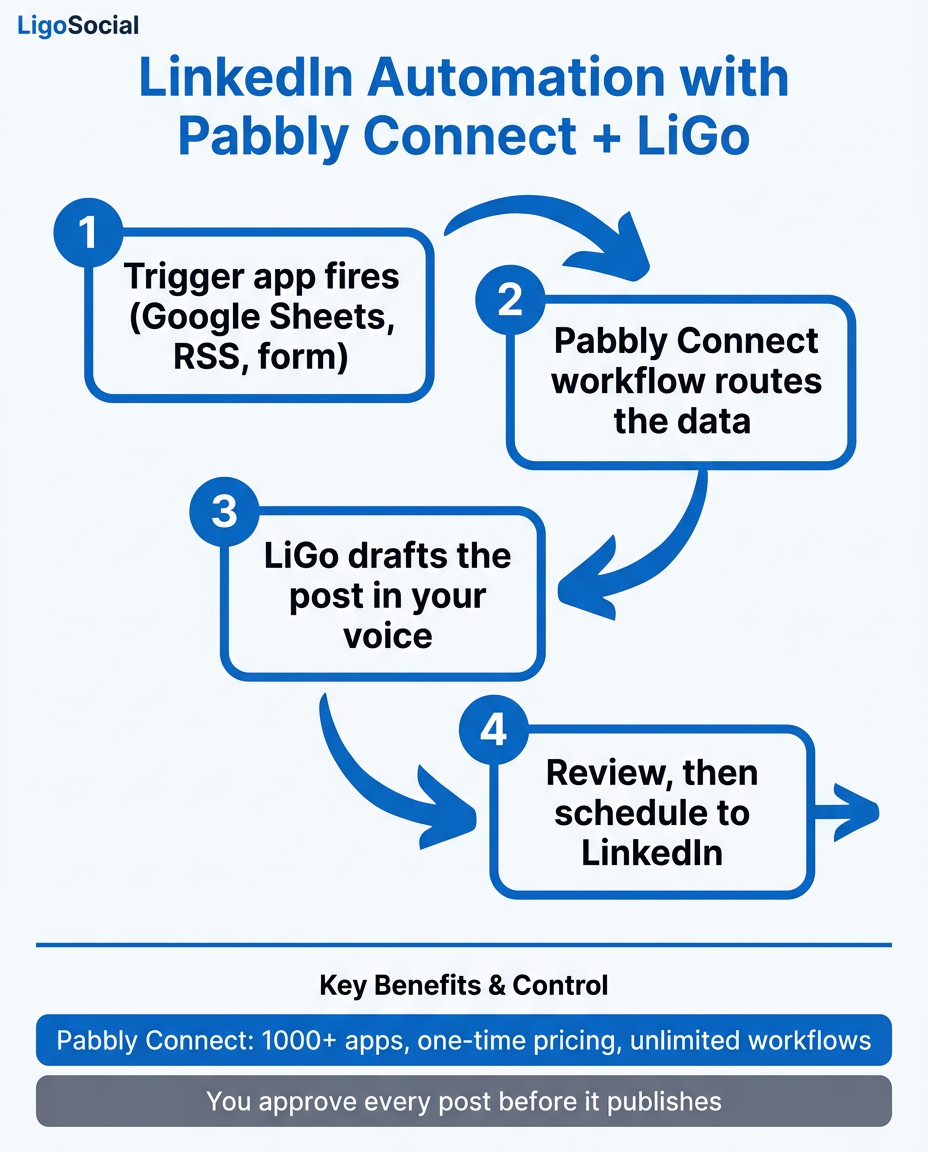
At a high level, every LigoSocial-plus-Pabbly automation follows the same four-step shape. Pick your own trigger app; the middle and end stay the same.
- Trigger fires. Something happens in a source app: a new row in Google Sheets, a new item in an RSS feed, a form submission, a new YouTube upload. This is the "when this happens" event.
- Pabbly Connect routes the data. Your workflow catches the trigger, and you map the useful fields (title, link, notes, topic) into the next step. Pabbly can also filter here, so only the items you want proceed.
- LigoSocial drafts the post in your voice. Pabbly sends the content to LigoSocial, which generates a LinkedIn post through your trained voice model rather than a generic template.
- You review, then it schedules or publishes. The draft lands where you can see it. Once you approve, it schedules or posts to LinkedIn through the official OAuth API.
The diagram below shows that flow end to end, plus the two things that make it safe: Pabbly's cheap, unlimited workflows and a review step before anything publishes.
A concrete field-mapping example (blog RSS to LigoSocial)
To make the middle step less abstract, here is exactly what you connect for the "new blog post to LinkedIn" workflow inside Pabbly:
- Trigger module: RSS by Pabbly, event "New Item in Feed." Paste your blog's feed URL. Pabbly will now watch for new posts and expose fields like
Title,Link, andDescription. - Action module: LigoSocial, "Generate Post." In this step you map the RSS fields into LigoSocial's inputs: send
TitleandDescriptionas the source content, and passLinkso it can be referenced. LigoSocial returns the post text drafted in your voice. - Action module: LigoSocial, "Create Draft" (or "Schedule Post"). Map LigoSocial's generated text into this step. Choosing the draft action keeps a human check; choosing schedule sends it out at your set time through the official OAuth API.
That is the whole map: three modules, a handful of fields, no code. Swap the RSS trigger for Google Sheets or a webhook and only the first module changes.
Three workflows worth building first
These are the automations that pay off fastest for a solo founder or a small content team.
| Trigger | What LigoSocial does | Why it earns its keep |
|---|---|---|
| New blog post published (RSS) | Drafts a LinkedIn post summarizing the key insight in your voice | Turns every article into distribution automatically |
| New row in a "content ideas" sheet | Drafts a post from the idea and topic you jotted down | Your scattered notes become scheduled posts |
| New YouTube video uploaded | Drafts a post pointing people to the video with a real hook | Cross-promotes without you writing a caption from scratch |
Start with the blog-to-LinkedIn one. It pays off fastest: you already do the hard work of writing the article, and this makes sure it never goes undistributed again. Then plug the output into a content calendar so your automated drafts land on a consistent schedule instead of clumping.
Keep it safe: a co-pilot, not a scraping bot
Search "pabbly connect linkedin" and most of what you find is lead-scraping and unattended auto-posting. That is worth being careful about. Aggressive scraping and fully hands-off posting through unofficial channels are exactly the behaviors that put a LinkedIn account at risk.
LigoSocial is built the other way on purpose. LigoSocial uses LinkedIn's official OAuth API, and the workflow above keeps you in the loop: the post is drafted for you to review, and it goes out only after you approve. You get the speed of automation without the account risk of a scraper.
A few habits keep it clean:
- Keep the review step on while you are learning what the automation produces. Once you trust it, you can decide how hands-off to go.
- Do not over-post. Automation makes volume easy, but a daily wall of auto-posts still reads as spam. Quality and cadence beat raw frequency.
- Guard your API key. Anyone with it can post as you, so store it securely and rotate it if it ever leaks.
Automation should make you sound more like yourself, faster, not turn your feed into a robot's.
Pabbly vs the other LigoSocial automation options
Pabbly is not the only way to automate LigoSocial. Which one fits depends on how you like to build and pay.
| Platform | Best for | Pricing shape |
|---|---|---|
| Pabbly Connect | High-volume automation on a budget; unlimited workflows | Known for one-time and lifetime plans |
| Zapier | The widest app catalog (5000+) and the simplest builder | Monthly, task-metered |
| Make.com | Visual, multi-step scenarios with advanced conditional logic | Monthly, operation-metered |
All three are live LigoSocial integrations and all three run the same core idea: a trigger, LigoSocial drafting in your voice, and a review before it posts. If you want the most detailed walkthrough of the pattern, our LigoSocial and Zapier complete guide covers connecting, testing, and troubleshooting a workflow in depth, and most of it transfers directly to Pabbly.
Frequently asked questions
Can Pabbly Connect post to LinkedIn automatically?
Yes. With LigoSocial connected, a Pabbly Connect workflow can take a trigger (a new blog, a sheet row, a form entry), have LigoSocial draft the LinkedIn post in your voice, and then schedule or publish it through LinkedIn's official OAuth API. You can keep a review step in the middle so you approve each post before it goes live.
Is the LigoSocial Pabbly integration free?
The integration is available to paid LigoSocial users, and you connect it using the API key in your LigoSocial settings. Want to check the voice quality first? Try it at ligosocial.com. Pabbly Connect itself is a separate account with its own plans, often sold as one-time or lifetime deals.
Do I need to know how to code?
No. Both Pabbly Connect and LigoSocial are no-code. You build the workflow by choosing a trigger app, mapping a few fields, and connecting LigoSocial with your API key. There is no scripting, no server, and no developer required.
Is automating LinkedIn with Pabbly against the rules?
The risk lies in how you automate, not whether you do. Scraping data and blasting unattended posts through unofficial channels is what puts accounts at risk. LigoSocial avoids that by posting through LinkedIn's official OAuth API and keeping you in control with a review step, so you get automation without acting like a bot.
What is the difference between using Pabbly and using Post Lab agents?
Pabbly is the plumbing that connects other apps to LigoSocial and triggers a workflow. Post Lab agents are LigoSocial's built-in AI agents (like the Content Atomizer or Repurpose Radar) that do specific content jobs in your voice. You can use them together: a Pabbly trigger can kick off content that an agent then expands into several posts.
Bottom line
Pabbly Connect gives you cheap, unlimited automation. LigoSocial gives that automation a voice and a safety layer. Put them together and a single trigger (a published article, an idea in a sheet, a new video) becomes a LinkedIn post that sounds like you and goes out only after you say so.
Start with the blog-to-LinkedIn workflow, keep the review step on until you trust it, and let the Pabbly integration turn the work you already do into consistent distribution.