
The secret to LinkedIn success isn't posting occasionally when inspiration strikes.
It's showing up consistently, week after week, with valuable content that resonates with your audience.
But let's face it: as busy agency owners, freelancers, and entrepreneurs, finding time to create AND publish LinkedIn content manually is nearly impossible. This is where LinkedIn scheduling tools become essential.
This ranking compares the best LinkedIn scheduling tools and wider social media schedulers, focusing on the features that matter on LinkedIn and the return you get for the time and money.
Quick Answer: Social Media Scheduling Tools for LinkedIn
Social media scheduling tools let you write posts once and publish them automatically at set times. For LinkedIn you have three choices: LinkedIn's built-in scheduler (one post at a time), multi-network tools like Buffer, Hootsuite, Sprout Social and SocialPilot, or a LinkedIn specialist like LigoSocial, which also drafts posts in your own voice.
AI tools for automating content creation and posting combine two jobs: an AI writer that drafts posts and a scheduler that publishes them. Buffer, Hootsuite and SocialPilot add an AI assistant to scheduling. On LinkedIn, LigoSocial's Post Lab agents turn your ideas into drafts in your voice, you approve them, and they publish through LinkedIn's official API.
How We Evaluated These LinkedIn Scheduling Tools
Our rankings aren't based on popularity or marketing claims. We assessed each tool across six critical dimensions:
- LinkedIn-Specific Features: How well the tool addresses LinkedIn's unique environment
- User Experience: Ease of use and learning curve
- Reliability: Consistency in posting performance and algorithm compatibility
- Analytics Integration: Connection between scheduling and performance tracking
- Value for Money: Features relative to cost
- Time Savings: Hours saved weekly for the average user
Let's dive into the top LinkedIn scheduling tools that can transform your presence on the platform.
1. LigoSocial: The All-in-One LinkedIn Specialist
Type: LinkedIn-specific platform Core Functions: Content creation, scheduling, analytics, optimization Best For: Agency owners and freelancers seeking a complete LinkedIn solution
Why it ranks #1: Unlike general social media schedulers adapted for LinkedIn, LigoSocial was built specifically to address LinkedIn's unique environment. It combines scheduling with content generation and analytics in a seamless workflow.
Key Features:
- AI-Powered Content Generation: LigoSocial Brain learns your voice, and Post Lab agents draft posts from your ideas for you to approve
- Official LinkedIn API: Publishes through LinkedIn's official OAuth connection, not browser automation
- Theme-Based Scheduling: Organizes posts around strategic content themes
- Smart Timing Algorithm: Automatically schedules for optimal engagement times
- Performance Analytics: Connects scheduling with content performance
- Image Generation: Creates accompanying visuals for posts
Real-World Time Savings: Users report average time savings of 3-4 hours weekly on their LinkedIn strategy.
Pricing: Premium plan (see pricing)
2. Buffer: The Multi-Platform Scheduler
Type: General social media scheduler Core Functions: Content scheduling across multiple platforms Best For: Professionals managing multiple social networks beyond LinkedIn
Why it ranks #2: While not LinkedIn-specific, Buffer offers a reliable, straightforward scheduling experience with excellent mobile support.
Key Features:
- Cross-Platform Publishing: Schedule across LinkedIn, Twitter, Instagram, etc.
- Content Calendar: Visual overview of your posting schedule
- Browser Extension: Save content while browsing
- Basic Analytics: Track post performance
- Team Features: Collaborate on content schedules
Real-World Time Savings: Users report average time savings of 1-2 hours weekly on LinkedIn (more across all platforms).
Pricing: Free plan for up to 3 channels; paid plans from $5 per channel per month (Essentials) or $10 per channel per month (Team), per Buffer's pricing page in November 2026
3. Hootsuite: The Enterprise-Level Tool
Type: Comprehensive social media management platform Core Functions: Advanced scheduling, team management, listening Best For: Larger agencies and businesses with multiple contributors
Why it ranks #3: Hootsuite offers robust enterprise features for teams managing multiple social channels, though its LinkedIn-specific capabilities are more standard.
Key Features:
- Advanced Scheduling: Complex posting patterns and team workflows
- Content Library: Store and reuse approved content
- Bulk Scheduling: Upload multiple posts at once
- Team Permissions: Control access and approval flows
- Social Listening: Monitor mentions and keywords
Real-World Time Savings: Users report average time savings of 2-3 hours weekly when managing LinkedIn as part of a broader social strategy.
Pricing: From $99 per user per month (Standard, billed annually), with Advanced and Enterprise tiers above it, per Hootsuite's pricing page in November 2026
4. Sprout Social: The Data-Driven Option
Type: Social media management suite with analytics focus Core Functions: Advanced scheduling, reporting, CRM features Best For: Data-focused teams needing detailed performance metrics
Why it ranks #4: Sprout Social combines scheduling with powerful analytics, though at a premium price point that may be excessive for individuals.
Key Features:
- Optimal Send Times: AI-suggested posting times
- Content Calendar: Visualization of posting schedule
- Advanced Reports: Detailed performance metrics
- Listening Features: Brand and keyword monitoring
- CRM Integration: Connect social activity with customer records
Real-World Time Savings: Users report average time savings of 2-3 hours weekly on LinkedIn content management.
Pricing: From $79 per seat per month billed annually ($99 monthly) for Essentials, up to $399 for Advanced, per Sprout Social's pricing page in November 2026
5. Later: The Visual-First Scheduler
Type: Visual-focused social media scheduler Core Functions: Visual content planning and scheduling Best For: Brands focusing heavily on visual LinkedIn content
Why it ranks #5: While primarily known for Instagram, Later has expanded its LinkedIn scheduling tool capabilities with a visual-first approach.
Key Features:
- Visual Content Calendar: Drag-and-drop interface
- Media Library: Store and organize visual assets
- Preview Feature: See how posts will appear
- Basic Analytics: Track engagement metrics
- Link in Bio Tool: Create custom landing pages
Real-World Time Savings: Users report average time savings of 1-2 hours weekly specifically for LinkedIn visual content.
Pricing: Several paid tiers; check Later's pricing page for current rates
6. SocialPilot: The Budget-Friendly Option
Type: Social media scheduling and management platform Core Functions: Scheduling, some analytics, team features Best For: Small businesses seeking affordable multi-platform scheduling
Why it ranks #6: SocialPilot offers core scheduling functions at a lower price point than most competitors, though with fewer LinkedIn-specific optimizations.
Key Features:
- Content Calendar: Visual scheduling interface
- Bulk Scheduling: Upload multiple posts at once
- Content Suggestions: Topic ideas for posts
- Team Collaboration: Basic workflow and approval features
- Social Inbox: Manage conversations
Real-World Time Savings: Users report average time savings of 1-2 hours weekly on LinkedIn management.
Pricing: From $20 per month ($17 billed annually) for Essentials, up to $200 for Ultimate, per SocialPilot's pricing page in November 2026
7. Sendible: The Content-Creation Helper
Type: Social media management with content assistance Core Functions: Scheduling, content suggestions, team workflows Best For: Content teams needing ideation support alongside scheduling
Why it ranks #7: Sendible combines scheduling with content creation assistance, though it's more general than LinkedIn-specific.
Key Features:
- Content Suggestions: Ideas based on relevant topics
- Content Calendar: Schedule visualization
- Smart Queues: Auto-populate posting schedule
- Team Workflows: Collaboration and approval processes
- Preview Function: See how posts will appear
Real-World Time Savings: Users report average time savings of 1-2 hours weekly on LinkedIn content.
Pricing: Several paid tiers; check Sendible's pricing page for current rates
LinkedIn Scheduling Tools Comparison Chart
| Tool | Best for | Built for LinkedIn | AI post drafting | Starting price (Nov 2026) |
|---|---|---|---|---|
| LigoSocial | Professionals and agencies focused on LinkedIn | Yes | Yes, in your voice | See pricing |
| LinkedIn built-in scheduler | Occasional single posts | Yes | No | Included with LinkedIn |
| Buffer | Simple multi-network scheduling | No | AI Assistant | Free plan, then $5 per channel/month |
| Hootsuite | Larger teams and agencies | No | Yes | $99 per user/month (annual) |
| Sprout Social | Data-heavy teams | No | Yes | $79 per seat/month (annual) |
| SocialPilot | Budget multi-client scheduling | No | AI credits on all plans | $17/month (annual) |
| Later | Visual-first content | No | Check vendor | See vendor pricing |
| Sendible | Agencies needing approvals | No | Check vendor | See vendor pricing |
Competitor prices come from each vendor's public pricing page in November 2026 and can change.
LinkedIn's built-in scheduler: when it is enough
LinkedIn lets you schedule a personal post from 10 minutes up to 3 months ahead, and a Page post from 1 hour up to 3 months ahead. It works for the odd post, but it schedules one post at a time, has no bulk upload, no AI drafting and no shared content calendar, and a scheduled Page post cannot be edited, only rescheduled or deleted.
How to Choose the Right LinkedIn Scheduling Tool
The best LinkedIn scheduling tool for you depends on your specific needs:
For Solo Professionals & Freelancers
Best Choice: LigoSocial or Buffer Why: Combines efficiency with affordability; streamlines the entire content process
For Small Agencies Managing Multiple Clients
Best Choice: Hootsuite or SocialPilot Why: Team features and multi-client management capabilities
For Enterprise Organizations
Best Choice: Sprout Social or Hootsuite Enterprise Why: Advanced permissions, workflows, and security features
For Visual-Heavy Strategies
Best Choice: Later or LigoSocial Why: Strong visual content management and preview capabilities
Beyond Basic Scheduling: Advanced Features to Consider
The best LinkedIn scheduling tools offer more than just posting automation:
1. Algorithm-Friendly Posting
LinkedIn's algorithm changes frequently. Tools like LigoSocial continuously update to align with these changes, ensuring your scheduled posts maintain maximum visibility.
2. Content Recycling
High-performing content deserves multiple shares. Look for tools that intelligently recycle your best content with enough variation to avoid algorithm penalties.
3. Cross-Posting Optimization
If you schedule posts across multiple platforms, ensure your tool optimizes each post for the specific platform rather than using identical content everywhere.
4. Engagement Monitoring
The conversation doesn't end when your post publishes. Some scheduling tools now offer engagement monitoring to alert you when posts receive comments requiring response.
5. Analytics Integration
Look for scheduling tools that connect posting times with performance metrics, helping you refine your schedule based on actual results.
In-browser analytics & engagement with LigoSocial v2 (Paid)
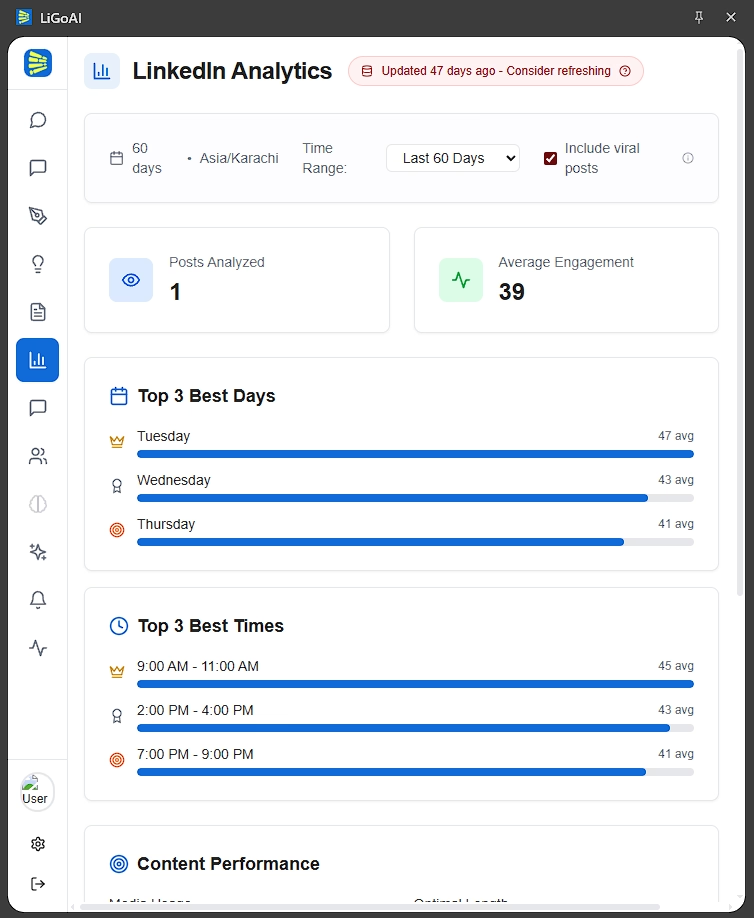
Beyond the scheduling and timing tools covered above, teams need fast feedback and the ability to act on signals the moment they appear. LigoSocial Extension v2 brings those feedback loops into the browser so analytics and engagement actions live where posts are seen and replied to - not in a separate dashboard. This keeps the flow from “schedule → wait” to “post → monitor → respond → iterate,” which is exactly what advanced workflows require.
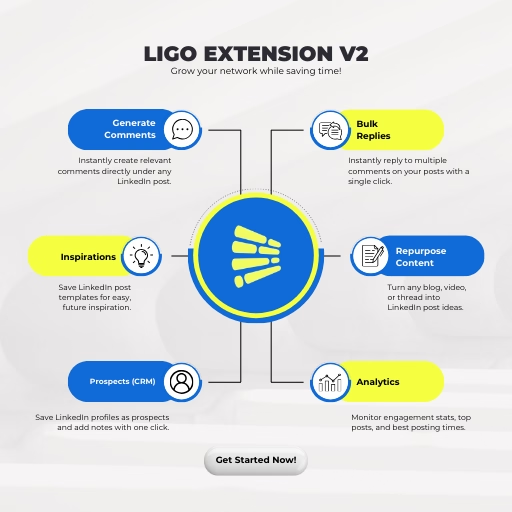
Key capabilities that add to the scheduling checklist:
- Immediate engagement actions: Bulk comment replies and quick, on-post reply generation so teams can respond to the comments on their posts at scale without leaving LinkedIn.
- In-extension analytics: Glanceable metrics (top posts, engagement spikes, best posting windows) shown alongside the feed to inform quick edits.
- “Chat with your data”: A query box in the extension to ask simple questions about recent performance and get plain-language answers, speeding decisions about what to repeat or stop.
- Content repurposing on the spot: Convert an article or long post into multiple LinkedIn-ready variants without switching tools.
- Prospect capture & mini-CRM: Save profiles and notes directly from the feed so engagement can be tied to outreach workflows.
The public Chrome extension is a limited release. You can try the public version from the Chrome Web Store (Click here to try it out). The full Extension v2 - with in-browser analytics, bulk replies, repurposing, prospect capture and more - is available only to LigoSocial paid plans, designed for teams that need the complete feedback-and-action loop.
If you want to gain access to v2 private LigoSocial extension, check our pricing page to see how to unlock it.
Setting Up Your Ideal LinkedIn Posting Schedule
Once you've selected your LinkedIn scheduling tool, implement these best practices:
1. Establish a Consistent Cadence
The LinkedIn algorithm favors accounts that maintain predictable posting patterns. Use your scheduling tool to establish a regular cadence-most professionals find 3-5 posts weekly optimal.
2. Diversify Content Types
Schedule a mix of content formats throughout the week:
- Thought leadership insights
- Industry news commentary
- Client success stories
- How-to content or tips
- Engagement-focused questions
3. Implement Theme Days
Many successful LinkedIn users assign specific themes to different days, making content creation and scheduling more systematic:
- Monday: Industry insights
- Tuesday: Client success stories
- Wednesday: How-to content
- Thursday: Thought leadership
- Friday: Conversation starters
4. Batch Your Scheduling Sessions
Rather than scheduling posts daily, set aside 1-2 hours weekly to schedule your entire week's content. This focused approach improves content quality and consistency.
5. Leave Room for Timely Content
While scheduling ensures consistency, leave some flexibility for timely, responsive content when industry news breaks or opportunities arise.
Common LinkedIn Scheduling Mistakes to Avoid
As you implement your scheduling strategy, watch out for these pitfalls:
1. Over-Automation
Scheduling every aspect of your LinkedIn presence can make your profile feel robotic. Maintain a balance between scheduled posts and authentic real-time engagement.
2. Ignoring Analytics
The best scheduling is data-informed. Regularly review performance metrics to refine your posting schedule based on actual engagement patterns.
3. Cross-Platform Copy-Pasting
Content that performs well on other platforms often fails on LinkedIn. Ensure your scheduled LinkedIn content respects the platform's professional context.
4. Set-and-Forget Mentality
Scheduling tools manage posting, not conversations. Stay actively engaged with comments on your scheduled posts to maintain authenticity.
5. Inconsistent Scheduling
Sporadic bursts of activity followed by silence confuse the LinkedIn algorithm. Maintain a consistent schedule for optimal visibility.
Case Study: The ROI of LinkedIn Scheduling Tools
Let's examine a real-world example of how scheduling tools transform LinkedIn results:
Client: B2B Software Agency Initial Approach: Manual posting whenever time allowed (1-2 posts weekly, inconsistent timing) Challenges: Sporadic presence, low engagement, significant time investment
New Approach:
- Implemented LigoSocial for content creation and scheduling
- Established consistent 3x weekly posting schedule
- Created content in batches during dedicated weekly sessions
- Scheduled at data-proven optimal engagement times
Results After 90 Days:
- Time investment reduced from 5-6 hours to 90 minutes weekly
- Posting consistency improved from 40% to 100%
- Average engagement increased by 217%
- Profile visits grew by 173%
- Generated 7 qualified leads directly attributed to LinkedIn content
The ROI was clear: less time invested, significantly better results, and measurable business impact.
Frequently Asked Questions
What are social media scheduling tools?
Social media scheduling tools let you write posts in advance and publish them automatically at chosen times across one or more networks. Most also include a content calendar, team approvals and basic analytics. Buffer, Hootsuite, Sprout Social and SocialPilot cover many networks, while LigoSocial is built only for LinkedIn.
Which tool is commonly used to schedule social media posts?
Buffer and Hootsuite are the most widely used general schedulers, and Sprout Social is common in larger marketing teams. For LinkedIn alone, many people start with LinkedIn's built-in scheduler and move to a dedicated tool like LigoSocial once they want AI drafting, a content calendar and analytics in one place.
What are the best AI tools for automating content creation and posting?
Pick a tool that both drafts and publishes. Buffer, Hootsuite and SocialPilot pair an AI writing assistant with scheduling across many networks. For LinkedIn, LigoSocial's Post Lab agents draft posts in your voice from your ideas, and connectors like Zapier and Make can feed new ideas in automatically. Keep a human approval step before anything goes live.
Can you schedule LinkedIn posts without a third-party tool?
Yes. LinkedIn's own scheduler lets you set a personal post from 10 minutes to 3 months ahead, and a Page post from 1 hour to 3 months ahead. It handles one post at a time, with no bulk scheduling or AI drafting, so most people who post several times a week use a dedicated LinkedIn scheduler.
Is it safe to use a LinkedIn scheduler?
It is safe when the tool publishes through LinkedIn's official API, which is how LinkedIn approves third-party posting. Tools that log in as you or automate your browser can put your account at risk. LigoSocial connects through LinkedIn's official OAuth API, so you never share your LinkedIn password.
The Bottom Line: Schedule LinkedIn Posts for Consistent Success
The professionals who succeed on LinkedIn aren't necessarily those with the most creative content-they're the ones who show up consistently with valuable insights.
LinkedIn scheduling tools transform this consistency from a burdensome chore into an efficient, systematic process. They allow you to maintain presence while focusing your limited time on high-value activities like client work and strategic growth.
When selecting your ideal tool, prioritize:
- LinkedIn-specific features that respect the platform's unique environment
- Integration between scheduling and analytics for data-driven refinement
- User experience that matches your workflow and technical comfort
- Value for money relative to your specific LinkedIn goals
Remember: The right scheduling tool doesn't replace strategy-it amplifies it, allowing you to execute consistently without consuming your valuable time.

Want more LinkedIn strategies? Check out these related articles: