You have a list of 40 people who should hear from you, a blank LinkedIn message box, and the quiet certainty that whatever you type will land next to eleven other pitches that arrived this week. Most template guides do not fix that. They hand you the same six sentences everyone else is pasting, which is exactly why those sentences read as cold.
This is for agency owners, consultants, freelancers, and solopreneurs who need outreach to start real conversations rather than hit a send quota. Below: the five-part structure every message that works is built from, 11 templates you can copy today, the character limits LinkedIn actually publishes, and the one habit that moves reply rates more than any template will.
Key takeaways
- Every cold message that works has the same five parts: a real trigger, relevance to them, one line of proof, one small ask, and a clean exit.
- LinkedIn's help center caps a free account's personalized invitation note at 200 characters, not the 300 most guides still quote, and limits how many you get per month.
- LinkedIn's published data says InMails under 400 characters see response rates 22% above average. Length is the cheapest variable you control.
- The 11 templates below are grouped by where the message lands: the invitation note, the first DM after they accept, InMail, the non-sales asks, and the follow-up.
- Templates do not fix the underlying problem. The people who reply are almost always people who have seen your name in their comments for two weeks first.
Why most cold LinkedIn messages get deleted in three seconds
Your prospect is not reading your message. They are pattern-matching it against the last hundred. Four tells get one binned before the second sentence.
It opens with you. "I'm the founder of X, and we help companies like yours scale their pipeline." The first eight words are the only ones you are guaranteed to get, and a job title wastes them.
The trigger is fake. "I came across your profile and was really impressed by your work" is what you write when you have read nothing. A real trigger carries a date and a detail: a post from last Tuesday, a role they just opened, a comment thread you were both in.
The ask is expensive. "Do you have 15 minutes for a quick call this week?" asks a stranger for time on a calendar they are already losing control of.
The length is wrong in one of two directions. A wall of text that looks like homework, or one line plus a booking link, which reads as a mail merge.
The five-part structure behind every template here
Do not memorize templates. Memorize the parts, and you can build a message for a situation nobody wrote a template for.
- Trigger. What made you write today, specifically. A post, a launch, a hire, a comment thread, a shared client. If you cannot name it, you are not ready to send.
- Relevance. Why that trigger connects to them rather than to your offer. One sentence.
- Proof. One line showing you can actually do the thing. A number with a timeframe beats an adjective every time.
- Ask. One small, specific request. A yes or no question, a single question to answer, a link to react to. Not "a quick call".
- Exit. Explicit permission to say no. It costs one line and removes the pressure that makes people ignore messages rather than decline them.
The same intent, written both ways.
Before: "Hi Sarah, I came across your profile and was impressed by your work at Northline. I'm the founder of an agency that helps B2B companies scale their LinkedIn presence. Do you have 15 minutes this week for a quick chat?"
After: "Sarah, your Tuesday post on killing the SDR team and going founder-led was the most honest thing in my feed this month. We rebuilt outbound the same way for two MSPs last year, and the awkward part was months two and three. Did you hit that dip, or did content carry you through it? Happy to be told this is a distraction."
Same person, same goal. The second has a trigger, relevance, quiet proof, one answerable question, and an exit.
11 cold LinkedIn message templates you can copy today
Replace every bracket with something specific. If you cannot fill a bracket with a real detail, that person is not ready to be messaged yet.
Group A: the invitation note (under 200 characters)
The note attached to a connection request is not the place to sell. Its only job is to make accepting feel obvious.
1. You commented on their post first
Hi [First name], your post on [specific point] is the reason I'm here. I've been arguing the same thing with [audience] all year. Connecting so I stop losing your posts in the feed.
2. Same room, different chair
Hi [First name], we were both in the [event or community name] thread about [topic]. Your point on [detail] stuck with me. Would like to follow your work properly.
3. Shared client, shared vendor, shared world
Hi [First name], we both work with [company or tool]. I run [what you do] for [audience] and your name keeps coming up. Happy to trade notes on [specific overlap] some time.
For the full library of invitation notes by scenario, see our guide to LinkedIn connection message templates that actually work.
Group B: the first message after they accept
This is the highest-value message in the sequence and the one most people waste by pitching immediately.
4. The no-pitch opener
Thanks for connecting, [First name].
No pitch. I read [specific post or talk] and wanted to ask the thing I could not tell from it: when you [did the thing], did [specific tradeoff] come up, or did you get around it?
Genuinely curious. If it is a long answer, ignore me.
5. The specific-problem opener
[First name], quick one.
You are hiring [role], which usually means [downstream consequence] lands on someone next quarter. We take that piece off [type of company], and the last one went from [starting point] to [end point] in [timeframe].
Worth a look, or is that already handled?
6. The reverse pitch, where you ask before you offer
[First name], I am putting together [a teardown, a benchmark, a short report] on [topic] for [audience].
You are one of maybe [number] people I know who actually [does the specific thing]. Would you answer one question for it: [the single question]?
I will send you the finished thing either way.
Group C: InMail, when connecting is not an option
InMail is for people you cannot reach another way. It costs a credit, so treat every one as a paid placement with a subject line.
7. The trigger InMail
Subject: [Their company] and [the trigger], one question
[First name], saw [the trigger: the round, the new market, the role you opened].
Companies at that point usually hit [specific problem] within [timeframe]. We handle that side for [type of customer], most recently [result with a number].
On your list this quarter, or too early?
8. The advice-first InMail
Subject: A question about [their specific work]
[First name], I do [what you do] for [audience], and I am stuck on something you have clearly solved: [the specific problem].
How did you handle [the specific fork in the road]? One sentence is plenty.
Not selling anything. I will owe you one.
Group D: the asks that are not sales
Cold outreach is not only for pipeline. These two are the most-searched scenarios on this topic, and they use the same five parts.
9. The referral request
Hi [First name], I am applying for [role] at [company] and saw you [work there or know the team].
I am not asking you to vouch for someone you have never met. Could I send you three lines on why I think I am a fit, and you decide from there? A no is completely fine.
For context: [the single most relevant thing you have done].
10. The advice or coffee-chat ask
Hi [First name], I am moving from [A] to [B], and you made that exact jump at [company].
Could I ask you two questions about it? I will send the two questions first, so you can decide whether they are worth 10 minutes before committing to anything.
Group E: the follow-up that is not "just bumping this"
One follow-up. It has to carry new information, or it is noise with your name on it.
11. The new-information follow-up
[First name], following up with something useful rather than a nudge.
[The new thing: a benchmark, a competitor's move, a two-line teardown of the page they just launched.]
Same question as before: is [the problem] worth 15 minutes this month? If not, I will stop here and leave you to it.
Adapting these 11 to any other scenario
You do not need a separate template for every situation. Start from the closest one above and change a single line.
| Scenario | Start from | The one line to change |
|---|---|---|
| Partnership or collaboration | Template 6 | Make the ask a shared output, not a call |
| Webinar or event invitation | Template 5 | Swap the proof line for who else is going |
| Investor outreach | Template 7 | The trigger is their thesis or a recent portfolio move |
| Messaging a recruiter as a job seeker | Template 8 | Ask about the hiring bar, not the open role |
| Sourcing a candidate | Template 7 | The trigger is their work, never their current employer |
| Reconnecting after months of silence | Template 11 | Lead with what changed since you last spoke |
The limits and reply-rate data LinkedIn actually publishes
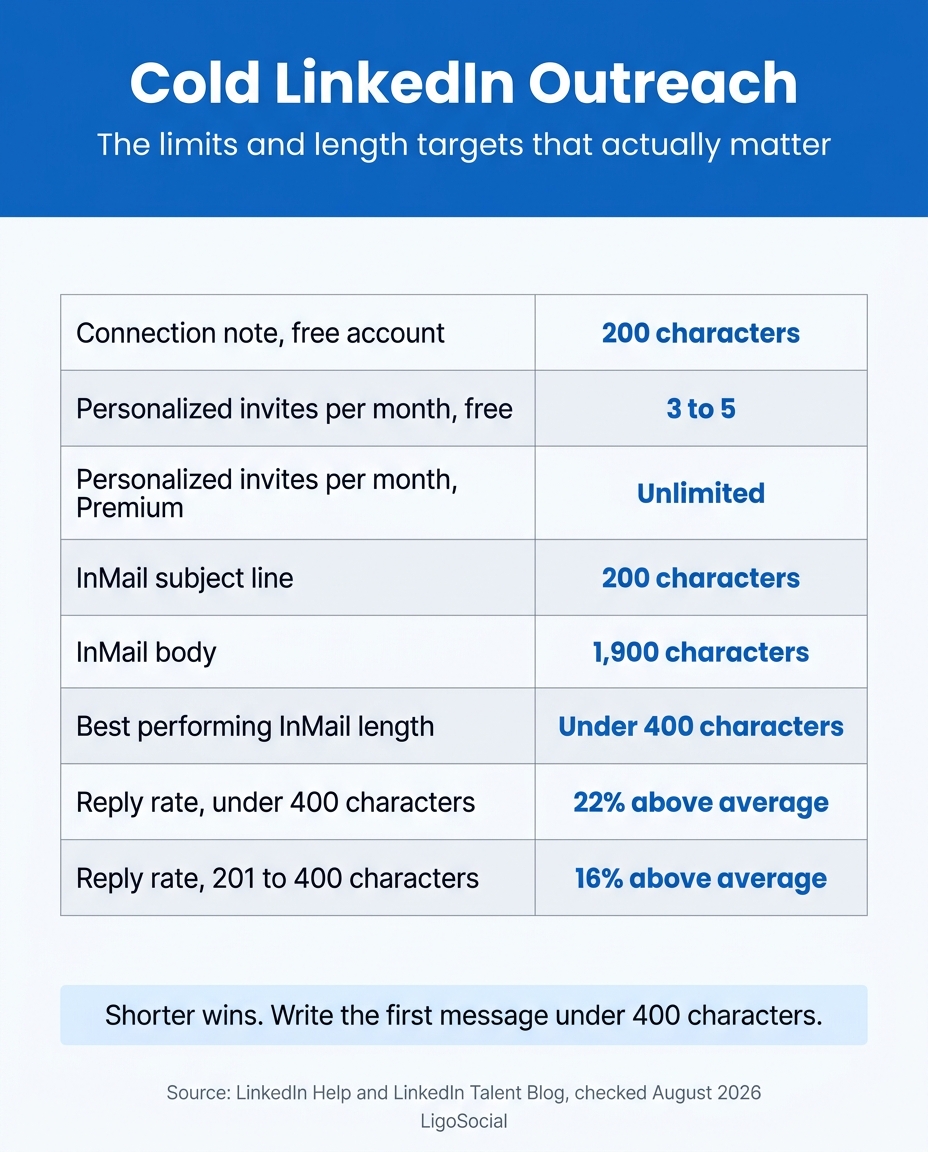
Most template guides quote a 300-character connection note. For a free account, LinkedIn's own help pages now say something different, and the gap matters if your outreach runs on a basic account.
| What you are sending | The published limit or target |
|---|---|
| Connection note, free account | 200 characters |
| Personalized invites per month, free account | 3 on one LinkedIn help page, 5 on two others |
| Personalized invites per month, Premium | Unlimited |
| InMail subject line | 200 characters |
| InMail body | 1,900 characters on one help page, 2,000 on another |
| Best-performing InMail length | Under 400 characters |
| Reply rate, InMails under 400 characters | 22% above the average for all InMails |
| Reply rate, InMails of 201 to 400 characters | 16% above the average |
Two honest notes. LinkedIn's help center does not agree with itself on the monthly personalized-invite allowance for free accounts: one page says three, two others say five. All agree on the 200-character cap and on Premium being unlimited. The InMail body cap reads 1,900 characters on the character-limits page and 2,000 on the send-an-InMail page, so write to 1,900 and the question never comes up.
The reply-rate figures come from LinkedIn's own analysis on its talent blog. LinkedIn also holds Recruiter customers to a floor of a 13% InMail response rate across 100 or more messages in every 14-day period, which tells you how the platform itself grades outreach quality.
Keep this card open in a second tab while you write.
We broke the weekly and monthly invitation caps down separately in are there any limits on the number of LinkedIn invitations I can send, and the anatomy of the note itself in the LinkedIn connection request message guide.
Warm the person first, because a template cannot fix a stranger
The templates above will roughly double what you are getting now if your current messages break the four rules in section one. They will not take you from 5% to 30%. What does that is being a name the person already recognizes when your message arrives.
Across the agency owners and consultants we work with, growth breaks down at roughly 80% strategic commenting and 20% original posting. That is our own observation, not a published industry figure, but the mechanism is easy to check: a thoughtful comment lands on an audience someone else already warmed, and it costs five minutes. It is why the comment to DM funnel beats a raw DM sequence almost every time.
The obstacle is not effort. It is memory. You cannot hold 30 prospects, what they posted, and who you already spoke to in your head while scrolling a feed built to distract you. Random engagement does not compound; the same 30 people, twice a week, does.
That is the job LiGo does. Engagement Lists (LiGo Lists) save any LinkedIn search as a one-click list, so the 30 people who matter open in one tab, and you can comment from inside the list without losing your place. The LiGo Chrome Extension then offers six comment suggestions on any post, three in your voice and three in optimized styles, and you pick one and post it yourself. One click saves the prospect to your lead list, so the person you warmed up in week one is still there in week three. LiGo reports its users save four or more hours a month just from not rebuilding searches.
Worth saying plainly: LiGo does not send cold DMs for you, and that is deliberate. It makes the two weeks before the DM cheap enough that you actually do them. There is a short walkthrough of Engagement Lists in action if you want to see it.
Here is the cadence that turns the templates above into a system.
| Day | What you do | Where |
|---|---|---|
| Days 1 to 10 | Comment twice on their posts, with something they have to think about | Their posts, opened from a saved list |
| Day 10 | Send the invitation note, referencing the comment thread | Invite note, under 200 characters |
| Days 11 to 12 | If they accept, send template 4 or template 5 | Direct message |
| Day 16 | One follow-up carrying new information, template 11 | Direct message |
| Day 17 onward | Stop messaging. Keep commenting. | Their posts |
Ten minutes a day, targeted and repeated, beats 40 messages on a Tuesday every quarter.
Make it sound like you, not like a template
A template feels cold because it is an average of everyone's voice, which means it is nobody's. The fix is not writing from scratch. It is spending 30 seconds putting three of your own fingerprints on it.
- Your verb. Swap the generic one for the one you would say out loud. "We rebuilt it" instead of "we optimized it."
- Your number. One real figure from a real project, with a timeframe. Vague proof reads as no proof.
- Your sign-off. Whatever you type at the end of an email to a peer. If you would never write "Best regards," do not start now.
Generic AI makes this worse, because it defaults to the same averaged register. That is what LiGo Brain exists to solve: it trains on your actual posts, tone, topics, and stored opinions, so drafts come back sounding like you wrote them. Training happens per client profile, each with its own independent voice model, which is how an agency runs six clients without any of them starting to sound alike.
The best cold message is the one that stopped being cold two weeks earlier.
Where to draw the automation line
LinkedIn publishes hard caps on invitations and InMail for a reason. Tools that drive your browser past those caps are betting your account, and it is your account, not theirs.
There is a quieter cost too: your buyer can usually tell. A message with a name merged into a sentence that does not quite fit is worse than no message, because you just spent the one impression you get.
The line worth holding is simple. Automate the remembering, never the relating. Letting software track which 30 people you are working, resurface what they posted, and draft something you then edit is fine. Letting software send messages nobody read first is not.
That is the standard LiGo is built to. LiGo is a co-pilot, not a bot. It posts through LinkedIn's official OAuth API, and with the Chrome extension you review before anything goes out. If your model of pipeline looks more like relationships than volume, we walked through the whole approach in LinkedIn for business development.
FAQ
Can you cold message someone on LinkedIn without connecting first?
Yes, three ways. Send an InMail if you have credits on a Premium, Sales Navigator, or Recruiter plan. Message anyone with an Open Profile at no cost. Or message a member of a LinkedIn group you both belong to. Otherwise you connect first, which is what the invitation notes in Group A are for.
How long should a cold LinkedIn message be?
Shorter than you think. LinkedIn's own data shows InMails under 400 characters get response rates 22% above the average, and messages of 201 to 400 characters run 16% above. On a free account, a connection note gives you 200 characters whether you like it or not. Working rule: if it does not fit on a phone screen without scrolling, cut it.
How do I end a cold LinkedIn message?
With one specific question and an explicit way out. "Worth a look, or is that already handled?" gives a busy person a reply they can send in three seconds, and "a no is completely fine" removes the social cost of declining. Ending with a calendar link instead is the most common reason a message that was going fine gets ignored.
How do I cold message someone on LinkedIn for a referral?
Ask for a decision, not a favour. Acknowledge that they have not worked with you, then ask permission to send three lines they can judge for themselves. Template 9 is written for this. It hands the other person control and gives them a graceful no, which is what makes yes low-risk.
How many cold messages can I send on LinkedIn in a day?
There is no single published daily number for messages, and chasing the ceiling is the wrong goal. The published limits you hit first are on invitations: free accounts get a capped number of personalized notes each month, and every account runs into a weekly invitation ceiling. Ten well-aimed messages a week to people who have seen your comments beats 200 sent cold.
Start with the ten minutes, not the templates
Copy the 11 templates. Fill the brackets with real details. Then do the part that actually moves the number: pick 30 people, comment on their posts twice a week for two weeks, and only then send the invitation note.
If you want the commenting half to stop eating your mornings, the free LinkedIn comment generator is a no-signup way to see what a comment in your own voice reads like. LiGo itself does this inside your feed. Try it at ligosocial.com.
One question worth arguing about in the comments: what is the last cold message that got a reply out of you, and what did it do differently?