Replies you can copy right now:
- "Thank you, [Name]. That really means a lot."
- "Thanks so much! I'm excited for what comes next."
- "I appreciate you taking the time to reach out, [Name]."
- "Thank you! It was a team effort, and I'm grateful for the support."
- "Thanks, [Name]. How have things been on your end?"
Got a pile of congratulations comments on your post? The free LinkedIn comment generator drafts a reply to each one in your own voice. You check it and post it yourself.
When someone congratulates you on LinkedIn, reply within a day with something specific: name the person, add one real detail about the milestone, and, where it fits, ask them a genuine question back. That last step is the entire game. A reply that ends with a period ends the exchange; a reply that ends with a question starts a relationship. Below are 25+ copyable templates for a new job, a promotion, a work anniversary, an award, and a business milestone, plus the exact formula for turning a wall of "congrats" into conversations that actually go somewhere.
Key takeaways
- Reply within 24 to 48 hours. A timely reply reads as respect and keeps your announcement active in the feed while it still has reach.
- Match the reply to the relationship: a one-line thank you for a one-click "Congratulate", a fuller reply for anyone who wrote a real sentence.
- The highest-value replies open a loop. Acknowledge the person, add one specific detail, then ask one question they can answer in a sentence.
- In 2026, comments and their replies carry roughly twice the weight of a like in LinkedIn's distribution, so a short threaded back-and-forth is worth more than fifty dead "thanks".
- Use the 25+ templates below by scenario, then personalize the bracketed parts so the reply sounds like you and not a form letter.
- For a flood of congratulations, post one group acknowledgment and reply individually only to the people who wrote something personal.
Short replies to congratulations (for any situation)
For a new job, a promotion, a birthday, an award or good news by text, a short reply is all most people expect. Pick one, add the person's name, and send it.
- "Thanks, [Name]! I appreciate you thinking of me."
- "Thank you! I'm still a little stunned, honestly."
- "Thanks a lot. It took a while, so this one feels good."
- "I appreciate it, [Name]. I couldn't have done it without people like you."
- "Thank you! Your message made my day."
- "That's so kind of you. Thank you, [Name]."
- "Thanks! Still sinking in, but I'm thrilled."
- "Thank you. Hearing that from you means a lot."
- "Thank you for the birthday wishes, [Name]! You made my day."
- "Thanks, [Name]. Your support along the way meant more than you know."
Want the reply to start a conversation instead of ending one? Use the formula below.
The one move almost everyone misses
Most people treat a congratulations reply as a chore to clear, so they answer "Thank you!" fifty times and move on. That is a waste of the warmest, cheapest touchpoint LinkedIn ever hands you. Someone just raised their hand to say they are paying attention to you. The operator move is to give them a reason to keep talking.
There is a real mechanism behind this, not just etiquette. LinkedIn strategists tracking the 2026 algorithm, including Richard van der Blom's annual Algorithm Insights report, find that comments carry roughly twice the weight of a like, and replies that spark a genuine back-and-forth get the strongest reach (here is more on how comments boost your reach). A one-click "Congratulate" reaction is a low-value signal. A threaded conversation under your announcement is a high-value one. So the reply that opens a loop does double duty: it deepens a relationship and it feeds the post that is celebrating you.
I learned this the slow way. In a two-week experiment where I stopped posting entirely and instead left daily, substantive comments on a handful of high-signal posts, my profile views tripled and inbound followed. A congratulations reply is that same mechanic in miniature. The principle I keep coming back to: random engagement does not compound, but specific, intentional engagement does.
The best answer to congratulations follows three steps: acknowledge them by name, add one detail, and ask one question back.
The formula: Acknowledge, Add, Ask
Keep it to three sentences or fewer.
- Acknowledge: use their name and one specific word ("Thanks, Priya", not "Thanks all").
- Add: one honest detail or a piece of credit ("this one took two years", "your intro made it happen").
- Ask: one low-effort question they can answer in a line ("how did your first 90 days go?").
Here is what that looks like next to the default "Thanks!":
| Scenario | The default (a dead end) | The version that opens a conversation |
|---|---|---|
| New job | "Thanks!" | "Thanks, Priya. The move into fintech is a bit of a leap for me. You made a similar jump last year, right? How did the first 90 days feel?" |
| Promotion | "Thank you so much." | "Appreciate it, Marcus. Honestly a little nervous about managing a bigger team. Any habit that helped when you stepped up?" |
| Work anniversary | "Thanks everyone!" | "Thanks, Dana. Five years flew by. You have been here longer than me. What is the one thing that has kept you around?" |
| Award | "Thank you!" | "Thanks, Leo. Means more from someone who actually does this work. Are you going to the [industry event] this year? Would be good to finally meet." |
You will not do this for every reply, and you should not. But do it for the ten people who matter, and you will get more out of one announcement than most people get out of a month of posting.
25+ copyable responses to congratulations, by scenario
Personalize the bracketed parts. The tone column tells you which to reach for: short for one-click congratulators, warm for people who wrote a real message, and relationship-building when you actually want to start a conversation. Every template below is a simple congratulations reply in English: copy it, then add one personal detail.
| # | Scenario and tone | Copy-paste reply | Best when |
|---|---|---|---|
| 1 | New job, short | "Thank you, [Name]. Genuinely excited to get started at [Company]." | Someone tapped "Congratulate" or left one word |
| 2 | New job, warm | "Appreciate you, [Name]. [Company] felt like the right next step and I'm glad to have you cheering it on." | They wrote a real sentence |
| 3 | New job, relationship-building | "Thanks, [Name]! I've followed your work in [field] for a while. What's keeping you busy at [their company] these days?" | A peer you want in your corner |
| 4 | New job, to a recruiter | "Thank you, [Name]! Thrilled about the [role]. I appreciate you and would gladly point good people your way. Let's stay in touch." | The recruiter who helped or engaged |
| 5 | Promotion, short | "Thank you, [Name]. Grateful for the trust and ready for the next chapter." | Quick, courteous acknowledgment |
| 6 | Promotion, warm | "Thanks so much, [Name]. This one meant a lot after the last couple of years on [team or project]." | A colleague who knows the backstory |
| 7 | Promotion, relationship-building | "Appreciate it, [Name]. You've led teams through this kind of step before. If you have one lesson from your own move up, I'd love to hear it." | A senior peer or mentor figure |
| 8 | Promotion, to your boss | "Thank you, [Name]. I don't take the responsibility lightly, and I'm looking forward to what we build next." | The leader who backed you |
| 9 | Work anniversary, short | "Thank you, [Name]. Hard to believe it's been [X] years." | Automated anniversary congratulations |
| 10 | Work anniversary, warm | "Thanks, [Name]! [X] years and still learning something new every week. Your support has been part of that." | Someone you actually work with |
| 11 | Work anniversary, relationship-building | "Appreciate it, [Name]. We started around the same time, didn't we? Curious what's changed most for you since." | Reconnecting with a long-time contact |
| 12 | Award or certification, short | "Thank you, [Name]. This one took a while, so it means a lot." | Fast, sincere acknowledgment |
| 13 | Award or certification, warm | "Thanks, [Name]! Earning [award or certification] was a stretch goal this year. Grateful you noticed." | A connection who wrote something kind |
| 14 | Award or certification, relationship-building | "Appreciate it, [Name]! I know you've looked at [related area] too. Happy to share what actually helped if it's useful." | A peer in the same field |
| 15 | Award, to a mentor | "Thank you, [Name]. Your advice on [specific thing] shaped how I approached this. I owe you a coffee." | The person who genuinely helped |
| 16 | Business milestone, short | "Thank you, [Name]. A big moment for the whole team." | Company anniversary, launch, funding |
| 17 | Business milestone, to a client | "Thanks, [Name]! Milestones like this only happen because of clients like you. Genuinely grateful." | A customer who reached out |
| 18 | Business milestone, to a partner | "Appreciate it, [Name]. Feels like a good moment to talk about what's next for us. Free for 15 minutes this week?" | A partner worth a real conversation |
| 19 | Generic or hard to place, short | "Thank you, [Name]. I appreciate you taking a second to reach out." | You can't tell how you know them |
| 20 | Generic or hard to place, warm | "Thanks, [Name]! Glad this popped up on your feed. How have things been on your end?" | A loose connection worth warming up |
| 21 | Something other than "thanks" | "That means a lot coming from you, [Name]." | You want variety across many replies |
| 22 | Something other than "thanks" | "You just made my day, [Name]. Thank you." | Warm, human, still brief |
| 23 | Something other than "thanks" | "Grateful for the shout-out, [Name]. It doesn't go unnoticed." | Acknowledging a public mention |
| 24 | High volume, one group reply | "Genuinely overwhelmed by the kind words here. Thank you all. I'm replying to as many of you as I can, but know every note was read." | Pin as your own comment on a busy post |
| 25 | High volume, fast personal one-liner | "Thank you, [Name]. Means a lot that you reached out." | Personalize the name, move down the list |
| 26 | Thank-you reply to a congratulations message (DM) | "Thank you for the kind message, [Name]. It genuinely made my week. How are things with you lately?" | A private note deserves a private, fuller reply |

The three levels of a congratulations reply. Most people stop at level one; the network is built at level three.
Reply to every comment on your post in a few minutes. Paste in a congratulations comment and the free LinkedIn comment generator drafts a reply in your voice, ready for you to tweak and post. Draft my replies
Short replies to congratulations at work, by email or by text
Not every congratulations arrives on LinkedIn. When a colleague, client or friend congratulates you on an achievement at work, over email or in a text, the same rule holds: thank them by name and keep it brief. A few you can adapt:
- At work, in person or on Slack: "Thanks, [Name]. It was a team effort, and your help on [project] made a real difference."
- To your manager: "Thank you, [Name]. I appreciate you backing me on this."
- By email: "Hi [Name], thank you for the kind note. It means a lot, and I'm looking forward to what comes next. Best, [Your name]"
- By text, to a friend: "Thank you! Honestly still sinking in. Drinks soon?"
- To a team channel: "Thank you all for the kind words. I couldn't have done it without this team."
- To a client: "Thank you, [Name]. Work like this is only possible with clients who trust us with it."
If you want the reply to lead somewhere, end it with one question, exactly as in the LinkedIn templates above.
How to respond to congratulations on a promotion or new job
For a promotion or a new job, lead with gratitude, resist the urge to over-explain, and, when the person is someone you value, hand them an easy on-ramp to keep talking. These are the two announcements that pull the most congratulations, so this is where the "Acknowledge, Add, Ask" formula pays off most.
A quick tone guide: for your manager or a senior leader, stay a little more formal and signal that you take the responsibility seriously (template 8). For a peer, be human and curious (template 3 or 7). For a recruiter who engaged, keep the door open for future referrals (template 4). If someone went out of their way to help you land the role, return the favour with a LinkedIn recommendation. Our LinkedIn recommendation examples show what a strong one looks like, and you can write a recommendation in a minute with the free generator.
It works the other way too. When you are the one congratulating, see these congratulations comment examples for other people's posts, and learn how to compliment a post without sounding generic.
How to reply to congratulations on a work anniversary
Work anniversaries are the trickiest, because most of the congratulations are triggered automatically by LinkedIn rather than written by a person. You do not owe every auto-prompt a paragraph. Acknowledge the one-click reactions with a short thank-you and save your real replies for the people who wrote an actual sentence (templates 9 to 11).
A work anniversary is also a natural excuse to reconnect. If a former colleague or a dormant contact congratulates you, that is an open invitation to ask what they have been up to (template 11). One warm question can restart a relationship that has been quiet for years, which is worth far more than the milestone itself. And once you thank people who congratulated you, connect with the ones you are not linked to yet. These connection message templates that get accepted make that easy.
How to respond to congratulations on an achievement or award
Thank them by name, share the credit, and say what comes next. For example: "Thank you, Priya! It took the whole team, and I can't wait to put what we learned to work on the next launch."
Mistakes that waste a good reply
The templates only work if you avoid the errors that make people ignore your reply. The most common ones:
- Copy-paste that shows. If ten people get the identical sentence, it reads as a mail merge. Change at least the name and one detail every time. A helper like the LinkedIn comment generator can give you varied first drafts, but you still edit each one so it sounds like you.
- False modesty. "It's really not a big deal" makes the person who congratulated you feel silly for bothering. Accept the moment with a simple thank-you.
- Making it all about you. A reply that is three sentences about your accomplishment and zero about the person lands cold. Acknowledge them first.
- Reaction-baiting your own thread. Do not prompt "react if you agree" or fish for more congratulations. LinkedIn's 2026 systems flag that kind of engagement bait, and it can quietly suppress the post.
- Silence. Ignoring congratulations entirely, especially from clients or senior contacts, reads as either arrogance or absence. A one-line thank-you is always better than nothing.
For the deeper version of why thoughtless, generic replies actively cost you, the sibling piece on why "great post" comments destroy your credibility is worth a read, and the complete guide to LinkedIn comments ties replies into a full engagement system.
How LigoSocial drafts your replies to congratulations
The Acknowledge, Add, Ask formula is easy for five replies and hard for fifty. LigoSocial's Bulk Reply gives you a first draft for every comment on your announcement, so your time goes into the personal detail and the question back.
- Open your announcement on LinkedIn and click Bulk Reply from the LigoSocial Chrome extension.
- LigoSocial runs Analyze on the comments, you Select the ones you want to answer, then click Generate.
- Read each Suggested Reply, add one real detail, click Copy Reply and post it yourself.
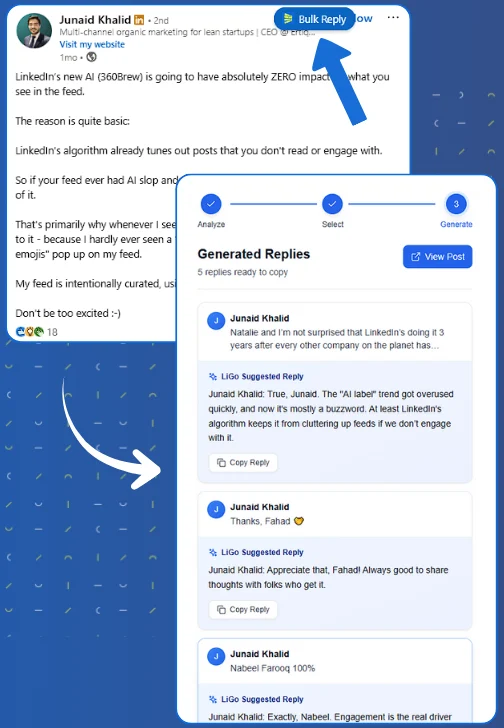
Try it at ligosocial.com, or see how the LigoSocial Chrome extension handles replies on your own posts.
FAQ
How do you respond to congratulations on LinkedIn professionally?
Reply within a day, keep it to three sentences or fewer, and match the tone to the relationship. Name the person, add one specific detail about the milestone, and thank them sincerely. If they are someone worth knowing better, close with a genuine question so the exchange becomes a short conversation instead of a dead end.
What should you reply when someone congratulates you on a new job?
Lead with thanks, name the company, and show honest enthusiasm without over-explaining the move. For example: "Appreciate you, [Name]. [Company] felt like the right next step and I'm glad to have you cheering it on." For a peer or mentor, add a question ("You made a similar jump last year, right? How did the first 90 days go?") to turn the reply into a real exchange.
Should you reply to every congratulations on LinkedIn?
You should acknowledge every one, but you do not need to write a unique paragraph for each. Reply individually to anyone who wrote a personal message, and use a short thank-you or a single pinned group comment for the one-click "Congratulate" reactions. Prioritize clients, senior contacts, and people you genuinely want to stay connected with.
What can you say other than "thanks" when someone congratulates you?
Vary it so fifty replies do not read identically. Good alternatives include "That means a lot coming from you, [Name]", "You just made my day, [Name]", and "Grateful for the shout-out, [Name], it doesn't go unnoticed." The best variation of all is a question back, which is what actually restarts a relationship.
How do you reply to congratulations on a work anniversary?
Since most anniversary congratulations are auto-generated, answer the one-click ones with a short thank-you and save fuller replies for people who wrote something real. Treat it as a chance to reconnect: "Appreciate it, [Name]. We started around the same time, didn't we? Curious what's changed most for you since." One warm question can revive a quiet connection.
Is it worth replying to the one-click "Congratulate" button?
A brief thank-you is enough, and it is worth it. In 2026, comments and replies carry more distribution weight than reactions, so a short reply keeps your announcement active and signals you actually read your notifications. Do not spend equal effort on every one; a fast, personalized one-liner is plenty for the automated congratulations.
What to comment on a LinkedIn post to say congratulations?
Name the milestone and add one specific detail: "Congratulations, Aisha! Leading the APAC rollout after two years of groundwork is well earned." One line like that does more than the one-click "Congratulate" button.
When the volume is the real problem
If you post announcements often, or one post takes off, the problem stops being what to write and becomes how to get through a hundred replies without going generic. That volume is exactly where good intentions collapse into "Thanks! Thanks! Thanks!"
This is the gap LigoSocial built Bulk Reply for. It drafts a reply to each congratulations on your post, so you can move down a long list, tweak, and post each one yourself in a few minutes rather than an hour. Nothing goes out until you approve it. It rests on a thesis I keep returning to: on LinkedIn, memory and volume are the real constraints, not effort, and random engagement does not compound. Fifty identical thank-yous vanish. Twenty specific, personal replies that each open a small loop build a network that remembers you. If you want to see where replies fit into the bigger picture, the personal branding on LinkedIn guide maps the full system.
So here is the question worth sitting with. The next time your notifications fill up with congratulations, which of those replies are you going to turn into an actual conversation?