The LinkedIn post character limit is 3,000 characters. That is the hard cap on a standard feed post, and it has not changed. Type past it and LinkedIn simply stops you.
Here is the opinion most "character limit" guides skip: 3,000 is a vanity number. It tells you where the wall is, not where the game is played. The number that actually decides whether your post spreads is the roughly 200 to 210 characters that show on desktop before the "see more" link, and only about 140 characters on mobile, where most of your audience is reading. That is your real budget. Everything after the fold is a reward for people you have already hooked.
So use both numbers. Write to the 3,000 cap when the idea earns the room, but win or lose the post in the first ~210 characters.
Paste your draft into the free LinkedIn Character Counter to watch it count in real time against both limits at once: the 3,000 hard cap and the ~210-character fold. It flags the exact word where your post gets truncated on mobile and on desktop, so you can see what your reader sees before they decide to expand.
Key takeaways
- The hard cap is 3,000 characters on a standard feed post, and it has not changed. LinkedIn simply stops you at the wall.
- The number that actually decides reach is the "see more" fold: about 210 characters on desktop and only ~140 on mobile, where most people read. Win or lose the post there.
- Aim for a 1,300 to 2,000 character sweet spot when the idea earns the room. Length is a correlation, not a cause, so let the idea set the exact count.
- A connection request note gets only 300 characters, so spend them on something specific, not a generic "I'd love to connect."
- A direct message to a connection allows up to 8,000 characters, far more than a post, though longer is almost never better in a DM.
Every LinkedIn character limit, corrected
Most tables floating around are stale or copied from each other. Here is a clean reference for the limits people actually search for, verified against LinkedHelper's current breakdown.
| Where you are typing | Character limit |
|---|---|
| Feed post / update | 3,000 |
| Visible before "see more" | ~210 on desktop, ~140 on mobile |
| Headline | 220 |
| About / summary | 2,600 |
| Comment | 1,250 |
| Connection request note | 300 |
| Direct message to a connection | 8,000 |
| InMail subject | 200 |
| InMail body | 1,900 |
| Native article body | 110,000 |
| Experience description | 2,000 |
(Source: LinkedHelper. The "see more" fold is device-dependent, so treat the mobile number as your working ceiling.)
Two of these are worth a second look. The connection request note is only 300 characters, which is why a generic "I'd love to connect" wastes the one moment you have to earn the accept. And the direct message limit to an existing connection is a generous 8,000 characters, far more than a post, though longer is almost never better in a DM.
The table above is the full reference. But four of those numbers are the only ones you actually write toward, and each does a different job:
| The number to write to | Why it is the one that matters |
|---|---|
| ~140 characters (mobile fold) | It is all most readers see before "see more." If the hook does not land here, nothing after it counts. |
| ~210 characters (desktop fold) | The desktop version of the same test. Front-load the claim before this line. |
| 1,300 to 2,000 characters | The sweet spot for a full post, when the idea genuinely earns the room. |
| 3,000 characters | The hard wall. Bumping into it usually means you have two posts, not one. |
What length actually performs
If 3,000 is the ceiling and 210 is the entry fee, what should you aim for in between?
AuthoredUp studied 372,126 LinkedIn posts from personal profiles between September 2025 and February 2026 and measured engagement rate against character count. Posts in the 1,301 to 2,500 character range earned roughly 27% higher engagement than posts under 400 characters. In their data the longer, mid-length posts landed at a median engagement rate of about 2.61% to 2.67%, versus 2.10% for the short ones.
LinkedHelper lands in the same place from a different angle, putting the recommended sweet spot at 1,300 to 2,000 characters. If you want the trade-offs broken down by post type, we go deeper in our guide to the ideal LinkedIn post length. In our own study, posts over 2,400 characters got 24% more engagement than the same author's 600 to 900 character posts (post length data).
The practical read: very short posts tend to underperform because there is not enough substance to hold attention or signal effort, and maxing out the full 3,000 rarely helps unless every line earns its place. Aim for 1,300 to 2,000 characters of genuinely useful writing, and let the idea decide the exact length rather than a target.
One caution before you chase that range: length is a correlation, not a cause. A 1,600-character post does not perform because it is 1,600 characters. It performs because a post worth that many words usually has a real idea and a strong opening. Which is the whole game.
Here is the same budget as a ladder, from the mobile fold at the bottom to the hard cap at the top.
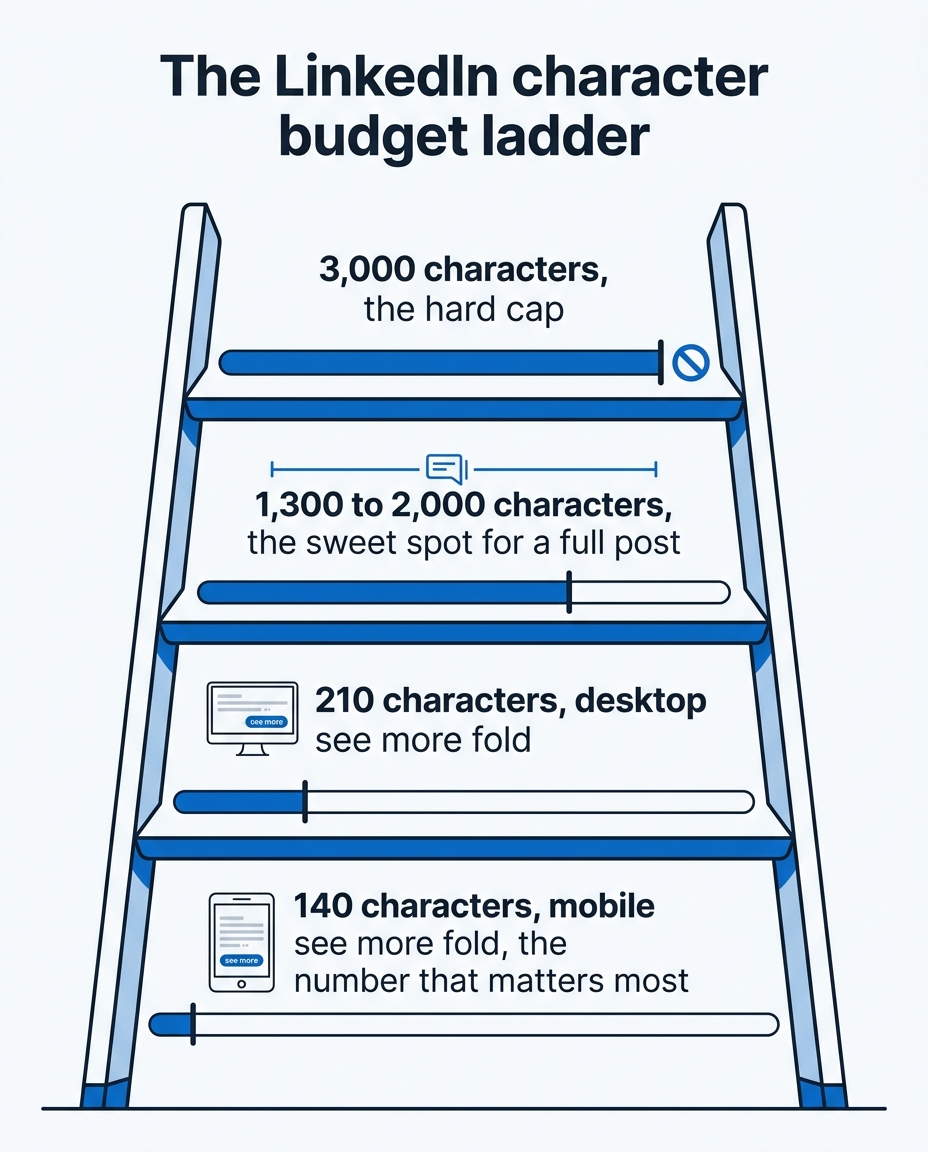
The LinkedIn character budget ladder: the fold decides reach, the sweet spot decides depth, and 3,000 is just the wall.
Write for the fold, not the cap
The ~210-character fold is not a limit to fear. It is the highest-leverage 210 characters you will write all week. Here is the framework I use.
Treat the post as Trailer, Meat, Summary. The Trailer is the first few lines, and it has exactly one job: earn the "see more" click. Do not teach in it. Most people fail here by cramming the lesson into line one, which gives the reader no reason to expand. The Meat teaches one specific thing. The Summary closes with a call to conversation, an invitation to comment, not a call to action.
Give the hook a re-hook. After the first line stops the scroll, the next line should promise what the reader gets by finishing. Most people bounce after line one when there is no clear promise. Hook, then re-hook, then deliver the value, then invite a response.
Write the opener as a self-contained hook. The first line should stand alone as its own sentence, a line that could be its own post. Not "here is the setup for my point," but a claim, a number, a named failure, or a before-and-after that creates enough tension that stopping feels like missing something. Same ideas, same body: the first line is what changes whether any of it gets read. Your first line is the only line most people ever read, so treat it as the whole job, not the warm-up. If you want ready-made openers to adapt, steal from these 30 first-line hook formulas.
Make a claim, not an announcement. "Excited to share some thoughts on remote work" is an announcement. "Remote work did not kill company culture. Bad managers did" is a claim. Claims filter the right audience in and give people a reason to expand and argue in the comments.
A quick test before you post: read only the first ~140 characters, the mobile fold, or run the draft through a LinkedIn post preview, and ask whether you would tap "see more." If you would not, the rest of your 3,000 characters does not exist.
When you genuinely need more than 3,000 characters
Sometimes the idea really is bigger than a post. A few clean ways to handle it without cramming:
- Put the overflow in the first comment. Extra context, sources, or a link belong in a comment you post yourself. It keeps the post tight and gives people a reason to open the comments, which helps reach.
- Use a document (carousel) post. If the content is visual or step-by-step, a multi-slide document post carries far more than 3,000 characters and tends to hold attention longer.
- Publish a native article. LinkedIn articles allow up to 110,000 characters. Write the long piece there and use a feed post to tease it, with the link in the comments.
- Break it into a series. One idea per post almost always outperforms three ideas crammed into one. If you are fighting the 3,000 limit, that is usually a sign you have two or three posts, not one.
The tool, and the shortcut
You can count characters by hand, but you should not have to think about it while you write. The free LinkedIn Character Counter shows your live count against the 3,000 cap and the ~210 fold, and marks exactly where your post cuts off on mobile and desktop so you can front-load the hook. If your posts still feel invisible after you nail the count, the fix is usually formatting, not length: our LinkedIn text formatter guide covers the line breaks and white space that make the fold skimmable.
If you want the writing itself to get easier, start with the free LinkedIn post generator, or go further with LigoSocial. LigoSocial Brain learns from your past posts and writes in your voice, not generic LinkedIn-speak, and it gives you options to work from with the "3 in your style, 3 in ours" variant system for both posts and comments. It counts and formats for you as you go, so hitting the sweet spot and nailing the fold stops being something you manage manually. Want to try it on your next post? Try it at ligosocial.com.
FAQ
What is the LinkedIn post character limit in 2026?
3,000 characters for a standard feed post. That number has been stable and applies on both desktop and mobile.
Does the character limit differ on mobile vs desktop?
The 3,000-character cap is the same on both. What changes by device is the visible "see more" fold: about 200 to 210 characters on desktop and roughly 140 on mobile before LinkedIn truncates the post. Because most reading happens on mobile, write your hook to fit the ~140-character budget.
What is the ideal LinkedIn post length?
Roughly 1,300 to 2,000 characters of useful writing. In AuthoredUp's study of 372,126 posts, the 1,301 to 2,500 character range earned about 27% higher engagement than posts under 400 characters. Substance matters more than hitting an exact count.
Is there a character limit on LinkedIn comments?
Yes, 1,250 characters per comment.
What is the LinkedIn headline character limit?
220 characters. The start of your headline shows under your name in comments and search results, so lead with the role or result you want to be known for.
What is the LinkedIn About section character limit?
2,600 characters, including spaces. Only the first few lines show before "see more," so put your strongest line first.
What is the character limit for a connection request note?
300 characters. Use them to say something specific about why you are connecting, not a generic greeting.
How do I post more than 3,000 characters on LinkedIn?
You cannot in a single feed post. Move the overflow into the first comment, use a document (carousel) post, publish a native article (up to 110,000 characters), or split the idea into a short series.
Is there a word limit on LinkedIn articles?
A LinkedIn article allows about 110,000 characters, more than 15,000 words, so length is rarely the problem. The 3,000-character cap only applies to feed posts.