You are looking at a $119.99 monthly charge and trying to work out what you actually get for it. Or your company bought you a seat, ran one short training session, and now you are staring at a search screen on Monday morning with no idea what to do next. This guide answers both: what LinkedIn Sales Navigator is, what the three plans cost right now, which features earn their keep, and who should not buy it at all.
Fair warning on one thing before we start. Most of what ranks for this question quotes prices from 2024. Every figure below came off LinkedIn's own plan comparison page and help centre on 1 August 2026.
Key takeaways
- Sales Navigator is a separate paid subscription that sits on top of your normal LinkedIn account, built for finding and tracking B2B buyers rather than for job hunting or personal branding.
- Current list pricing: Core at US$119.99/month or US$1,079.88/year, Advanced at US$159.99/month or US$1,799.88/year, and Advanced Plus priced custom by team size.
- All three tiers give you 50 InMail credits a month and 10,000 saved leads and accounts per user. The real difference between tiers is team collaboration and CRM sync, not search power.
- It is a targeting tool, not a persuasion tool. It shows you who to talk to. It does nothing about whether those people recognise your name when you show up.
- Skip it if you sell to under a few hundred addressable accounts, if you cannot name your ideal customer profile in one sentence, or if you have no plan for what happens after you find the list.
What LinkedIn Sales Navigator actually is
Sales Navigator is LinkedIn's paid sales platform. It is a separate product with its own login, its own interface, and its own subscription, sitting on top of the LinkedIn account you already have. Your connections, your profile, and your posts stay where they are. What changes is your ability to search across LinkedIn's membership and keep track of specific people and companies over time.
LinkedIn's own pitch on the Sales Navigator page is "find the right buyers, grow your pipeline, and close deals faster." Underneath that marketing line, the product does three concrete jobs:
- Search deeper. Standard LinkedIn search caps what you can see and how precisely you can filter. Sales Navigator opens up more than 50 filters across a stated membership of over one billion people, including seniority, headcount, company growth, and recent job changes.
- Save and monitor. You build lead lists and account lists, and Sales Navigator watches them for you. When someone on your list changes job, gets mentioned in the news, or posts something, it tells you.
- Reach people outside your network. Every tier includes 50 InMail credits per month, so you can message people you are not connected to.
It is a research and monitoring tool, not an outreach automation tool. It will not send sequences, it will not scrape emails, and it will not write your messages. Those are separate purchases, and several of them carry real account risk.
If you are weighing this against the cheaper Premium tiers, we broke that decision down separately in LinkedIn Sales Navigator vs Premium.
What Sales Navigator costs in 2026
Here is where most articles on this topic go wrong. A lot of the pages ranking for this question still quote US$79.99 for Core, which was accurate a couple of years ago and is not accurate now. Even Google's AI summary for this query was repeating the old figure when we checked.
These are the list prices published on LinkedIn's own Sales Navigator plan comparison page at business.linkedin.com, checked 1 August 2026:
| Plan | Monthly | Annual | Effective monthly on annual |
|---|---|---|---|
| Sales Navigator Core | US$119.99 | US$1,079.88 | US$89.99 |
| Sales Navigator Advanced | US$159.99 | US$1,799.88 | US$149.99 |
| Sales Navigator Advanced Plus | Custom | Custom | Custom |
Two things worth noticing.
The annual saving on Core is meaningful, roughly US$360 a year, about 25 percent. On Advanced it is much thinner, roughly US$120 a year, about 6 percent. So the "just pay annually" advice is much stronger for solo sellers than for teams.
Advanced Plus is quoted per team and sized to your seat count, so there is no list price to compare. If nobody at your company has asked for a quote, assume Advanced is your ceiling.
LinkedIn does promote a free trial on the Sales Navigator page, but the plan comparison page does not publish the trial length, so check what you are actually offered at signup rather than trusting a number you read on a blog.
The features that matter, and the ones that do not
Sales Navigator has a long feature list. Most of it is noise for a solo seller or a small agency. Here is the honest split.
The features that carry the subscription:
- Lead and account lists with alerts. You save 200 target accounts once, and the product tells you when someone gets promoted, when a company grows headcount, or when a saved lead posts. This is the single feature most people underuse and it is the reason the tool is worth anything.
- Advanced search filters. Filtering by seniority plus headcount plus geography plus recent job change is what turns "everyone in SaaS" into a list of 180 people you can genuinely work.
- Spotlights. Flags on search results showing which leads changed jobs recently, posted on LinkedIn recently, or share something with you. It is a prioritisation layer over a list you already built.
- 50 InMail credits per month. Useful, and finite. Fifty messages is roughly two a working day, which forces you to be selective. That constraint is a feature.
The features that mostly do not matter until you are a team:
- Buyer Intent and Smart Links. Advanced-tier features, genuinely useful when several reps work the same accounts. Close to irrelevant for a single consultant.
- Account IQ and Lead IQ. LinkedIn's AI research summaries, also Advanced and above. Nice time savers for enterprise account planning, not the reason a freelancer buys a seat.
- CRM sync and embedded workflows. Advanced Plus only. If you do not run a CRM your whole team lives in, this is not a line item you should be paying for.
The storage limits are identical everywhere. LinkedIn's Sales Navigator help centre lists 10,000 saved leads and 10,000 saved accounts per user on every plan, and 50 InMail credits a month on all three tiers. If someone tells you the expensive tier lets you save more prospects, that is not what LinkedIn's own documentation says.
Core vs Advanced vs Advanced Plus: which tier fits you
Strip out the marketing and the tier decision is almost entirely about how many people need to see the same pipeline.
| Core | Advanced | Advanced Plus | |
|---|---|---|---|
| Built for | Individual sellers | Sales teams | Teams with an integrated CRM |
| Monthly price | US$119.99 | US$159.99 | Custom |
| Annual price | US$1,079.88 | US$1,799.88 | Custom |
| InMail credits/month | 50 | 50 | 50 |
| Saved leads and accounts | 10,000 | 10,000 | 10,000 |
| Advanced search filters | Yes | Yes | Yes |
| Team collaboration and shared lists | No | Yes | Yes |
| Buyer Intent and Smart Links | No | Yes | Yes |
| Account IQ and Lead IQ | No | Yes | Yes |
| CRM sync and embedded workflows | No | No | Yes |
| Dedicated account team and training | No | No | Yes |
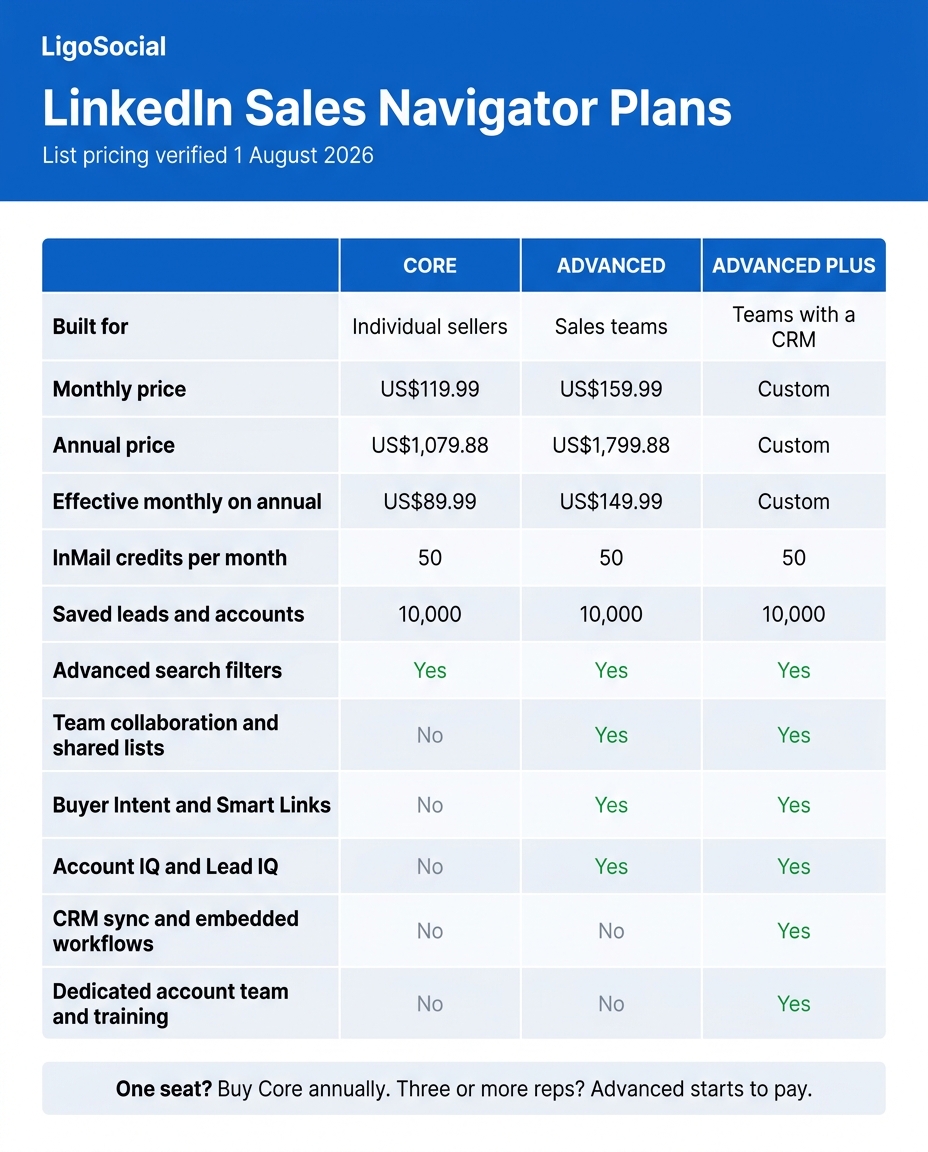
The decision rule most people need: if you are one person, buy Core annually and stop reading the Advanced page. The extra US$40 a month buys collaboration features that a solo operator cannot use. If you have three or more reps working overlapping accounts, Advanced starts to pay. If your CRM is the system of record for a team of ten or more, get an Advanced Plus quote.
The full plan breakdown, side by side:
Your first two weeks in Sales Navigator
The most common Sales Navigator failure is not buying the wrong tier. It is buying a seat, running a couple of searches, saving nothing, and cancelling four months later. Here is the sequence that actually gets you to value.
Days 1 to 2: write your ideal customer profile as a filter, not a sentence. Not "mid-market B2B companies." Instead: headcount 50 to 200, headquartered in the UK or Ireland, in software or professional services, and the person is a Head of or Director of Marketing. If you cannot express your ICP as filters, Sales Navigator will not help you, and that is a strategy problem, not a tooling problem.
Days 3 to 4: build two account lists and one lead list. One account list of 50 companies you would love to work with. One of 100 companies that look like your best current client. One lead list of the specific humans inside them. Small enough that you will actually look at it.
Days 5 to 10: turn on alerts and check them once a day for ten minutes. Job changes are the highest-value alert in the entire product. Someone who just moved into a new role usually has a mandate to change something and no loyalty to the incumbent vendor, and that window closes as soon as they settle in.
Days 11 to 14: engage before you pitch. Take the 20 highest-priority people on your lead list and comment thoughtfully on their posts for two weeks before any message goes out. This is the step nearly everyone skips, and it is the step that decides whether your InMail gets a reply or gets ignored.
That last step is also the one Sales Navigator gives you the least help with, which brings us to the real limitation.
What Sales Navigator does not do
Sales Navigator answers "who." It does not touch "why would they care."
You can build a perfect list of 200 decision makers, and every one of them will still open your InMail as a total stranger. LinkedIn's own marketing cites up to 11.9x improved InMail response rates, which sounds enormous until you realise the baseline it is measured against is cold outbound to people who have never heard of you. Warm still beats optimised cold.
The thing that closes that gap is not a better message template. It is being visible in the feed of the people on your list, consistently, for weeks before you ask for anything. That is a memory problem, not an effort problem. Nobody fails at this because they are lazy. They fail because at 9am on a Tuesday they cannot remember which 30 people they were supposed to engage with, so they scroll the main feed instead and engage with whoever floats past. Random engagement does not compound.
This is the part we built LiGo for. Inside the LiGo Chrome extension, LiGo Lists let you save any LinkedIn search as a one-click curated feed, so your target accounts are waiting for you instead of being rebuilt from filters every morning. When you land on a post worth engaging with, the comment co-pilot drafts six options, three in your own voice and three in optimised styles, and you pick one, edit it, and post it yourself. It suggests; you decide. LiGo is a co-pilot, not a bot, and it posts through LinkedIn's official OAuth API, which matters in a category where the automation tools sitting next to Sales Navigator are the fastest route to a restricted account.
The voice part is not a throwaway. LiGo Brain trains on your past posts and your own stated opinions, and for agencies it trains per client profile with no cross-contamination, so comments going out under three different clients' names actually sound like three different people.
Sales Navigator tells you who to talk to. It cannot make them glad you did.
The maths is the reason to bother. LiGo's own user-reported figures put a five-minute comment on a high-reach post at roughly 1,200 impressions, against roughly 2,000 impressions for an original post that took an hour or more to write. Per minute invested, commenting wins by a wide margin, and it lands you in front of an audience someone else already warmed up. For agency owners and consultants we put the split at roughly 80 percent strategic commenting and 20 percent original posting. If you want that mapped onto a full client-acquisition process, we wrote it up in LinkedIn lead generation for agencies, and the mechanics of saving searches properly are in how to save LinkedIn searches.
Underneath all of it sits your profile, because every one of those comments sends people to it. If yours is thin, the engagement leaks. Our complete guide to personal branding on LinkedIn covers that layer properly.
FAQ
How does LinkedIn Sales Navigator work?
You subscribe, log into a separate Sales Navigator interface with your existing LinkedIn account, and set a preference profile describing who you sell to. From there you run searches across more than 50 filters, save results into lead and account lists, and Sales Navigator monitors those lists and alerts you when something changes. You reach out using your 50 monthly InMail credits or a normal connection request. Nothing you do inside Sales Navigator changes your public LinkedIn profile.
What is the difference between LinkedIn and LinkedIn Sales Navigator?
Regular LinkedIn is a network: your profile, your feed, your connections, and a limited search. Sales Navigator is a paid layer on top that adds deeper search filters, saved lead and account lists with alerts, Spotlights that prioritise those lists, and InMail credits for contacting people outside your network. It does not replace your LinkedIn account and your existing connections stay exactly as they are.
Do you have to pay for Sales Navigator on LinkedIn?
Yes. There is no free version of Sales Navigator. LinkedIn promotes a free trial on the Sales Navigator page, but the plan comparison page does not state the trial length, so confirm what you are being offered at signup. After the trial, the entry price is US$119.99 per month or US$1,079.88 per year for Core.
Is Sales Navigator on LinkedIn worth it?
It is worth it if you can name your ideal customer profile as a set of filters, you have at least a few hundred addressable accounts, and you will genuinely check your alerts daily. At US$1,079.88 a year for Core, one closed deal usually covers it many times over. It is not worth it if your market is small enough to track in a spreadsheet, or if you have no plan for warming those leads once you have the list.
What is LinkedIn Sales Navigator Core?
Core is the entry tier, built for individual sellers on a single seat. It includes advanced search, lead and account lists, alerts, Spotlights, 50 InMail credits a month, and storage for 10,000 saved leads and 10,000 saved accounts. It leaves out the team features: shared lists, Buyer Intent, Smart Links, Account IQ and Lead IQ, and CRM sync. For a solo consultant or freelancer, Core is almost always the right choice.
Do I need LinkedIn Premium as well as Sales Navigator?
Generally no. Sales Navigator already covers most of the reasons sellers buy Premium, and paying for both is a common way to overspend. If you are trying to work out which subscription actually returns the money, we ran that comparison in LinkedIn Premium and where the ROI really comes from.
The short version
Sales Navigator is a good product with a narrow job. It finds the right people and tells you when something changes about them. At US$119.99 a month, or US$89.99 effective on annual, it pays for itself quickly if you use the alerts and it is dead money if you do not.
The mistake I keep seeing, and I have been running LigoSocial at Ertiqah long enough to have seen it a few hundred times, is treating the list as the finish line. Finding 200 buyers is the easy half. Being someone those 200 buyers already recognise by the time you message them is the half that decides your reply rate, and no amount of search filtering does that for you.
So here is the question worth answering before you enter your card details: once Sales Navigator hands you the list, what is your actual plan for the next 30 days?
If the honest answer is "send InMails and hope," fix that first. Ten targeted minutes a day beats fifty cold messages a month. See how LiGo turns that into a routine. Try it at ligosocial.com.