
Repurpose Content
The Write tab in the LigoAI Chrome extension turns an article, newsletter, transcript or social post into LinkedIn posts written in your voice. You can paste any text, or let LigoAI pick up the content of a Medium, Substack, Reddit or YouTube page for you. Each run gives you three different post variants to choose from.
Open the Write tab
- Click the LigoAI icon in your browser toolbar to open the side panel.
- Click the ... (More) button at the end of the tab bar.
- Under Create, click Write.
Option 1: One click from Medium, Substack, Reddit or YouTube
On these four sites LigoAI adds a small floating LigoAI button on the right edge of the page. You can drag it if it is in the way.

- Open the article, post, thread or video you want to build on.
- Hover over the floating LigoAI button and click Generate Post.
- The side panel opens on Write with the content filled in and the matching content type selected. A note confirms where it came from, for example Content extracted from medium.com.
- Review the text in Source content. Delete anything you do not want the post to use.
- Click Generate 3 variants · 1 rewrite.
If you already have variants on screen, LigoAI asks before replacing them: "Loading new content will discard them. Do you want to continue?"
Option 2: Paste content yourself (works for any source)
- Under Content type, choose what you are pasting: Article, Audio & Video, Research or Social.
- Paste the text into Source content (up to 10,000 characters). Newsletters, blog posts, meeting or podcast transcripts and email threads all work.
- Click Generate 3 variants · 1 rewrite.
Use the variants
Under Your variants you get three posts, each with a different angle:
- Hook-led: opens with a strong first line.
- Story: frames the idea as a short narrative.
- Actionable: turns it into steps or takeaways.
For each one:
- Save draft sends it to the Drafts tab of the Publishing Hub in the web app, where you can edit, add media and schedule it. The button shows Saved! when it is done.
- Copy puts it on your clipboard so you can paste it straight into LinkedIn.
Click Clear to remove the variants, or Create Another Set to start again with new content.
Other ways to fill the Write tab
- From Inspirations: click Repurpose with AI on a saved item. See Content Inspirations.
- From Inspirations > Prompts: click Use on a writing prompt.
In the web app
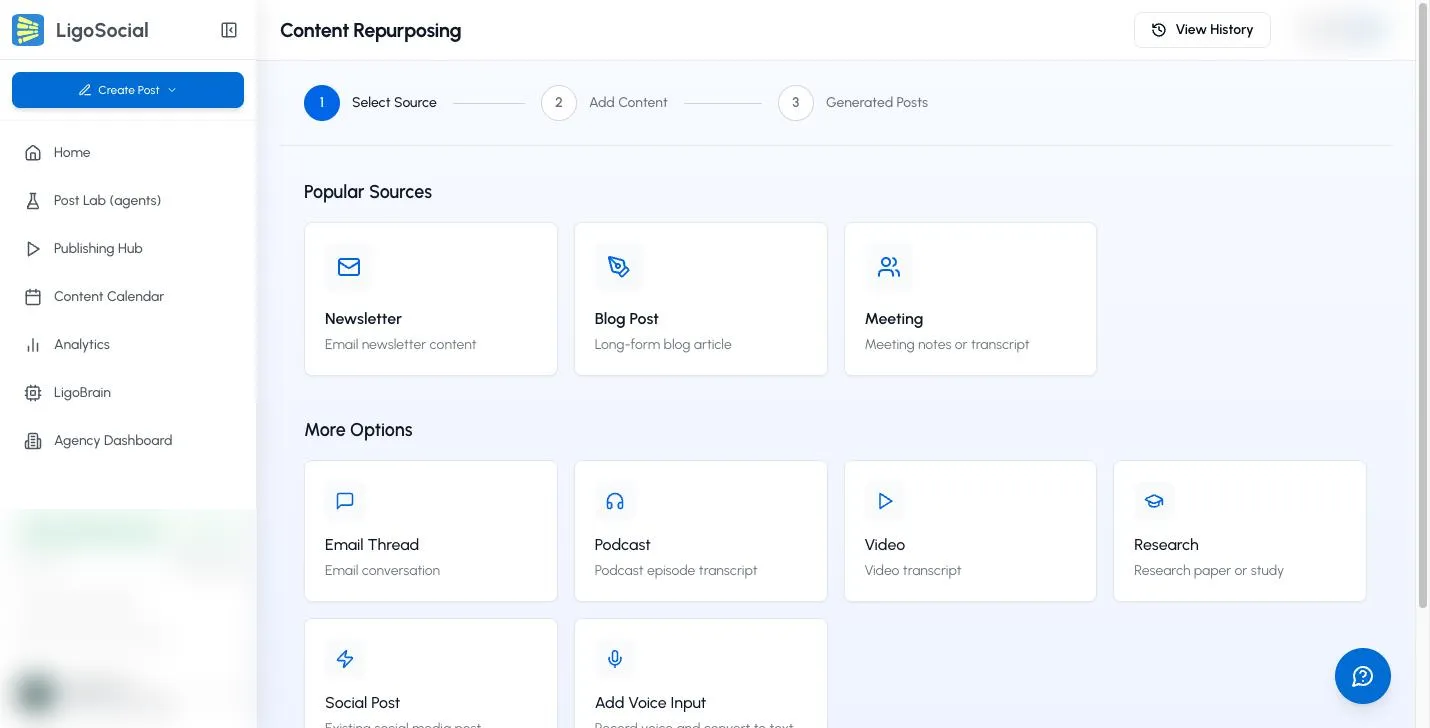
The web app has a fuller version of this tool on the Content Repurposing page. Open the Create Post menu at the top of the sidebar and choose Repurpose content (Classic layout: WRITE > Repurpose Content), or go to https://app.ligosocial.com/rewrite-post. It offers more source types, voice input and a View History of past generations. See How to repurpose content.
Make the post yours
- Treat each variant as a first draft. Add your own example, number or opinion before posting.
- Keep paragraphs short and the language plain.
- If the idea came from someone else's work, name or link the original, for example "Inspired by a great piece from
". - Do not paste long passages word for word into your post. Paraphrase and add your view.
Troubleshooting
The floating LigoAI button does not appear. Refresh the page and wait for it to load fully. The button only appears on Medium, Substack, Reddit and YouTube. If you clicked Hide on this site before, it stays hidden on that website until you clear that site's cookies and site data in your browser settings. You can always copy the text and paste it into Write instead.
The extracted text is wrong or incomplete. Edit the text in Source content, or paste the part you want manually. Paywalled or private content may not be picked up.
"Content is too long. Please limit to 10,000 characters." Paste the most relevant section instead of the whole piece.
The variants do not sound like me. Edit them before posting, and make sure your profile and writing style are set up in the web app, so LigoAI has more to learn from.
Common questions
Does the extension post to LinkedIn for me? No. You copy a variant or save it as a draft, then publish it yourself or schedule it from the web app.
Can I generate new variants from the same content? Yes. Edit the source text if you like and click Generate 3 variants · 1 rewrite again.
Which sites support one-click extraction? Medium, Substack, Reddit and YouTube. For any other site, paste the text.
Related articles
Was this page helpful?