
Troubleshooting Theme Configuration Problems
Content themes tell LigoSocial what you write about, who you write for and how you sound. Ideas and posts are generated from them, so a theme problem shows up everywhere. This guide covers the errors and blockers you are most likely to hit when creating or editing a theme, and how to fix each one.
Where to find your themes: click Create Post at the top of the sidebar, then Explore themes, or open https://app.ligosocial.com/themes-library. Your own themes are under My Themes in Filter themes. Open the three-dot menu on a theme and click Edit to change it.
The idea button says "Add 3 More Posts to Generate"
This is the most common blocker. A theme needs at least 3 example posts (up to 5) before it can generate ideas. Until then, the button in the top right of the theme editor reads Add 1 More Post to Generate (or 2, or 3) instead of Generate Post Ideas. If you click it anyway you will see More context needed.
To fix it:
- In the theme editor, go to the Writing Style & Voice panel.
- Click Teach LigoBrain Your Style (or Add Your Best Posts if you already have some).
- In Refine Your Style, pick posts from My Top Posts (your own LinkedIn posts) or from the Expert Library.
- Once you have 3, the counter shows 3/5 Trained and the button changes to Generate Post Ideas.
Choose posts that sound like you and match the theme's topic. See Choosing example posts for your theme.
"Save theme first"
You clicked to generate ideas on a theme that has not been created yet. Fill in the required fields, click Create Theme, add your example posts, then generate.
The Create Theme button is greyed out
Create Theme stays disabled until all four required fields have text:
- Theme Name
- I write about
- I write for
- Background & Offering
Purpose and Complexity Level are optional. You will find them under Show Advanced Settings.
"Error creating theme"
- Check your internet connection and try again.
- If you were importing a ready-made theme from the library, try a different one, or create your own theme instead.
- Refresh the page and check My Themes before trying again, so you do not end up with duplicates.
Themes under Drafts are suggestions LigoSocial generated for you. Open one and activate it if it fits.
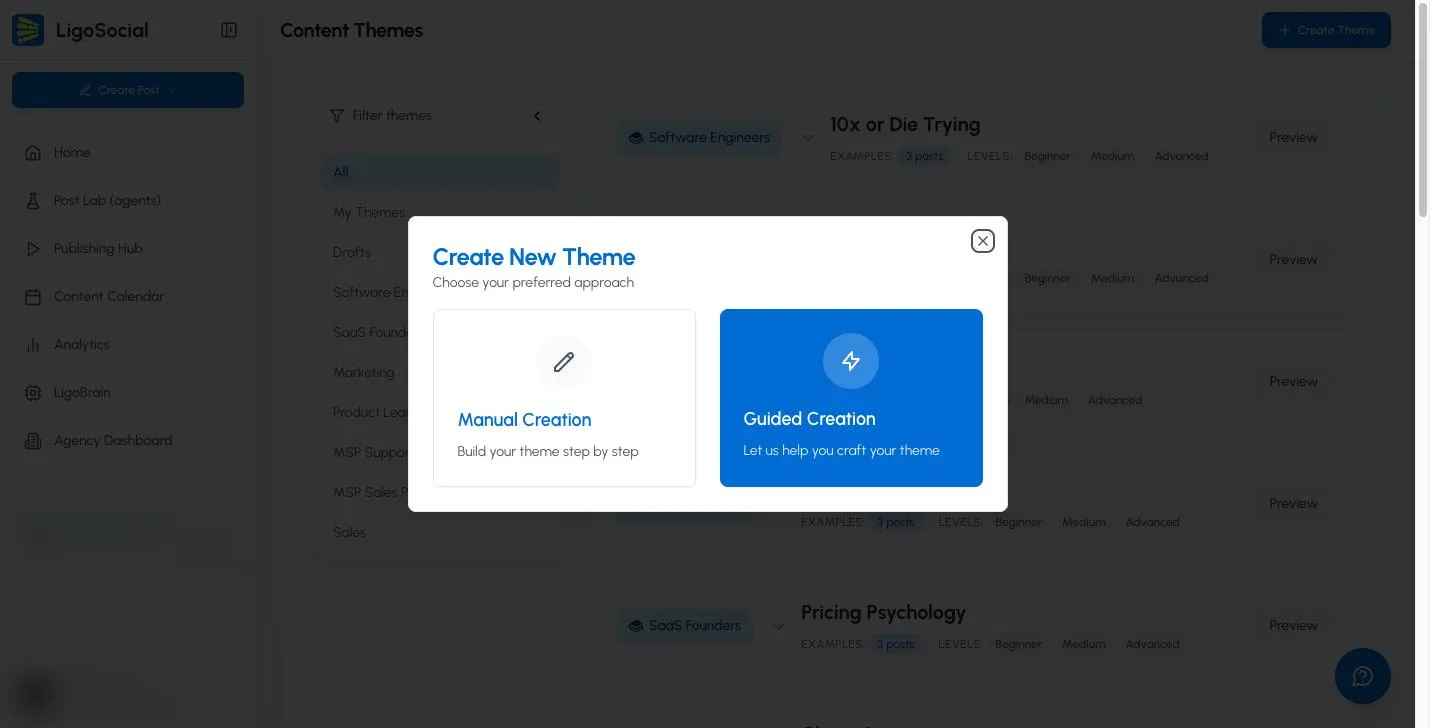
When you click Create Theme in the library you can choose Manual Creation (fill in the fields yourself) or Guided Creation (answer questions and let LigoSocial draft the theme). If one route keeps failing, try the other.
To start from a ready-made theme, click Preview on any library theme, then Customize & Activate Theme. Click Not right for me to close it.
My edits are not saving
Themes you have already created save automatically. There is no Save button. Watch the indicator next to Back to Library at the top of the editor:
- Saving... while it writes your changes
- Saved when they are stored
- Save failed if something went wrong
If you see Save failed:
- Copy any long text you just typed so you do not lose it.
- Check your connection, then refresh the page and reopen the theme.
- Make the change again and wait for Saved before leaving.
If you try to leave with changes still pending, an Unsaved Changes dialog appears. Click Keep Editing and wait for the save, or Discard Changes to drop them.
"Ideas Limit Reached"
You have used the idea generations your plan includes for now. See Billing in the app for your options. Your theme is fine.
"Error generating ideas"
The generation request failed. Wait a minute and try again. If it keeps happening, add more detail to the theme (see below) and contact support.
Ideas come out generic or off-topic
The theme works, but there is not enough specific detail for the AI to work with. Quick fixes:
- Background & Offering: say what you actually do, for whom, with which methods and results. "I'm a consultant who helps businesses" is too vague. "I'm a supply chain consultant who helps mid-sized manufacturers cut inventory carrying costs" works.
- I write about: list specific topics, not broad categories.
- I write for: name the job titles, company types and problems of your readers.
- Example posts: replace anything generic with posts that sound like you.
- Complexity Level: if ideas feel too basic, tick Medium or Hard under Show Advanced Settings.
As a rough guide, 150 to 200 words across the theme fields gives the AI enough to work with. For a full checklist with before-and-after examples, see Theme optimization and troubleshooting.
Contact support
If none of this helps, click the round Contact Support button at the bottom right of the screen (on a computer), or Settings & Support > Contact Support in the sidebar. Include the theme name, the exact message you saw and a screenshot if you can.
FAQ
How many themes can I have? As many as you need. For very different areas of expertise, separate themes usually give better ideas than one broad theme.
How many example posts can a theme have? At least 3 and up to 5.
Where do generated ideas go? To Content Ideas (https://app.ligosocial.com/content-ideas), where you review them and turn the good ones into posts.
Related articles
Was this page helpful?